TL;DR

Get audio and creator gear delivered free with Prime
- Fast, free delivery on millions of items
- Prime Video, Amazon Music and more included
- Member-only deals all year
Cameras for vlogging and hybrid shooters should prioritize reliable autofocus, clean audio options, stabilization, manageable file sizes, and lenses that suit arm’s-length filming as well as still photography. You do not need the biggest sensor or flashiest spec sheet; you need a camera that works smoothly when you are filming yourself, shooting B-roll, and grabbing stills in the same session.
The camera that looks impressive on a spec sheet can feel awkward the second you hold it at arm’s length, hit record, and realize your face is soft, your voice sounds thin, and your wrist is already tired.
I have shot paid stills, behind-the-scenes clips, travel footage, and quick talking-head videos with the same bag, and the lesson is simple: hybrid shooting rewards balance. You need video tools, photo quality, and a body that does not slow you down when the light changes or the moment starts moving.
This guide will help you choose cameras for vlogging and hybrid work by looking at the features that matter in real shoots: autofocus, audio, stabilization, lenses, battery life, and handling.
Prioritize face and eye autofocus, a flip screen, and a microphone input before chasing bigger sensors or extreme resolution.
A wide 20-24mm equivalent lens is one of the most useful choices for handheld vlogging because it gives your face and surroundings room to breathe.
4K is a sensible baseline, but 10-bit color, log profiles, and 120fps slow motion only matter if your editing workflow can handle them.
Audio, stabilization, power, and heat management shape real shooting days as much as image quality does.
The best hybrid setup is repeatable: save custom modes for stills, talking-head video, B-roll, and livestreaming.
Cameras for Vlogging and Hybrid Shooters
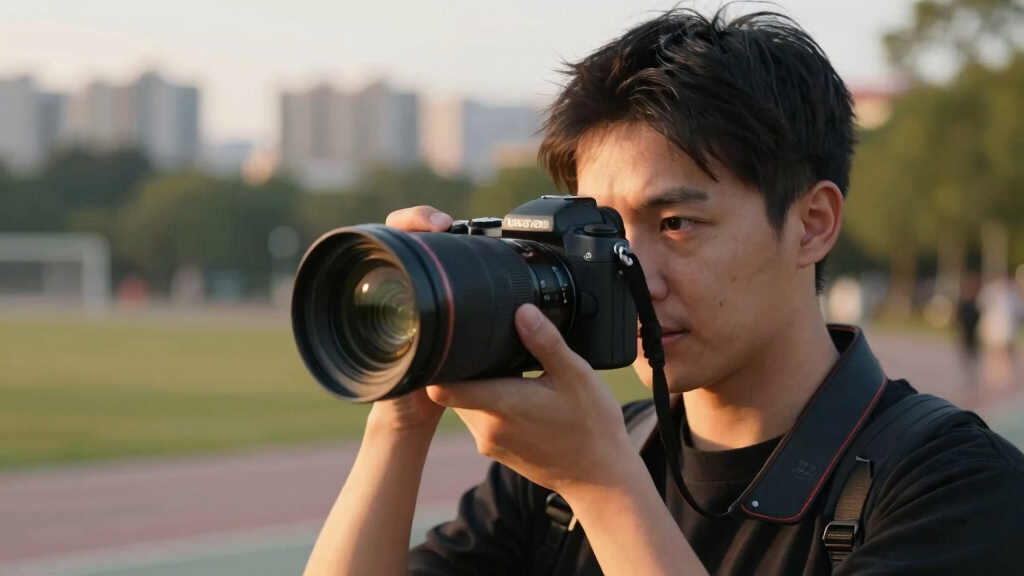
The best hybrid camera is not the one with the loudest spec sheet. It is the one that keeps your face sharp, your audio clean, your files manageable, and your hand comfortable while you move between talking-head video, B-roll, and still photography.
Dependable autofocus, a microphone input, and a wide lens often improve real footage more than maximum resolution.
20-24mm
Equivalent focal length gives face, hands, and environment room at arm’s length.
4K
Enough detail for YouTube, crop-ins, and clean delivery.
Eye AF
Face and eye tracking save more takes than flashy extras.
3.5mm
A microphone input turns thin camera sound into usable voice.
60fps
Smoother hands, food prep, gear demos, and travel movement.
Repeat
Custom modes for stills, vlog, B-roll, and streaming.
Buy for the Shoot You Actually Do
Cameras for vlogging and hybrid work should make solo production calmer. Start with the pressure points you feel on real shooting days: focus, sound, stabilization, power, lenses, and weight.
Let the camera hold your eye
Face and eye tracking should work in video mode, with glasses, side light, and hands moving near the lens.
Give your voice a clean path
A microphone input is the line between usable dialogue and audio that sounds distant, thin, or boxed in.
Respect your wrist
A lighter body with a compact wide lens often beats a larger camera that looks better online but stays in the bag.
Smooth the ordinary movement
IBIS, lens stabilization, digital stabilization, or a small grip can turn walk-and-talk footage from nervous to watchable.
Plan for long takes
USB power, spare batteries, and heat management matter for interviews, tutorials, desk videos, and livestreaming.
Choose the view first
A 20-24mm equivalent lens is a practical vlogging anchor; add portrait or detail lenses for stills and B-roll.
Compare Camera Types Without Getting Lost
Smartphones, compact cameras, mirrorless bodies, and cinema-style cameras each solve a different problem. The right choice depends on whether you need speed, growth, image quality, or production control.
| Camera type | Best for | Main strength | Hybrid stills | Audio growth | Real tradeoff |
|---|---|---|---|---|---|
| Smartphone | Fast daily clips and social posts | Small, stabilized, always nearby | ~ | ~ | Limited lens control and weaker monitoring |
| Compact vlogging camera | Travel and walk-and-talk clips | Light body with built-in lens | ~ | ✓ | Less room to grow with lenses |
| Mirrorless camera | Hybrid photo and video work | Interchangeable lenses and strong files | ✓ | ✓ | More menu choices and gear decisions |
| Cinema-style camera | Controlled productions and client video | Video-first tools and robust codecs | ✗ | ✓ | Bulkier and slower for still photography |
Specs That Change the Footage
Clean 4K is the sensible baseline. Beyond that, prioritize the tools your edit can actually absorb: 10-bit color, log profiles, reliable heat behavior, faster frame rates, and autofocus that recovers quickly.
Practical rule
Choose the camera that gives you beautiful files you will actually edit, not massive files that sit untouched because every timeline feels heavy.
A Repeatable Hybrid Setup
Save custom modes so your camera can move from photos to talking-head video to B-roll without rebuilding exposure, color, frame rate, and autofocus every time.
Still photos
Raw files, viewfinder comfort, responsive shutter, and a lens that suits portraits, travel, or products.
Talking head
4K 24p or 30p, face tracking, external microphone, flip screen, and steady power.
B-roll
60fps for smoother motion, stabilized lens or IBIS, and a profile that matches your main footage.
Slow motion
120fps for sports details, splashes, hair movement, or product reveals when your workflow can handle it.
Livestream
USB power, clean HDMI or webcam mode, reliable heat behavior, and audio monitoring if available.
Lens Width Is a Usability Feature
For handheld vlogging, the lens determines whether the frame feels natural or cramped. Wide enough shows your face and context; too wide bends the edges and makes close faces look strange.
Start here
A 20-24mm equivalent view is the sweet spot for most arm’s-length filming. It gives the shot breathing room without making the image feel like a novelty effect.
- Use 20mm equivalent for walking, travel, and small rooms.
- Use 24mm equivalent for a more natural face shape.
- Add a small prime for portraits, products, and low light stills.
Field of view scale
Think of lens choice as comfort, not just style. A slightly wider lens can reduce retakes because framing yourself becomes easier.
Trace the Real-World Chain
Hybrid shooting rewards balance. Each choice affects the next one, from lens width to battery planning to whether you feel confident enough to keep recording.
Sharp face
Tracking holds focus while you move, turn, or lift products.
Clean voice
External audio makes small cameras sound more professional.
Stable motion
Stabilization smooths walking, pans, and handheld B-roll.
Flexible edit
Detailed footage allows cropping, reframing, and clean delivery.
Long takes
Power options protect tutorials, interviews, and livestreams.
Strong stills
Photo quality keeps the same kit useful beyond video work.
Choose the Camera That Makes Solo Shooting Easier
Cameras for vlogging and hybrid shooters should make solo work feel calm, not technical. Prioritize face detection, eye autofocus, a flip screen, and a body you can hold for several minutes without strain. These features matter every time you film yourself without another person behind the camera.
When I shoot a quick field note after a portrait session, I do not want to tap the screen three times while the light is fading. I want the camera to find my eye, hold focus, and let me talk. A good hybrid body feels like a quiet assistant standing just outside the frame.
According to CIPA shipment reporting, mirrorless cameras have taken over much of the interchangeable-lens camera market because makers now pack strong stills and video tools into smaller bodies [1]. That shift helps vloggers because mirrorless cameras usually give you live exposure preview, fast autofocus coverage, and lighter lens options than older DSLR setups.
- Flip or vari-angle screen: Lets you frame yourself when filming alone.
- Reliable autofocus: Keeps your face sharp when you move toward the lens.
- Mic input: Lets you use clean external audio instead of tiny built-in mics.
- USB power: Helps during long desk videos, interviews, or livestreams.
best vlogging camera with flip screen and microphone input
As an affiliate, we earn on qualifying purchases.
As an affiliate, we earn on qualifying purchases.
Use This Feature Checklist Before You Buy
- Start with your main shooting style. If you film handheld walking clips, choose stabilization and light weight first. If you record tutorials at a desk, clean audio and unlimited power matter more.
- Check the autofocus behavior. Look for face and eye tracking that works in video mode, not only for stills. Test it with glasses, side lighting, and a hand moving in front of your face.
- Look for a wide lens option. For handheld vlogging, a 20-24mm equivalent view usually feels natural. It shows your face and a slice of the room without making the edges stretch like warm taffy.
- Confirm the audio path. A 3.5mm microphone input is the line between “usable” and “why does this sound like a phone in a cereal box?” Headphone monitoring is even better.
- Think about stills workflow. If you shoot portraits, products, or travel photos too, check lens choices, raw files, grip comfort, and viewfinder quality.
How to choose a hybrid camera is less about one magic model and more about matching tools to pressure. A travel creator walking through a night market needs different strengths than a studio photographer recording lighting tutorials. The right checklist keeps you honest.
I once watched a beginner buy a large full-frame body for café vlogs because the footage looked creamy online. After one afternoon, they hated carrying it. A smaller mirrorless body with a bright compact lens would have given them more clips, less fatigue, and far fewer missed moments.
hybrid camera with face autofocus and stabilization
As an affiliate, we earn on qualifying purchases.
As an affiliate, we earn on qualifying purchases.
Pick Video Specs That Actually Change Your Footage
Cameras for vlogging should record clean 4K video, but resolution is only one part of image quality. Better color, strong autofocus, less rolling shutter, and dependable heat handling often matter more than chasing the highest number printed on the box.
Most current creator-focused cameras offer at least 4K recording, and many add 10-bit color, flat profiles, and high frame rates such as 120fps for slow motion [2]. Those tools help if you grade footage, match cameras, or shoot paid work. They can also make editing heavier, like loading wet canvas into a small backpack.
For a simple YouTube talking-head video, clean 4K at 24fps or 30fps is plenty. For cooking videos, workshop clips, or product demos, 60fps can make hand movement smoother. For dramatic water splashes, hair flips, or sports details, 120fps gives you that slow, floating look.
My practical rule: choose the camera that gives you beautiful files you will actually edit, not massive files that sit untouched on a hard drive.
compact camera for travel vlogging and photography
As an affiliate, we earn on qualifying purchases.
As an affiliate, we earn on qualifying purchases.
Compare Camera Types Without Getting Lost
Cameras for vlogging come in compact, mirrorless, smartphone, and cinema-style bodies, and each one solves a different problem. Compact cameras travel light, mirrorless systems grow with your skills, phones are always with you, and cinema-style cameras suit crews more than casual solo creators.
| Camera Type | Best For | Main Strength | Real Tradeoff |
|---|---|---|---|
| Smartphone | Fast daily clips and social posts | Small, stabilized, always nearby | Limited lens control and weaker audio options |
| Compact vlogging camera | Travel, walk-and-talk clips, simple setups | Light body with built-in lens | Less room to grow with lenses |
| Mirrorless camera | Hybrid photo and video work | Interchangeable lenses and strong image quality | More menu choices and more gear decisions |
| Cinema-style camera | Controlled productions and client video | Video-first tools and robust files | Usually bulkier and slower for stills |
If you film weekend travel videos, a compact body may feel freeing. If you shoot family portraits on Saturday and record a gear tutorial on Sunday, mirrorless gives you more range. Think of the camera as a kitchen knife: the best one depends on whether you are slicing herbs or carving a roast.
wide angle lens 20-24mm for vlogging
As an affiliate, we earn on qualifying purchases.
As an affiliate, we earn on qualifying purchases.
Let Autofocus Do the Boring Work for You
Autofocus is the feature that saves the most ruined takes for solo vloggers. You want face and eye tracking that sticks when you lean forward, turn sideways, lift a product to the lens, or step from shade into harsh afternoon sun.
Canon’s Dual Pixel AF and Sony’s Real-time Tracking are well-known examples of autofocus systems built for this kind of work [2]. The names matter less than the behavior. The camera should hold your eye and recover quickly when something crosses the frame.
In real shooting, autofocus is like a good focus puller with quiet shoes. You barely notice it when it works. You notice it instantly when it drifts to the bookshelf behind you during your best sentence.
This works well, except when you shoot through glass, heavy rain, smoke, or busy foreground objects. In those cases, use touch tracking, a smaller focus area, or manual focus with peaking. Hybrid shooters need both confidence and a backup plan.
Treat Audio Like Half the Video
Good audio makes modest video feel professional, while bad audio makes sharp 4K footage feel unfinished. For vlogging, choose a camera with a microphone input, visible audio meters, and ideally a headphone jack so you can catch problems before recording twenty minutes of unusable sound.
Built-in camera mics sit close to handling noise, lens motors, and wind. They capture the room, not just your voice. Add a small shotgun mic for walk-and-talk videos or a lavalier mic for tutorials, and your sound tightens up like a well-made drum.
Here is a real-world test I use: record 30 seconds in the place you actually shoot. A tiled kitchen, a windy overlook, or a half-empty office will tell you more than any spec sheet. Listen on headphones before you pack up.
- Shotgun mic: Best for camera-mounted talking pieces and quick setups.
- Lavalier mic: Best for teaching, interviews, and steady voice levels.
- Wireless mic: Best when you move away from the camera.
- Headphones: Best for catching hum, wind, clipping, and loose cables.
Choose Stabilization for the Way You Move
Image stabilization reduces shake, but it does not replace careful movement. For handheld vlogging, look for in-body stabilization, lens stabilization, or strong digital stabilization, then practice walking softly and keeping your elbows close to your ribs.
In-body image stabilization, often called IBIS, helps with small hand movements. Lens stabilization helps too, especially with longer focal lengths. Digital stabilization can smooth walking footage, but it often crops the frame, which makes a wide lens even more useful.
If you film yourself walking through a city, stabilization turns nervous jitters into a gentler sway. But it will not make rushed footsteps look like a floating dolly shot. For polished movement, use a small gimbal, a mini tripod held against your chest, or slower body movement.
Stabilization is a seatbelt, not a chauffeur: it helps you stay steady, but you still have to drive the shot.
Pick Lenses That Fit Both Your Face and Your Photos
The best hybrid lens setup covers wide vlogging, natural stills, and detail shots. Start with a compact wide lens around 20-24mm equivalent for handheld video, then add a standard zoom or prime if you shoot portraits, products, food, or travel details.
A wide lens helps when the camera sits on a small tripod an arm’s length away. It shows your shoulders, hands, and enough background to give context. Too wide, though, and walls bow outward while faces stretch at the edges.
For hybrid stills, I like having one lens that feels natural for daily work: something in the 24-70mm equivalent range or a small prime near 35mm equivalent. It lets you shoot street scenes, environmental portraits, and B-roll without changing glass every five minutes.
Lens choice is one of the important aspects of hybrid shooting because it shapes how close you stand, how your room feels, and how much gear you carry. A small kit you love beats a heavy kit you avoid.
Plan for Batteries, Heat, and Long Recording Days
Battery life and heat management decide whether your camera survives a real shooting day. Look for USB-C power, spare batteries, clear heat settings, and recording limits that match your work, especially if you film interviews, livestreams, classes, or long studio sessions.
A 12-minute vlog segment feels short until you record four takes, check focus, adjust the light, and repeat. Suddenly the battery icon turns red. The room gets warm, the camera body feels hot, and your rhythm breaks.
For desk videos, plug into wall power when the camera supports it. For outdoor shoots, carry at least two spare batteries and a small power bank. For long interviews, test the full recording length before the paid shoot, not five minutes before your subject arrives.
This is true, but only if you shoot long clips. If your work is mostly short social videos, battery swaps may matter less than startup speed and quick file transfer. Match the problem to your day, not someone else’s studio.
Build a Hybrid Workflow You Can Repeat
A good hybrid workflow lets you move from stills to video without rebuilding the camera. Save custom modes for photo, talking-head video, and slow-motion B-roll so you can switch quickly when the moment changes.
On a client shoot, I might photograph a finished portrait, roll a short behind-the-scenes clip, then grab detail shots of hands adjusting fabric or light skimming across a backdrop. The best camera setup keeps those moves fluid. You should not feel like you are changing instruments mid-song.
Set one custom mode for raw stills, one for 4K talking video, and one for slow motion. Keep white balance intentional instead of leaving every clip to auto. Your edit will look cleaner, and your future self will be grateful at midnight.
- Photo mode: Raw files, fast shutter control, viewfinder-ready settings.
- Talking-head mode: 4K, face tracking, mic levels visible, steady color.
- B-roll mode: 60fps or 120fps, stabilization on, shutter set for motion.
- Livestream mode: Clean HDMI or USB webcam output with constant power.
Know When a Smaller Camera Is the Smarter Camera
The smartest camera is often the one you will carry and use without fuss. Full-frame bodies can look beautiful, but smaller APS-C, Micro Four Thirds, compact, and smartphone setups often make more sense for travel, daily vlogging, and quick hybrid work.
Large sensors can give you cleaner low-light files and softer backgrounds. They also bring larger lenses, more visible shake, thinner focus, and heavier bags. For beginners, that can turn a creative afternoon into a menu wrestling match.
I have seen creators make stronger videos after downsizing because they filmed more often. They stopped saving the camera for “proper shoots” and started catching steam rising from coffee, rain tapping against a train window, and the small human details that make a story breathe.
That is why questions suitable for a blog article are not always “Which camera is best?” A better question is: Which camera removes the fewest moments from your day?
Frequently Asked Questions
Do I need a full-frame camera for vlogging?
No. Full-frame cameras can look beautiful, especially in low light, but they are not required for strong vlogs. Many APS-C, Micro Four Thirds, compact, and smartphone cameras give you sharp 4K video, good stabilization, and lighter setups.
What matters more for beginners: video resolution or autofocus?
Autofocus usually matters more than extra resolution for beginners. Sharp 4K footage with steady face tracking looks better than higher-resolution footage where your eyes drift soft every time you move.
Should I buy a compact camera or a mirrorless camera?
Choose a compact camera if you want a light, simple setup for travel and everyday clips. Choose a mirrorless camera if you want interchangeable lenses, stronger still-photo options, and room to grow into more advanced video work.
Is the built-in microphone good enough for vlogging?
Built-in mics are fine for quick reference clips, but they rarely sound polished. A small external mic or lavalier gives your voice more body, cuts room noise, and makes your video feel more finished.
What is the best first lens for a hybrid shooter?
A compact wide zoom or prime around 20-24mm equivalent works well for handheld vlogging. If you also shoot stills, add a small standard zoom or a 35mm equivalent prime for portraits, details, and everyday scenes.
Conclusion
Choose the camera that helps you keep shooting when the light changes, your hands are full, and the idea is still warm. For most people, that means reliable autofocus, clean audio, steady handheld footage, and a lens kit you will actually carry.
The right hybrid camera should feel less like a trophy and more like a trusted tool: close by, ready, and quiet enough to let the story stay in front.
Columbus Day / Indigenous Peoples' Day Picks
long weekend sales
As an affiliate, we earn on qualifying purchases.