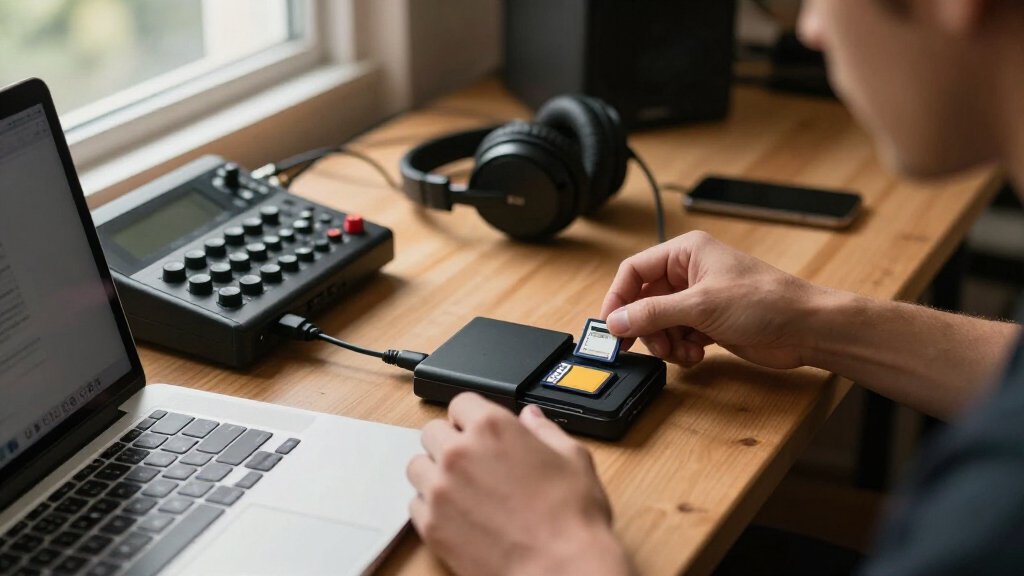

Choosing the right dual slot memory card reader in 2026 means balancing speed, compatibility, and portability. The ProGrade Digital SD UHS-II Dual-Slot Card Reader stands out for its blazing transfer speeds and rugged build, making it ideal for demanding workflows. Meanwhile, the ProGrade Digital SDXC and microSDXC Dual-Slot USB-C Card Reader offers excellent versatility for those who need to transfer both SDXC and microSDXC cards quickly on the go. For compact convenience, the Anker USB-C SD Card Reader provides a lightweight option compatible with a wide range of USB-C devices, though it lacks the high-speed performance of the others. Lastly, the SABRENT USB-C Card Reader balances affordability and decent speed for casual users who need reliable performance without extra frills. Each picks has tradeoffs, so I’ll help clarify who benefits most from each model.

Get audio and creator gear delivered free with Prime
- Fast, free delivery on millions of items
- Prime Video, Amazon Music and more included
- Member-only deals all year
Complete the kit



Key Takeaways
- Speed varies significantly: ProGrade SD UHS-II offers the highest transfer rates, ideal for professional workflows.
- Compatibility is key: Some readers support only SDXC/microSDXC cards, limiting versatility.
- Portability matters: Compact designs like Anker are perfect for on-the-go use, but may sacrifice some speed.
- Durability and warranty add value for demanding environments, especially in rugged models.
- Price and features are balanced differently; higher speeds often come with a premium price tag.
| ProGrade Digital SD UHS-II Dual-Slot Card Reader USB 3.2 | 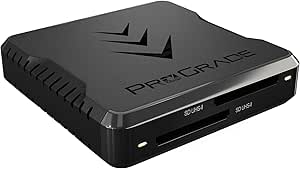 | Best Overall for Speed and Rugged Use | Transfer Speed: up to 1.25GB/s | Connectivity: USB 3.2 Gen 2 | Slots: Dual SD UHS-II | VIEW LATEST PRICE | See Our Full Breakdown |
| ProGrade Digital SDXC and microSDXC Dual-Slot USB-C Card Reader 3.2 Gen 2 |  | Best for Versatility and Travel | Transfer Speed: up to 625MB/s | Compatibility: SDXC and microSDXC UHS-II | Interface: USB-C 3.2 Gen 2 | VIEW LATEST PRICE | See Our Full Breakdown |
| Anker USB-C SD Card Reader with Dual Slots |  | Best Compact for Everyday Use | Slots: 1 SD, 1 microSD | Compatibility: USB-C devices such as MacBook 2018, Galaxy S10 | Warranty: 18 months | VIEW LATEST PRICE | See Our Full Breakdown |
| SABRENT USB-C Card Reader, Dual-Slot UHS-II SD & microSD |  | Best Budget-Friendly Reliable Performance | Card Slots: SDXC UHS-II, microSD | Transfer Speed: up to 312MBps | USB Version: USB 3.2 Gen1 | VIEW LATEST PRICE | See Our Full Breakdown |
| dual slot memory card reader | Transfer Speed | Warranty | Compatibility | Slots |
|---|---|---|---|---|
| ProGrade Digital SD UHS-II Dua | up to 1.25GB/s | 2 years | — | Dual SD UHS-II |
| ProGrade Digital SDXC and micr | up to 625MB/s | 2 years | SDXC and microSDXC UHS-II | — |
| Anker USB-C SD Card Reader wit | — | 18 months | USB-C devices such as MacBook 2018, Galaxy S10 | 1 SD, 1 microSD |
| SABRENT USB-C Card Reader | up to 312MBps | — | Windows 8+, macOS 12+ | — |
More Details on Our Top Picks
ProGrade Digital SD UHS-II Dual-Slot Card Reader USB 3.2
This card reader stands out for blazing transfer speeds up to 1.25GB/s from both cards simultaneously, making it a top choice for professionals handling large files. Its magnetic attachment allows easy portability, and the rugged design ensures durability in tough environments. Compared to other options, it sacrifices versatility—being limited to SD UHS-II cards—so it’s best suited for users who need high performance with specific card types. The 2-year warranty adds confidence for demanding workflows.
Pros:- High-speed data transfer up to 1.25GB/s
- Compact with magnetic attachment for portability
- Rugged construction withstands tough conditions
- Includes 2-year warranty
Cons:- Limited to SD UHS-II cards only
- Requires USB 3.2 port for optimal speeds
- No support for microSD cards
Best for: Professional photographers and digital creators needing fast, reliable performance in demanding conditions
Not ideal for: Users who need to work with microSD cards or require ultra-compact devices
- Transfer Speed:up to 1.25GB/s
- Connectivity:USB 3.2 Gen 2
- Slots:Dual SD UHS-II
- Warranty:2 years
Our verdict“The best choice for speed-focused professionals who work mostly with SD UHS-II cards and need durability.”
ProGrade Digital SDXC and microSDXC Dual-Slot USB-C Card Reader 3.2 Gen 2
This pick is ideal for users who need to transfer SDXC and microSDXC UHS-II cards quickly, with transfer speeds up to 625MB/s. Its USB-C interface ensures broad compatibility with modern laptops and smartphones, making it perfect for on-the-go workflows. While it offers impressive speeds for its class, it’s limited to SDXC and microSDXC cards, so users working with other formats may find it restrictive. Its durable design and 2-year warranty reinforce its suitability for frequent travelers.
Pros:- Transfer speeds up to 625MB/s
- Supports SDXC and microSDXC UHS-II cards
- USB-C connectivity for modern devices
- Portable and durable for travel
Cons:- Limited to SDXC and microSDXC cards
- Requires USB-C port for full functionality
- Not compatible with older USB-A ports
Best for: Photographers, videographers, and mobile professionals needing versatile, fast card access on the move
Not ideal for: Users with older USB-A devices or needing to work with other card types beyond SDXC/microSDXC
- Transfer Speed:up to 625MB/s
- Compatibility:SDXC and microSDXC UHS-II
- Interface:USB-C 3.2 Gen 2
- Warranty:2 years
Our verdict“A versatile and speedy choice for mobile professionals who primarily work with SDXC and microSDXC cards.”
Anker USB-C SD Card Reader with Dual Slots
This ultra-compact reader features one SD slot and one microSD slot, supporting a broad range of USB-C devices like MacBook and Galaxy phones. Its lightweight design makes it perfect for quick transfers on the go, but it’s limited to USB-C compatibility, and may require removal of device cases for proper connection. While it supports both card types, it does not match the speed of higher-end models—making it better suited for casual or infrequent use.
Pros:- Ultra-compact and lightweight
- Supports both SD and microSD cards
- Universal USB-C device compatibility
- Easy to carry everywhere
Cons:- Limited to USB-C devices
- Lower transfer speeds compared to premium models
- May need case removal for connection
Best for: Casual users and mobile professionals seeking a small, compatible card reader for everyday file transfers
Not ideal for: High-speed workflows or users working with multiple card formats beyond SD and microSD
- Slots:1 SD, 1 microSD
- Compatibility:USB-C devices such as MacBook 2018, Galaxy S10
- Warranty:18 months
- Cable:Built-in USB-C
Our verdict“A convenient, portable option for everyday data transfers on compatible USB-C devices, with some speed tradeoffs.”
SABRENT USB-C Card Reader, Dual-Slot UHS-II SD & microSD
This affordable option supports SDXC UHS-II and microSD cards with transfer speeds up to 312MBps, suitable for casual and semi-professional use. Its built-in USB 3.2 Gen1 Type-C cable ensures straightforward plug-and-play operation across Windows and macOS systems. While it doesn’t match the ultra-fast speeds of higher-end models, it offers a durable, no-frills experience for users who prioritize value and reliable media transfer without extra features.
Pros:- Transfer speeds up to 312MBps
- Supports both SDXC UHS-II and microSD cards
- Built-in USB-C cable for convenience
- Plug-and-play with no drivers needed
Cons:- Limited to SDXC UHS-II and microSD cards
- Speed varies with older cards
- Lacks additional ports or features
Best for: Casual users and hobbyists needing dependable performance without a high price tag
Not ideal for: Professional workflows requiring maximum transfer speeds or support for other card types
- Card Slots:SDXC UHS-II, microSD
- Transfer Speed:up to 312MBps
- USB Version:USB 3.2 Gen1
- Cable Length:6 inches
- Compatibility:Windows 8+, macOS 12+
- Backward Compatibility:Yes
Our verdict“An affordable, reliable choice for everyday media transfers, suitable for casual and hobbyist users.”

How We Picked
Our selection process focused on dual slot card readers that support the latest SD and microSD standards, prioritize transfer speed, and offer reliable build quality. I compared key features such as transfer rates, compatibility, portability, and warranty coverage. I looked for options suitable for both professional and casual users, ensuring each product has distinct strengths to meet different needs. Limitations like card type restrictions and device compatibility were carefully considered to present balanced recommendations. The final lineup aims to cover a broad spectrum—high-speed, versatile, compact, and budget-friendly models—so every buyer can find a suitable choice.
| dual slot memory card reader | Transfer Speed | Compatibility |
|---|---|---|
| ProGrade Digital SD UHS-II Dua | up to 1.25GB/s | — |
| ProGrade Digital SDXC and micr | up to 625MB/s | SDXC and microSDXC UHS-II |
| Anker USB-C SD Card Reader wit | — | USB-C devices such as MacBook 2018, Galaxy S10 |
| SABRENT USB-C Card Reader | up to 312MBps | Windows 8+, macOS 12+ |
Factors to Consider When Choosing Best Dual Slot Memory Card Readers
When selecting a dual slot memory card reader in 2026, consider your primary use case—whether professional speeds, portability, or multi-card compatibility. The best models balance transfer rates, device compatibility, and build quality, ensuring smooth workflows. Understanding your device interface (USB-C or USB 3.2) and the types of cards you work with most will help you choose a device that fits seamlessly into your setup and budget.Speed and Performance
Transfer speed is a key factor—professional workflows benefit from high speeds up to 1.25GB/s, while casual users may find 300MB/s sufficient. Consider whether your workflow involves large RAW files or high-definition videos, which demand faster data rates.
Compatibility and Card Types
Check if the reader supports your specific card formats—SDXC, microSDXC, or both. Also, verify device compatibility; USB-C readers work well with modern laptops and smartphones, but older devices may require USB-A ports or adapters.
Portability and Design
If you need a reader for on-the-go use, opt for compact, lightweight options with durable construction. Magnetic or clip-on features can add convenience for mobile workflows.
Connectivity and Features
Ensure the reader uses a connection type compatible with your device—USB 3.2 Gen 2 offers the fastest speeds, while USB-C options provide broad compatibility. Built-in cables and rugged designs add value for frequent travelers and outdoor use.
Warranty and Support
A solid warranty reflects manufacturer confidence. Longer warranties are preferable for professionals or those investing heavily in reliable gear.
Frequently Asked Questions
What is the main difference between USB 3.2 and USB-C in these card readers?
USB 3.2 refers to a data transfer protocol that can operate over various connectors, including USB-C or USB-A. USB-C, on the other hand, describes the type of connector—reversible and compact—used on many modern devices. Some card readers combine both, offering USB-C connectors that support USB 3.2 speeds, providing both fast data transfer and broad device compatibility.
Are dual slot card readers safe for high-volume professional workflows?
Yes, many high-end models like the ProGrade Digital SD UHS-II Dual-Slot provide fast transfer speeds and rugged designs, making them suitable for demanding professional use. However, always verify the supported card types and ensure your workflow aligns with the reader’s capabilities to avoid bottlenecks.
Can I use these card readers with older computers or devices?
Compatibility depends on your device’s ports. Readers with USB-C connectors work best with newer laptops and smartphones, while those with USB 3.2 ports can be used with older computers. For devices lacking these ports, adapters might be necessary, but check transfer speed limitations and compatibility beforehand.
How important is transfer speed when choosing a card reader?
Transfer speed is critical if you regularly handle large files like RAW images or 4K videos. Faster speeds save time and streamline your workflow, especially during bulk transfers. For casual use or smaller files, moderate speeds may suffice without sacrificing performance.
What should I consider regarding durability and warranty?
Durability is important for those working in varied environments. Rugged, weather-resistant models with longer warranties can provide peace of mind, especially for professional photographers and videographers who rely on consistent performance in challenging settings.
Conclusion
If you are a professional needing maximum speed and durability, the ProGrade Digital SD UHS-II Dual-Slot Card Reader is the best fit. For mobile creatives requiring versatile SD and microSD support on modern devices, the ProGrade Digital SDXC and microSDXC Dual-Slot USB-C Card Reader makes the most sense. Casual users or hobbyists who prioritize portability and affordability will find the Anker USB-C SD Card Reader or SABRENT USB-C Card Reader suitable, depending on their speed needs and device compatibility.
Halloween Picks
halloween
As an affiliate, we earn on qualifying purchases.