For most photographers who want dependable 4×6 prints away from a desk, I’d choose the Canon SELPHY CP1500 as the best overall option in this roundup. The Liene M100 is a strong alternative for photographers who want a straightforward 4×6 dye-sublimation setup, while the Canon SELPHY QX20 suits smaller-format prints and more compact carry. The main tradeoff is between print size and workflow flexibility on one side, and a lighter, simpler setup on the other. Sticker-sized ZINK and 2×3-inch printers are easier to carry, but they serve a different purpose than 4×6 prints for clients or portfolios. Read on for how all 15 options differ and which one fits your photography workflow.

Get audio and creator gear delivered free with Prime
- Fast, free delivery on millions of items
- Prime Video, Amazon Music and more included
- Member-only deals all year
Complete the kit


Key Takeaways
- The Canon SELPHY CP1500 line leads for versatile 4×6 output: its different bundles vary mainly in included supplies and carrying accessories, not in the core printer choice.
- Liene M100 bundles are useful when print supplies matter: the printer with 100 sheets and three cartridges gives buyers a ready-to-print package, while the standard M100 keeps the setup simpler.
- The QX20 prioritizes compact, smaller-format printing: it is a better match for portable creative prints than for photographers who need standard 4×6 handouts.
- 2×3-inch and ZINK models favor casual sharing: Nelko PP01, KODAK Mini 2 Retro, and KODAK Step are easier to carry, but their small output limits portfolio and client-proof uses.
- Bundle contents can matter more than the model name: CP1500 packages range from a shoulder bag to multiple paper-and-ink sets, so compare included supplies before choosing between near-identical printers.
| Nelko PP01 Portable 2×3-Inch Photo Printer |  | Best for Pocket-Sized Stickers | Printer type: Inkjet | Print size: 2×3 inches | Print resolution: 600 × 600 DPI | VIEW LATEST PRICE | See Our Full Breakdown |
| Canon SELPHY CP1500 Wireless Compact Photo Printer Bundle with Ink, Paper, and Shoulder Bag |  | Best for Field-to-Print Workflows | Printer type: Wireless dye-sublimation photo printer | Print size options: 4×6 in, 2.1×2.1 in, and mini label stickers | Connectivity: Wi-Fi, AirPrint, USB, camera memory card, and SELPHY Photo Layout app | VIEW LATEST PRICE | See Our Full Breakdown |
| Canon SELPHY CP1500 Wireless Compact Photo Printer Bundle with RP-108 Ink and Paper Set, Black |  | Best for Camera-Media Flexibility | Printing technology: Dye-sublimation | Resolution: 300 × 300 dpi | Connectivity: Wi-Fi and USB | VIEW LATEST PRICE | See Our Full Breakdown |
| Liene M100 Wireless 4×6-Inch Dye-Sublimation Photo Printer |  | Best for Shared Phone Printing | Printer type: Thermal dye sublimation | Print size: 4×6 inches | Resolution: 300 × 300 dpi | VIEW LATEST PRICE | See Our Full Breakdown |
| Canon SELPHY QX20 Portable Dye-Sublimation Photo Printer, White |  | Best Battery-Powered Creative Printer | Printer type: Dye sublimation | Supported paper formats: 72×85 mm and 54×85 mm | Print resolution: 1200 × 1200 dpi | VIEW LATEST PRICE | See Our Full Breakdown |
| Liene Pearl N200 Pro Portable Dye-Sublimation Photo Printer, Gold |  | Best for Phone-First Sticker Prints | Print technology: Dye sublimation | Maximum media size: 2 × 3 inches | Print resolution: 300 × 300 dpi | VIEW LATEST PRICE | See Our Full Breakdown |
| Liene M100 4×6-Inch Dye-Sublimation Photo Printer with 100 Sheets and 3 Cartridges |  | Best Value for Wireless 4 × 6 Prints | Print technology: Dye sublimation | Maximum media size: 4 × 6 inches | Print resolution: 300 × 300 dpi | VIEW LATEST PRICE | See Our Full Breakdown |
| Canon SELPHY CP1500 Wireless Compact Photo Printer Bundle with RP-108 Ink and 108 Sheets of 4×6 Photo Paper |  | Best for Flexible Print Sizes and Finishes | Print technology: Dye sublimation | Print resolution: 300 × 300 dpi | Supported print sizes: 4 × 6, 3.5 × 4.7, 2.1 × 3.4, and 2.1 × 2.1 inches | VIEW LATEST PRICE | See Our Full Breakdown |
| Canon SELPHY QX20 Wireless Compact Photo Printer Bundle, Dark Gray |  | Best for Battery-Powered Square Prints | Print technology: Dye sublimation | Print resolution: 300 × 300 dpi | Supported photo sizes: 2.7 × 2.7 inches and 2.1 × 3.4 inches | VIEW LATEST PRICE | See Our Full Breakdown |
| Canon SELPHY CP1500 Compact Photo Printer Bundle with Two KP-108IN Ink and Paper Sets |  | Best for Larger Print Runs and Direct Camera-Card Printing | Printer model: Canon SELPHY CP1500 | Print technology: Dye sublimation | Print resolution: 300 × 300 dpi | VIEW LATEST PRICE | See Our Full Breakdown |
| KODAK Mini 2 Retro Portable Photo Printer, 2 × 3 in, White |  | Best for Durable Pocket Prints | Printer type: Dye sublimation | Print method: 4PASS | Print resolution: 291 × 300 dpi | VIEW LATEST PRICE | See Our Full Breakdown |
| KODAK Step Portable ZINK Instant Photo Printer, White |  | Best for Ink-Free Sticker Prints | Printer type: ZINK | Print size: 2 × 3 in (5.1 × 7.5 cm) | Print technology: Zero-ink thermal paper | VIEW LATEST PRICE | See Our Full Breakdown |
| KODAK Dock Plus 4PASS 4×6 Photo Printer with Smartphone Dock |  | Best for Docked 4×6 Phone Printing | Printer type: 4PASS dye sublimation | Maximum media size: 4 × 6 inches | Printing: Color, borderless | VIEW LATEST PRICE | See Our Full Breakdown |
| Liene Amber M110 Bluetooth Portable Photo Printer with Dual Trays |  | Best for Two Photo Formats | Printer type: Thermal dye sublimation | Connectivity: Bluetooth, USB | Compatible devices: Android and iOS smartphones, laptops, PCs, tablets | VIEW LATEST PRICE | See Our Full Breakdown |
| Canon SELPHY CP900 Wireless Color Photo Printer | 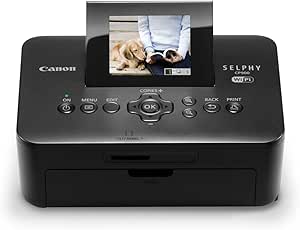 | Best for Camera and Computer Connectivity | Printer type: Inkjet | Connectivity: Wi-Fi, PictBridge, USB 2.0 | Compatible devices: Camera, PC, smartphones, tablets | VIEW LATEST PRICE | See Our Full Breakdown |
| portable photo printers for photographer | Connectivity | Compatible devices | Weight | Printer type |
|---|---|---|---|---|
| Nelko PP01 Portable 2×3-Inch P | Bluetooth | iOS and Android smartphones | 308 g | Inkjet |
| Canon SELPHY CP1500 Wireless C | Wi-Fi, AirPrint, USB, camera memory card, and SELPHY Photo Layout app | — | — | Wireless dye-sublimation photo printer |
| Canon SELPHY CP1500 Wireless C | Wi-Fi and USB | Smartphones, tablets, memory cards, USB flash drives, and Mac and Windows computers | — | — |
| Liene M100 Wireless 4×6-Inch D | Built-in Wi-Fi hotspot; wired connection for PC | — | 2.2 pounds | Thermal dye sublimation |
| Canon SELPHY QX20 Portable Dye | Wi-Fi and USB-C charging | Smartphones and tablets | 455 g | Dye sublimation |
| Liene Pearl N200 Pro Portable | Bluetooth | Android and iOS smartphones | 340 g | — |
| Liene M100 4×6-Inch Dye-Sublim | Wi-Fi and USB Type-C | Laptops, PCs, and smartphones | 200 g | — |
| Canon SELPHY CP1500 Wireless C | Wi-Fi and USB | — | — | — |
| Canon SELPHY QX20 Wireless Com | Wi-Fi | Smartphones and tablets | 1.7 pounds | — |
| Canon SELPHY CP1500 Compact Ph | Wi-Fi, Bluetooth, USB, and SD card | — | — | — |
| KODAK Mini 2 Retro Portable Ph | Bluetooth | iOS and Android smartphones | 255 g | Dye sublimation |
| KODAK Step Portable ZINK Insta | Bluetooth, NFC | — | 0.07 kg | ZINK |
| KODAK Dock Plus 4PASS 4×6 Phot | Bluetooth, docking, USB-C | iOS and Android smartphones and tablets | — | 4PASS dye sublimation |
| Liene Amber M110 Bluetooth Por | Bluetooth, USB | Android and iOS smartphones, laptops, PCs, tablets | 2.9 pounds | Thermal dye sublimation |
| Canon SELPHY CP900 Wireless Co | Wi-Fi, PictBridge, USB 2.0 | Camera, PC, smartphones, tablets | 1.8 pounds | Inkjet |
More Details on Our Top Picks
Nelko PP01 Portable 2×3-Inch Photo Printer
The Nelko PP01 suits photographers who want to turn phone images into small, adhesive-backed keepsakes on the go. Its 600 × 600 DPI output is a higher stated resolution than the 300 × 300 DPI Canon SELPHY CP1500 bundles here, but the Nelko is limited to 2×3-inch prints rather than the Canon’s larger 4×6 format. That size difference matters more than the number alone if you want prints for sharing or a compact album. Prints are described as resistant to smudges, water, and tearing, and the app adds filters, frames, collages, and stickers for quick personalization. At 308 g, it is easier to slip into a travel kit than the larger dye-sublimation options. The tradeoff is a small print area, and the USB charging cable is included without a power adapter.
Pros:- Compact 308 g body is easy to carry alongside a phone and camera gear.
- 600 × 600 DPI output is a higher stated resolution than the 300 × 300 DPI Canon SELPHY CP1500 bundles.
- Adhesive-backed prints are described as smudge-resistant, water-resistant, and tear-resistant.
- Nelko app includes editing, filters, frames, collages, and stickers.
Cons:- Prints are limited to 2×3 inches, far smaller than the 4×6-inch Canon SELPHY CP1500 output.
- The package includes a USB charging cable but no power adapter.
- Bluetooth printing and phone-app workflow offer less source-device flexibility than the Canon SELPHY CP1500.
Best for: Travel and event photographers who want lightweight, adhesive-backed mini prints from an iOS or Android phone.
Not ideal for: Photographers who need 4×6-inch prints, broad camera or computer connectivity, or larger finished images for portfolios.
- Printer type:Inkjet
- Print size:2×3 inches
- Print resolution:600 × 600 DPI
- Connectivity:Bluetooth
- Compatible devices:iOS and Android smartphones
- Print media:Glossy adhesive-backed photo paper
- Weight:308 g
- Print speed:Under 90 seconds per photo
Our verdict“Choose the Nelko PP01 for portable, customizable 2×3-inch adhesive prints, but pick a Canon SELPHY CP1500 if print size and broader connectivity matter more.”
Canon SELPHY CP1500 Wireless Compact Photo Printer Bundle with Ink, Paper, and Shoulder Bag
This Canon SELPHY CP1500 bundle is the most adaptable choice here for photographers who bring a camera, phone, or memory card and want to print 4×6 images without relying on a single device. Its Wi-Fi, AirPrint, USB, and memory-card support give it a broader input mix than the phone-focused Nelko PP01 or battery-powered SELPHY QX20. The included 108-sheet paper-and-ink set and padded shoulder bag make it especially practical for an event station or a planned outing where supplies need to travel together. Dye-sublimation prints are dry on output, with a coating described as resisting water, fingerprints, and fading; glossy, semi-gloss, and satin finishes also give more presentation choice than the QX20’s sticker-oriented formats. The main catch is power: mobile printing away from an outlet requires an optional battery pack, and the included media runs out after 108 sheets.
Pros:- Prints 4×6-inch photos and supports additional square and mini-label formats.
- Wi-Fi, AirPrint, USB, and camera memory-card support accommodate several shooting and editing workflows.
- Bundle includes 108 sheets with matching ink, a paper cassette, power accessories, and a padded shoulder bag.
- Dye-sublimation prints are dry on output and described as resistant to water, fingerprints, and fading.
Cons:- An optional battery pack is required for printing away from a power source.
- The included paper-and-ink supply is limited to 108 sheets.
- Larger and less pocketable than the battery-powered Canon SELPHY QX20.
Best for: Event and travel photographers who want 4×6 prints from phones, cameras, or memory cards and value a carrying bag and bundled supplies.
Not ideal for: Photographers who need a self-powered printer straight out of the box or a pocket-sized setup for casual mini prints.
- Printer type:Wireless dye-sublimation photo printer
- Print size options:4×6 in, 2.1×2.1 in, and mini label stickers
- Connectivity:Wi-Fi, AirPrint, USB, camera memory card, and SELPHY Photo Layout app
- Included ink and paper:Canon KP-108IN set with 108 sheets of 4×6-inch paper and matching ink cartridges
- Print finishes:Glossy, semi-gloss, and satin
- Print durability:Water-resistant; described as lasting up to 100 years
- Included accessories:Paper cassette, compact power adapter, AC cable, and Slinger Alpine 160 shoulder bag
- Battery:Optional battery pack
Our verdict“Pick this CP1500 bundle when you want a camera-friendly 4×6 field-printing kit, provided you can supply outlet power or add the optional battery.”
Canon SELPHY CP1500 Wireless Compact Photo Printer Bundle with RP-108 Ink and Paper Set, Black
The black Canon SELPHY CP1500 bundle makes sense for photographers who want a compact home or studio printer that can accept images from more than a phone. It prints 4×6 photos and supports smartphones, tablets, computers, USB drives, and memory cards, giving it a more varied source-device workflow than the Liene M100, which centers on its Wi-Fi hotspot and app. The bundle’s 108 sheets and two ink cartridges provide a useful starting supply, while the CP1500’s supported sizes and glossy, semi-gloss, and satin-style finishes let you tailor output to albums or display. Compared with the shoulder-bag CP1500 bundle, this package focuses on desk accessories rather than travel storage. The stated resolution is 300 × 300 dpi, and the optional battery pack is sold separately, so this is better for a powered workspace than untethered field printing.
Pros:- Accepts images from smartphones, tablets, Mac and Windows computers, USB flash drives, and memory cards.
- Includes 108 sheets of 4×6-inch paper and two ink cartridges.
- Supports several paper sizes and glossy, semi-gloss, and satin-style finishes.
- Compact footprint suits a desk or countertop printing setup.
Cons:- Optional battery pack is sold separately, limiting printing away from an outlet.
- The 300 × 300 dpi stated resolution is lower than the Nelko PP01’s stated 600 × 600 DPI.
- No shoulder bag is included, unlike the other CP1500 bundle in this roundup.
Best for: Photographers who print from several devices or memory cards at a desk and want multiple paper sizes with a substantial starter supply.
Not ideal for: Photographers who need a battery-ready field printer, a travel bag in the box, or prints larger than 4×6 inches.
- Printing technology:Dye-sublimation
- Resolution:300 × 300 dpi
- Connectivity:Wi-Fi and USB
- Compatible devices:Smartphones, tablets, memory cards, USB flash drives, and Mac and Windows computers
- Supported paper sizes:4×6 in, 3.5×4.7 in, 2.1×3.4 in, and 2.1×2.1 in
- Included paper and ink:108 sheets of 4×6-inch paper and 2 ink cartridges
- Dimensions:Approximately 7×5×2 in
- Battery:Optional battery pack sold separately
Our verdict“Choose this CP1500 bundle for flexible camera-card and computer printing at a powered workspace, not for a fully mobile print station.”
Liene M100 Wireless 4×6-Inch Dye-Sublimation Photo Printer
The Liene M100 is a straightforward fit for small teams or families who want several phones to send 4×6 prints without joining a home network. Its built-in Wi-Fi hotspot supports up to five devices, an advantage over the Bluetooth-only Nelko PP01, though the Nelko is lighter and makes smaller adhesive prints. The M100’s app adds frames, filters, and printing guidance, while its dye-sublimation coating is described as helping protect images from water, scratches, and fading. The included 20 sheets and one cartridge let buyers start printing, but the supply is modest beside either Canon SELPHY CP1500 bundle’s 108-sheet set. At 2.2 pounds, it is portable between rooms or for planned outings, not pocket-sized; its 4×6-inch maximum also leaves no room for the small sticker formats offered by the Canon SELPHY QX20.
Pros:- Built-in Wi-Fi hotspot connects up to five devices without requiring a home network.
- Prints standard 4×6-inch photos, larger than the Nelko PP01’s 2×3-inch output.
- Protective coating is described as helping resist water, scratches, and fading.
- App includes frames, filters, and printing guidance.
Cons:- The included 20 sheets and one cartridge are a smaller starter supply than either CP1500 bundle’s 108 sheets.
- Maximum media size is 4×6 inches, with no smaller adhesive formats like the Canon SELPHY QX20.
- At 2.2 pounds, it is less convenient to carry than the Nelko PP01 or SELPHY QX20.
Best for: Families, workshop groups, and photographers sharing a printer among several iOS or Android devices for 4×6 output.
Not ideal for: Photographers who need a pocketable printer, larger or varied paper formats, or a generous supply of media in the box.
- Printer type:Thermal dye sublimation
- Print size:4×6 inches
- Resolution:300 × 300 dpi
- Connectivity:Built-in Wi-Fi hotspot; wired connection for PC
- Supported devices:iOS, Android, laptops, and PCs
- Simultaneous connections:Up to 5 devices
- Included media:20 sheets of photo paper and 1 cartridge
- Weight:2.2 pounds
Our verdict“Choose the M100 for shared, network-free 4×6 printing from multiple phones, but look to a Canon bundle for more included media or the QX20 for sticker formats.”
Canon SELPHY QX20 Portable Dye-Sublimation Photo Printer, White
For photographers who want creative prints away from an outlet, the Canon SELPHY QX20 is the clearest mobile pick in this group: it has a built-in rechargeable battery, weighs 455 g, and prints over Wi-Fi from a phone or tablet. Its two adhesive media formats and writable borders favor small albums, labels, and gift prints rather than conventional 4×6 presentation. That makes it a different tool from the Canon SELPHY CP1500 bundles, which handle larger photos and accept memory cards and USB sources but need an optional battery for outlet-free use. Dye-sublimation output receives a protective coating, and the SELPHY Photo Layout app adds text, stamps, filters, and other effects. The tradeoffs are a 20-sheet maximum capacity and a phone-centered workflow; photographers seeking standard-size prints or broader device inputs should choose the CP1500 instead.
Pros:- Built-in rechargeable battery and USB-C charging support printing away from a wall outlet.
- 455 g weight and compact body are easier to carry than the Liene M100.
- Two adhesive paper formats suit mini photo projects, labels, and stickers.
- App supports writable borders, text, stamps, filters, and other creative effects.
Cons:- Maximum capacity is 20 sheets, well below the 108-sheet starter supplies in the CP1500 bundles.
- Small adhesive formats do not replace the 4×6-inch output of the CP1500 or Liene M100.
- Designed for smartphone and tablet photo workflows rather than general-purpose printing or broad camera-media input.
Best for: Travel and event photographers who want battery-powered adhesive prints with writable borders and app-based creative layouts.
Not ideal for: Photographers who need standard 4×6 prints, high-volume output, or direct printing from memory cards and computers.
- Printer type:Dye sublimation
- Supported paper formats:72×85 mm and 54×85 mm
- Print resolution:1200 × 1200 dpi
- Connectivity:Wi-Fi and USB-C charging
- Compatible devices:Smartphones and tablets
- Maximum media capacity:20 sheets
- Weight:455 g
- Battery:Built-in rechargeable battery
Our verdict“Pick the QX20 for self-powered, creative mini prints on the move, and choose a CP1500 if you need 4×6 output or more flexible source devices.”
Liene Pearl N200 Pro Portable Dye-Sublimation Photo Printer, Gold
The Liene Pearl N200 Pro is the most pocket-friendly pick here for photographers who want small, shareable edits rather than full-size prints. Its 2 × 3-inch adhesive photos suit contact sheets, journal pages, and quick handouts, while the app’s background removal and styling tools make it easy to turn a phone image into a playful sticker. Compared with the Canon SELPHY QX20, it prints a narrower, smaller format but includes adhesive paper and supports up to 27 prints per charge. That makes it a handy companion for casual shoots, not a substitute for reviewing work at 4 × 6 inches. The 300 × 300 dpi output and 10-sheet capacity also limit its use for larger batches or detailed portfolio proofs.
Pros:- Compact 340 g design is easy to carry with a phone kit
- Prints color or monochrome 2 × 3-inch adhesive photos
- App includes background removal, styling, frames, and stickers
- Supports Android and iOS, with one-touch shooting and printing
Cons:- Maximum output is limited to 2 × 3 inches
- Battery is rated for up to 27 stickers per charge
- 10-sheet capacity requires frequent reloading during a print session
Best for: Mobile photographers who want adhesive mini prints for journals, event handouts, or behind-the-scenes sharing.
Not ideal for: Photographers who need 4 × 6-inch client proofs, larger batches, or a high-capacity print workflow.
- Print technology:Dye sublimation
- Maximum media size:2 × 3 inches
- Print resolution:300 × 300 dpi
- Print output:Color and monochrome
- Connectivity:Bluetooth
- Compatible devices:Android and iOS smartphones
- Weight:340 g
- Battery capacity:Up to 27 stickers per full charge
- Included paper:50 sheets of adhesive paper
Our verdict“Choose the Pearl N200 Pro for portable, app-styled sticker prints; pick a SELPHY model instead when you need larger photographic output.”
Liene M100 4×6-Inch Dye-Sublimation Photo Printer with 100 Sheets and 3 Cartridges
For photographers who want standard-size prints without relying on a home network, the Liene M100 offers a practical middle ground. Its direct Wi-Fi hotspot connection lets phones send images straight to the printer, and the included 100 sheets make it better prepared for a small event or a batch of family portraits than the paper-free Canon SELPHY QX20. The laminated dye-sublimation finish is designed to resist water, scratches, and fingerprints, which helps prints survive handling and display. Unlike the broader media options on the SELPHY CP1500, the M100 is focused on 4 × 6 output and uses proprietary cartridges. Its 20-sheet capacity means fewer reloads than a mini printer, but it remains a compact tabletop workflow rather than a pocket-sized field printer.
Pros:- Direct Wi-Fi hotspot printing works without an external network
- Includes 100 sheets and three cartridges for a ready-to-print setup
- Laminated prints are designed to resist water, scratches, fingerprints, and fading
- Supports up to five simultaneous device connections
Cons:- Uses proprietary Liene cartridges
- Maximum media size is limited to 4 × 6 inches
- Print head may need cleaning if smudges appear
Best for: Photographers printing 4 × 6 keepsakes or event photos from several phones without access to a router.
Not ideal for: Travel photographers who need a genuinely pocketable printer, or users who want flexible cartridge and media choices.
- Print technology:Dye sublimation
- Maximum media size:4 × 6 inches
- Print resolution:300 × 300 dpi
- Connectivity:Wi-Fi and USB Type-C
- Compatible devices:Laptops, PCs, and smartphones
- Compatible operating systems:Windows, iOS, macOS, and Android
- Maximum sheet capacity:20 sheets
- Included paper:100 sheets
- Weight:200 g
Our verdict“Choose the M100 for network-free 4 × 6 printing and a substantial included paper supply, but skip it if pocket portability is the priority.”
Canon SELPHY CP1500 Wireless Compact Photo Printer Bundle with RP-108 Ink and 108 Sheets of 4×6 Photo Paper
The Canon SELPHY CP1500 is the most adaptable option in this group for photographers who want to make more than one kind of print. It supports multiple photo sizes and finishes, giving it an edge over the 4 × 6-focused Liene M100 when a shoot calls for square, card-size, or differently finished output. This bundle includes 108 sheets of 4 × 6 paper and two cartridges, so it is ready for a sizeable run in its main format. Wireless printing, USB, memory-card, and computer support also suit mixed-device workflows better than phone-only models such as the SELPHY QX20. The tradeoff is portability: it is compact, but its optional battery is sold separately, and using other print sizes requires the matching paper.
Pros:- Supports several print sizes and glossy, semi-gloss, and satin-style finishes
- Bundle includes 108 sheets of 4 × 6 paper and two cartridges
- Prints from compatible mobile devices, computers, memory cards, and USB drives
- Compact design can be made portable with an optional battery
Cons:- Optional battery pack is sold separately
- Other print sizes require separately matched paper
- SD card is not included
Best for: Photographers who want one compact printer for standard 4 × 6 images plus smaller formats and varied finishes.
Not ideal for: Photographers who need a self-contained, battery-powered printer for remote shoots or who want all media sizes included in one paper pack.
- Print technology:Dye sublimation
- Print resolution:300 × 300 dpi
- Supported print sizes:4 × 6, 3.5 × 4.7, 2.1 × 3.4, and 2.1 × 2.1 inches
- Connectivity:Wi-Fi and USB
- Print speed:10 color pages per minute
- Included photo paper:108 sheets of 4 × 6-inch paper
- Included ink:Two cartridges, up to 108 prints
- Finishes:Glossy, semi-gloss, and satin-style
- Optional portability:Battery support; battery pack sold separately
Our verdict“Pick this CP1500 bundle if format and finish flexibility matter more than built-in battery operation.”
Canon SELPHY QX20 Wireless Compact Photo Printer Bundle, Dark Gray
When the goal is to print a few images away from a desk, the Canon SELPHY QX20 has the clearest portable advantage: its integrated rechargeable battery avoids the separate battery purchase required by the CP1500 models. It makes square and card-size photos, so it suits social sharing and small keepsakes better than the full-size Liene M100, which is built around 4 × 6 output. The Canon app provides a phone-based workflow for iOS and Android, and dye-sublimation prints are dry to the touch. This is not a batch printer, though: its one-sheet capacity calls for frequent loading, and this bundle includes no photo paper. Photographers who need 4 × 6 proofs or a ready-to-print paper supply should look at the CP1500 bundle instead.
Pros:- Integrated rechargeable battery supports printing away from an outlet
- Prints 2.7 × 2.7-inch square and 2.1 × 3.4-inch card-size photos
- Wireless printing works with iOS and Android devices through the Canon app
- Dye-sublimation output is dry to the touch
Cons:- Photo paper is not included
- One-sheet capacity makes batch printing slow and hands-on
- Limited to two small print formats
Best for: Photographers who want battery-powered square or card-size prints for travel, meetups, or casual client handouts.
Not ideal for: Photographers making 4 × 6 proofs or printing in batches, especially those who need paper included.
- Print technology:Dye sublimation
- Print resolution:300 × 300 dpi
- Supported photo sizes:2.7 × 2.7 inches and 2.1 × 3.4 inches
- Connectivity:Wi-Fi
- Hardware interface:USB Type-C
- Compatible devices:Smartphones and tablets
- Weight:1.7 pounds
- Maximum sheet capacity:1 sheet
- Paper included:No
Our verdict“Choose the QX20 for occasional phone-driven prints on the go, but choose a CP1500 for larger sizes and longer print sessions.”
Canon SELPHY CP1500 Compact Photo Printer Bundle with Two KP-108IN Ink and Paper Sets
This CP1500 bundle is the stronger fit for photographers who expect to print a run of standard-size images rather than just a few travel keepsakes. It includes two KP-108IN ink and paper sets, while the other CP1500 bundle in this roundup supplies one 108-sheet set; the added media makes this package more suited to post-shoot printing at home or an event station. Its Wi-Fi, Bluetooth, USB, and SD card support gives photographers several ways to move images to print, including without relying solely on a phone. The 3.5-inch LCD and multiple finishes add useful control. Compared with the battery-powered SELPHY QX20, this model offers larger output and more connection options, but it is less self-contained for remote work and tops out at 4 × 6 inches.
Pros:- Bundle includes two KP-108IN color ink and paper sets
- Supports Wi-Fi, Bluetooth, USB, and SD card printing
- 3.5-inch LCD provides on-printer access to settings and images
- Offers glossy, semi-gloss, and satin finishes plus several paper and sticker sizes
Cons:- Maximum media size is 4 × 6 inches
- Battery support does not mean a battery is included
- 300 × 300 dpi resolution is modest for photographers seeking fine-detail proofing
Best for: Photographers who want a compact 4 × 6 printer with a larger included media supply and direct SD-card or USB workflows.
Not ideal for: Photographers who need pocket-sized portability, larger-than-4 × 6 output, or an included battery for off-grid printing.
- Printer model:Canon SELPHY CP1500
- Print technology:Dye sublimation
- Print resolution:300 × 300 dpi
- Maximum media size:4 × 6 inches
- Connectivity:Wi-Fi, Bluetooth, USB, and SD card
- Display:3.5-inch LCD
- Media capacity:20 sheets
- Bundle contents:Printer and two KP-108IN color ink and paper sets
- Warranty:Limited 1-year manufacturer warranty
Our verdict“Choose this CP1500 bundle for a more substantial 4 × 6 print supply and flexible input options, not for pocket-first field printing.”
KODAK Mini 2 Retro Portable Photo Printer, 2 × 3 in, White
The KODAK Mini 2 Retro suits photographers who want small keepsake prints from a phone, with a finish designed to resist fingerprints, water, and fading. Its 4PASS dye-sublimation process differs from the KODAK Step’s ZINK approach: the Mini 2 uses cartridges, while the Step avoids ink cartridges and makes peel-and-stick prints. That makes this a better fit when a coated, conventional photo surface matters more than sticker backing. At 255 g and roughly 3 × 5 × 1 inches, it is easy to pack, and the included paper and cartridges let buyers start printing without assembling supplies separately. The compromise is format: 2 × 3-inch images are handy for albums and sharing, but too small for photographers who want standard 4 × 6-inch prints. Printing also depends on a compatible phone and Kodak’s app.
Pros:- Compact 255 g body is easy to carry in a camera bag.
- 4PASS prints have a protective layer designed to resist water, fingerprints, and fading.
- App provides editing and customization before printing.
- Bundle includes 38 sheets, four cartridges, and a USB Type-C cable.
Cons:- Prints are limited to 2 × 3 inches, much smaller than the KODAK Dock Plus’s 4 × 6 output.
- Requires a compatible iOS or Android phone and the KODAK Photo Printer app.
- Cartridges are needed for printing, unlike the KODAK Step’s ink-free ZINK paper.
Best for: Phone photographers who want pocketable, coated 2 × 3-inch keepsake prints for albums or sharing.
Not ideal for: Photographers who need 4 × 6-inch prints, or who want peel-and-stick output without cartridge-based printing.
- Printer type:Dye sublimation
- Print method:4PASS
- Print resolution:291 × 300 dpi
- Maximum media size:2.1 × 3.4 in
- Connectivity:Bluetooth
- Compatible devices:iOS and Android smartphones
- Weight:255 g
- Dimensions:3 × 5 × 1 in
- Included paper:38 sheets
Our verdict“Choose the Mini 2 if durable, pocket-sized 2 × 3-inch photo prints matter more than larger formats or cartridge-free operation.”
KODAK Step Portable ZINK Instant Photo Printer, White
The KODAK Step makes the most sense for photographers who want quick, adhesive-backed snapshots rather than a traditional 4 × 6 print. Its ZINK paper needs no ink, toner, or ribbons, simplifying what you carry compared with the cartridge-based KODAK Mini 2 Retro. Bluetooth and NFC provide two ways to connect a compatible phone, and the app adds filters, borders, stickers, and collage layouts for casual edits before printing. Each print is 2 × 3 inches and takes under a minute, so it works well for event favors, journals, or sharing small selections on the spot. The tradeoff is scale and stamina: its output cannot match the KODAK Dock Plus’s larger borderless prints, and the battery is specified for up to 25 prints per charge. It also depends on a smartphone app rather than offering standalone image selection.
Pros:- ZINK paper eliminates the need to carry ink cartridges or ribbons.
- Bluetooth and NFC support pairing with compatible iOS and Android phones.
- Peel-and-stick prints have a coating designed to resist moisture, tears, and smudges.
- App includes filters, stickers, borders, and collage tools.
Cons:- 2 × 3-inch output is far smaller than the KODAK Dock Plus’s 4 × 6-inch prints.
- Battery is specified for up to 25 prints per charge.
- Printing requires a compatible smartphone; the printer does not scan or copy.
Best for: Mobile photographers who want adhesive-backed 2 × 3-inch snapshots for journals, event sharing, or quick keepsakes.
Not ideal for: Photographers who need larger, conventional prints or expect to print more than a short batch away from charging.
- Printer type:ZINK
- Print size:2 × 3 in (5.1 × 7.5 cm)
- Print technology:Zero-ink thermal paper
- Connectivity:Bluetooth, NFC
- Resolution:300 × 300 dpi
- Print time:Under 60 seconds
- Battery output:Up to 25 prints per charge
- Weight:0.07 kg
Our verdict“Pick the KODAK Step for ink-free, peel-and-stick snapshots, but choose a 4 × 6 printer if print size matters more.”
KODAK Dock Plus 4PASS 4×6 Photo Printer with Smartphone Dock
Among these picks, the KODAK Dock Plus is the clearest choice for photographers who want borderless 4 × 6-inch prints directly from a phone or tablet. That full-size format is more useful for framing and sharing than the KODAK Mini 2 Retro or KODAK Step’s 2 × 3-inch output. Its dock can charge a compatible phone while printing, and Bluetooth plus the KODAK Photo Printer app handle connection and image adjustments. The 4PASS process adds a finish designed to resist water, fingerprints, and fading, while a roughly 55-second print time keeps small batches moving. It is less flexible on location than battery-powered pocket printers: the Dock Plus requires a power outlet, so it is portable in the sense of being compact, not truly untethered. Its 4 × 6-inch ceiling also rules out larger photographic prints.
Pros:- Prints borderless 4 × 6-inch color photos, larger than the KODAK Mini 2 Retro and Step outputs.
- Dock can charge a compatible phone during printing.
- 4PASS finish is designed to resist water, fingerprints, and fading.
- App supports editing, cropping, and customization.
Cons:- Requires a power outlet, unlike pocket printers intended for untethered use.
- Maximum media size is limited to 4 × 6 inches.
- Bluetooth and app-based printing are central to the phone workflow.
Best for: Phone photographers who print borderless 4 × 6-inch images at home, events, or another place with outlet access.
Not ideal for: Photographers who need battery-powered printing in the field or want formats larger than 4 × 6 inches.
- Printer type:4PASS dye sublimation
- Maximum media size:4 × 6 inches
- Printing:Color, borderless
- Connectivity:Bluetooth, docking, USB-C
- Compatible devices:iOS and Android smartphones and tablets
- Print time:Approximately 55 seconds per photo
- Dimensions:4.5 × 8.5 × 2 inches (D × W × H)
- Output sheet capacity:50
Our verdict“Choose the Dock Plus for outlet-powered, borderless 4 × 6 phone prints; skip it if field portability means printing without mains power.”
Liene Amber M110 Bluetooth Portable Photo Printer with Dual Trays
The Liene Amber M110 earns its place through flexibility: its dual trays accommodate standard 4 × 6-inch photo paper and 3 × 3-inch sticker paper, so photographers can switch between album-ready prints and square adhesive images. That makes it more versatile in format than the KODAK Dock Plus, which tops out at 4 × 6 inches, though the Dock Plus adds a phone-charging dock. The Liene’s dye-sublimation output is rated at 300 × 300 dpi, and its app includes brightness and contrast controls as well as ID and visa photo tools. The included bundle—60 sheets of 4 × 6 paper, 20 square sticker sheets, and two cartridges—supports both kinds of printing from the start. The tradeoffs are bulk and supplies: at 2.9 pounds, it is less pocketable than the KODAK Mini 2, and it accepts only Liene-compatible cartridges.
Pros:- Dual trays support both 4 × 6-inch glossy paper and 3 × 3-inch sticker paper.
- Dye-sublimation prints are described as resistant to water, scratches, fingerprints, and fading.
- App offers brightness and contrast adjustments, filters, borders, and ID or visa photo support.
- Bundle includes 60 standard sheets, 20 sticker sheets, and two cartridges.
Cons:- At 2.9 pounds, it is heavier than the KODAK Mini 2 Retro for travel carry.
- Cartridges are limited to compatible Liene 4 × 6 and 3 × 3 supplies.
- Neither supported format is larger than 4 × 6 inches.
Best for: Photographers who want both standard 4 × 6 prints and square sticker photos, plus app tools for ID-style images.
Not ideal for: Travelers prioritizing a very light pocket printer, or buyers who want broad cartridge compatibility.
- Printer type:Thermal dye sublimation
- Connectivity:Bluetooth, USB
- Compatible devices:Android and iOS smartphones, laptops, PCs, tablets
- Supported paper sizes:4 × 6 inches, 3 × 3 inches
- Resolution:300 × 300 dpi
- Weight:2.9 pounds
- Dimensions:8.07 × 3.48 × 5.38 inches
- Number of trays:2
- Included paper:60 4 × 6-inch sheets and 20 3-inch square sticker sheets
Our verdict“Choose the Amber M110 if switching between 4 × 6 photos and square stickers matters more than minimizing weight or using widely compatible cartridges.”
Canon SELPHY CP900 Wireless Color Photo Printer
The Canon SELPHY CP900 stands apart from phone-first models by supporting Wi-Fi, PictBridge, and USB 2.0, giving photographers more ways to print from a camera, computer, or mobile device. Its 2.7-inch tilt-up LCD lets users preview images on the printer, unlike the KODAK Dock Plus, which relies on a phone app and dock for its workflow. The CP900 produces water-resistant 4 × 6-inch color photos in about 47 seconds and includes Portrait Image Optimize for photo enhancement. At 1.8 pounds, it remains compact, and an optional battery supports use away from an outlet. That said, the supplied information identifies the printer type as inkjet, so it does not share the stated 4PASS dye-sublimation process of the Kodak models here. It also has a single tray, no duplex printing, and a 4 × 6-inch format limit.
Pros:- Wi-Fi, PictBridge, and USB 2.0 support printing from computers, cameras, and mobile devices.
- 2.7-inch tilt-up LCD allows image previews without relying solely on a phone screen.
- Prints water-resistant 4 × 6-inch photos in about 47 seconds.
- Optional battery supports printing away from an outlet.
Cons:- Maximum media size is 4 × 6 inches, matching the Dock Plus but not supporting larger prints.
- Single tray and no duplex printing limit paper-handling flexibility.
- At 1.8 pounds, it is less pocketable than the KODAK Step or Mini 2 Retro.
Best for: Photographers who print 4 × 6 images from cameras or computers as well as phones, and value an onboard preview screen.
Not ideal for: Photographers seeking multiple paper formats, duplex output, or a very small pocket printer.
- Printer type:Inkjet
- Connectivity:Wi-Fi, PictBridge, USB 2.0
- Compatible devices:Camera, PC, smartphones, tablets
- Maximum media size:4 × 6 inches
- Print resolution:300 × 300 dpi
- Display:2.7-inch tilt-up LCD
- Weight:1.8 pounds
- Photo durability:Water-resistant photos lasting up to 100 years
Our verdict“Pick the CP900 if camera and computer connections plus an onboard preview screen outweigh the appeal of a lighter phone-only printer.”
How We Picked
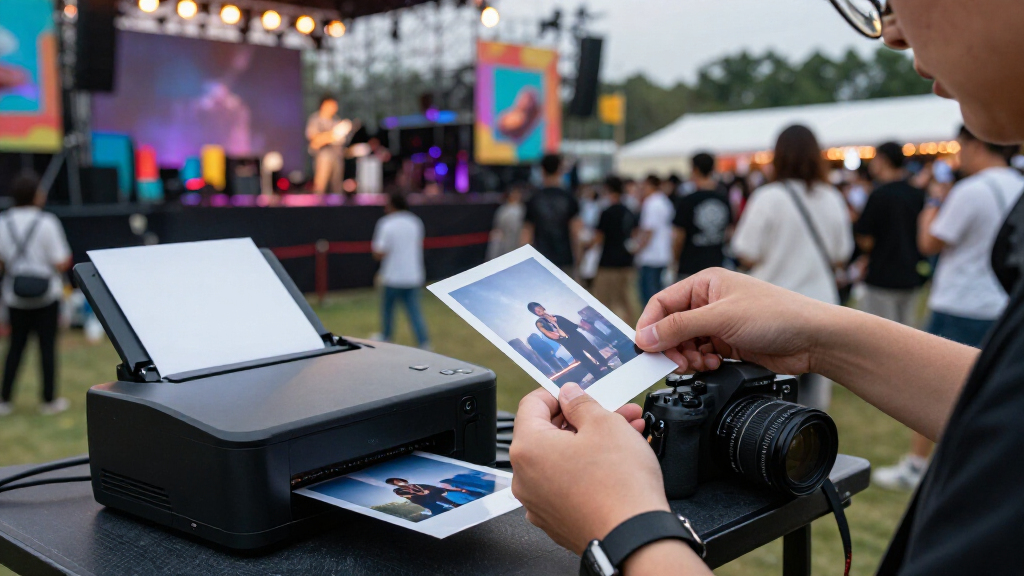
I compared these printers as tools for photographers who may want to make prints at a shoot, share images with clients, or carry a small printer for events. The main criteria were print format and process, portability, setup and phone connectivity, the usefulness of included supplies, and how well each model fits a repeatable photo workflow. A small sticker printer can be genuinely portable, but it ranks below a 4×6 model when the goal is to make larger keepsakes or client-facing prints.
The ranking gives priority to printers that balance useful print size with practical portability and clear workflow value. That puts the Canon SELPHY CP1500 family near the top, while the Liene M100 stands out as a capable 4×6 alternative and the QX20 earns a place for compact output. Bundles with the same core printer are differentiated by paper, ink, and carry accessories rather than treated as separate performance upgrades. Older or more specialized models rank lower when their format or workflow narrows their usefulness for photographers.
Factors to Consider When Choosing Portable Photo Printers For Photographers
Before choosing, decide what job the printer needs to do: create a client handout, make a small keepsake, or produce quick prints for a personal project. The printer itself is only part of the workflow; paper, ink or cartridge availability, phone compatibility, and the size of the finished print shape what is practical on location.
Choose the print size before the printer
Start with the print you expect to hand someone, not the smallest printer you can carry. A 4×6 image is more useful for a client handout or a small portfolio than a 2×3 print, while compact formats suit stickers, journals, and casual sharing. Small prints can also make detailed compositions and fine edits harder to judge at a glance. If you need prints for both uses, ask whether you are willing to carry two workflows or whether one format can cover most situations. A common mistake is buying the lightest model and later finding that its output is too small for the job. Match the printer to the final use, then weigh portability among the models that meet that requirement.
Think about print process and consistency
Dye-sublimation models and ZINK printers approach printing differently, so do not treat all portable output as interchangeable. Dye-sublimation is a common choice for photographers seeking a finished photo print, while ZINK favors compact, cartridge-free convenience. A printer’s process also shapes its consumables and the way you plan a print session. For color-critical work, a portable printer should be treated as a sharing or proofing tool unless its output has been checked against your editing display and intended workflow. Avoid assuming that a print that looks good on a phone will match a calibrated monitor. Choose based on whether convenience or closer control over a conventional photo-print workflow matters more to you.
Budget for the whole print session
Compare how many prints are ready to make from the supplies included, not just the printer package name. Bundles for the same model may include a shoulder bag, a paper-and-ink set, or enough supplies for a longer session, and these differences can change how prepared you are on arrival. Check whether paper and ink are sold together or need separate replenishment, and confirm that the consumable format is easy for you to source. A low-supply bundle can be fine for occasional use but inconvenient at an event. Photographers who expect to print repeatedly should plan for spare media and a way to keep it protected. The practical cost is the ongoing print workflow, not only the device.
Check the complete on-location workflow
Portability means more than a compact body: the printer, paper, cartridges, charging method, and phone all need to work together at the location. Before buying, check whether the connection method fits the devices you use and whether the printer needs a particular app or setup step. A dock-based model can suit a fixed table or event station, while a wireless unit may be easier to place wherever guests gather. Think about where you will store supplies so paper stays clean and ready to load. Do not assume that wireless means instant printing; pairing and image selection still take time. For event work, a simple, repeatable sequence can matter more than a long feature list.
Decide whether you need editing or just output
A portable printer does not replace the editing process, and phone screens can make brightness and color decisions difficult. If you plan to print directly from a phone, prepare a consistent export and check that the app supports the image selection and adjustments you need. For client previews, the printer’s purpose may be quick sharing rather than a definitive color reference. For portfolio or display work, consider whether a small portable print is the final deliverable or simply a prompt for later production at a larger size. One common mistake is expecting a pocket printer to validate every detail of a high-resolution file. Let the printer support the stage of the workflow it can handle well.
Pay for portability only when it changes your work
A smaller printer is worth the compromise when it will actually travel with you or serve a specific on-site need. If the printer mostly stays at a home studio, a larger 4×6 unit may be a more useful choice than a tiny model that saves little in your day-to-day routine. For photographers who print at events, the ability to carry supplies and keep a steady output rhythm may matter more than the smallest body. For travel, weigh the printer’s footprint alongside the media and any required accessories. Think through a typical day in your bag rather than comparing device dimensions alone. That simple exercise often separates a genuinely portable setup from a printer that is merely compact.
Frequently Asked Questions
Is a 2×3-inch portable printer enough for client proofs?
It can work for quick keepsakes or a small selection of images, but the format is limiting for judging composition details or presenting a polished set. A 4×6 printer gives clients more room to view the image and is closer to a conventional photo print. If proofs are meant to guide a selection or discussion, decide whether clients can comfortably assess the images at the smaller size. For casual event sharing, 2×3 may be an appropriate compromise. For a portfolio handout or more formal client interaction, I would favor a 4×6 workflow.
Should I choose a Canon SELPHY CP1500 bundle or a Liene M100 bundle?
Start by comparing the supplies and accessories in the exact package, since both printer families target portable 4×6 printing. A CP1500 bundle may include a shoulder bag or different amounts of paper and ink, while the Liene M100 package with 100 sheets and three cartridges emphasizes having supplies ready. Check which package fits your expected print volume and how you prefer to carry the printer. Also confirm the app and connection workflow suits your phone. The best choice is the one whose complete kit supports your actual session, not simply the one with the longer bundle description.
Can I rely on portable printer output for color-critical photography?
Portable output is useful for sharing and rough checks, but it should not automatically be treated as a color-managed reference. Your phone display, editing settings, printer process, and paper all affect the result. If accurate color is central to a job, make a test print and compare it under consistent viewing light before relying on the printer for client approval. Keep your main display and export workflow consistent as well. A portable printer can complement a color-managed process, but it does not replace one.
Which portable printer setup makes the most sense for events?
For events, prioritize a format guests will value, predictable supply capacity, and a workflow that is quick to repeat. A 4×6 printer is a strong fit when you want substantial take-home prints, while a 2×3 model is easier to carry and can suit informal favors. Look beyond the printer to the included paper and ink, spare media, power plan, and where the printer will sit during the event. Test phone pairing and the image-selection process before the day. A convenient setup is one that can keep moving without frequent supply changes or troubleshooting.
Are the Canon SELPHY CP1500 bundles different printers?
The listed CP1500 options are bundles built around the same printer model, so the meaningful differences are the accessories and supplies included. Some packages add a shoulder bag, while others include one or more ink-and-paper sets. Compare the exact contents rather than assuming a larger bundle changes print performance. If you already have compatible supplies or a carrying case, a simpler package may fit better. If you are starting from scratch or expect a busy print session, a bundle with more media can reduce preparation work.
Conclusion
For the strongest all-around mix of 4×6 output and portable use, I recommend the Canon SELPHY CP1500 as best overall. The Liene M100 bundle with 100 sheets and three cartridges is my best value-oriented pick for photographers who want a ready supply of media, while the CP1500 bundles with extra sets or a shoulder bag suit buyers who want a more complete kit. For beginners, I’d start with a straightforward 4×6 setup such as the CP1500 or Liene M100 rather than choosing a tiny format that may not fit future needs. The Canon SELPHY QX20 is the better choice for compact, smaller-format creative prints, and the Nelko PP01, KODAK Mini 2 Retro, or KODAK Step make more sense for lightweight casual sharing. Choose the print size you need first, then select the bundle whose supplies and carry setup match your typical shoot.