TL;DR

Get audio and creator gear delivered free with Prime
- Fast, free delivery on millions of items
- Prime Video, Amazon Music and more included
- Member-only deals all year
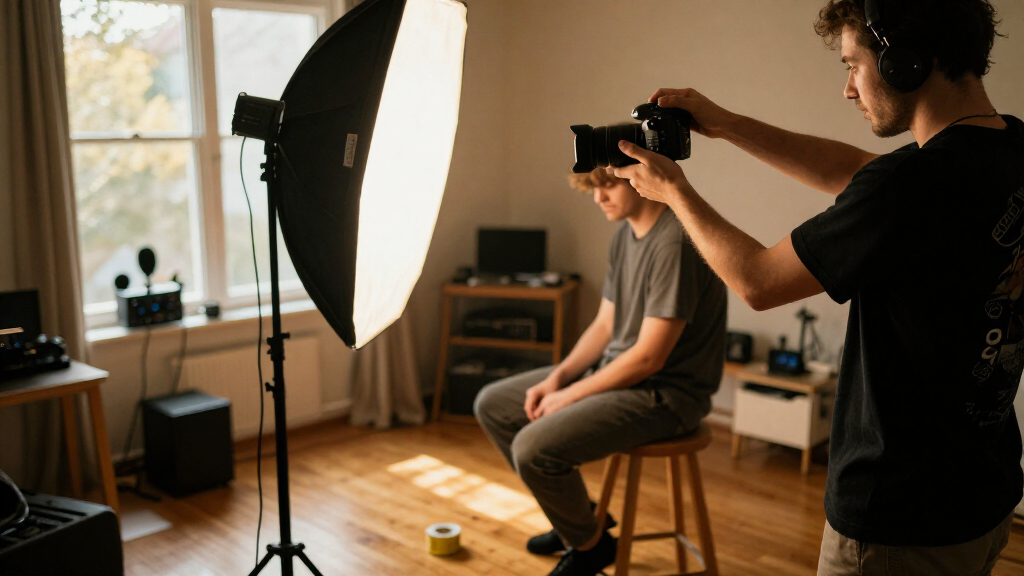
A consistent headshot station keeps camera position, subject placement, lighting, background, framing, and direction repeatable. Mark positions, lock exposure and white balance, compare test frames with an approved reference, and make only modest adjustments for each person. A simple written setup guide helps you reproduce the look across long sessions or different locations.
At the end of a long portrait day, the lighting stand has not moved, but the light has. Someone nudged it while stepping around a cable. The last few portraits now have a different shadow under the jaw, and the group page looks less like a team. I have learned to treat a headshot station like a small stage: tape marks, a clear routine, and one approved reference keep the look steady when the room gets busy.
This guide shows you how to set up a headshot station that produces cohesive, usable portraits across a group or across several days. You will learn what to fix in place, which camera settings to hold steady, how to direct people without making them feel stiff, and how to adapt the setup for different faces, heights, and mobility needs.
A consistent headshot station makes it easier to produce portraits that look like they belong together, whether you are photographing a small office team or a rotating cast of conference speakers. The aim is not to make every person look identical. It is to give each portrait the same visual foundation while leaving room for the person in front of your camera.
Tape the camera, light, backdrop, and subject positions so small shifts do not change shadows or perspective.
Use manual exposure and fixed white balance to prevent clothing and changing room light from shifting the series.
Choose a crop and eye position in advance, then compare test frames with an approved portrait.
Offer clear pose cues, seated and standing options, and a comfortable prep area.
Document settings, measurements, editing, file naming, intended use, and participant consent.
Setting Up a Headshot Station That Delivers Consistency
Build a repeatable visual foundation with marked positions, steady camera settings, a trusted reference portrait, and a clear routine. Keep the setup consistent while making each person feel at ease.
camera · light · backdrop · subject
to check throughout
for exposure and white balance
for focus, crop, color, tone
Fix what shapes every frame
Repeatability comes from controlling the setup and process, not from buying the most expensive camera.
Mark the stage
Tape the tripod legs, light stand feet, subject mark, and backdrop location. Record camera height, lens, distances, and light placement in a short setup guide.
Make the backdrop predictable
Check wrinkles, marks, uneven light, and subject separation. Move the subject as far forward as the room allows, then check for hard shadows.
Keep a visual target nearby
Compare lighting, crop, pose, and overall tone against an approved portrait. A setup photo helps restore the scene if equipment shifts.
Keep the lighting flattering and repeatable
Use the same sources and power settings, then make small, considered adjustments for the person in front of you.
Keep camera settings from drifting
Automatic decisions can react to dark jackets, pale shirts, and changing room light. Set a stable baseline before the first participant.
A short routine keeps the day moving
Use the same sequence for every participant; adjust gently for comfort, accessibility, glasses, and natural expression.
Reset
Confirm tape marks, light power, backdrop, and reference frame.
Welcome
Offer a mirror, lint roller, tissues, and clear clothing guidance.
Position
Offer seated or standing options; set height and framing comfortably.
Direct
Give simple posture and expression cues, then let the person settle.
Review
Check focus, exposure, color, crop, and likeness before moving on.
Match the foundations, personalize the direction
A consistent series has a shared visual language. It does not require every face or pose to look identical.
| Element | Keep consistent | Adjust with care | Check against |
|---|---|---|---|
| Lighting | Source, softness, direction, power | Small angle changes for glasses or features | Shadow shape and skin tone |
| Camera | Exposure, white balance, focus, format | Framing for seated or standing height | Eye sharpness and exposure |
| Portrait | Crop, eye line, background, editing style | Pose and expression cues | Approved reference image |
| Experience | Routine, clear instructions, respectful tone | Mobility needs and personal comfort | Natural, usable expression |
Document the look so it travels.
Record measurements, equipment, camera settings, lighting, crop, editing approach, file naming, intended use, and participant consent. Add reference images so another operator can rebuild the station across rooms or days.
Fix the five positions that shape every portrait
A repeatable headshot station fixes the camera, lights, background, and subject positions so each person meets the same visual setup. Mark those positions with tape, record camera height and distance, and keep a reference portrait nearby. These simple anchors reduce subtle shifts in perspective, shadows, and framing as the session moves along.
Start by placing the backdrop far enough behind the subject that it does not cast a hard shadow across it. Then position the camera and choose a standing or seated mark for the subject. A tripod makes camera height and angle easier to repeat; a tape mark on the floor gives the subject a clear place to stand. Even a small height change can alter how prominent the jaw or forehead looks, especially when you photograph people of very different heights.
In a real office, you might have only a conference room and an hour before the next meeting. Tape the stand feet, subject mark, and tripod legs, then photograph the setup from the side. If someone shifts the light while helping a participant, the floor marks and setup photo give you a quick way back. Think of the marks as the rails of a stage: they keep the scene steady while the person changes.
Write down distances and heights in a short setup guide. For example, note the lens, camera height, subject-to-background spacing, and light position. If another photographer has to run the station next month, those details are more useful than “put everything about here.”
Room layout can limit your options. In a narrow space, a long separation from the background may not fit; move the subject as far forward as practical, then check the backdrop for shadows and uneven light. The best station is the one you can set up again in the actual space available.
Products Worth Considering

DJI Osmo Pocket 4 Gimbal Camera Pro Kit, 18-Piece Bundle

Apple iPad Air (2025) 13‑inch Wi‑Fi 256 GB – Space Gray (M3 chip)

DJI Osmo Pocket 3 Creator Combo Vlogging Camera with Mic 2, 1 CMOS, 4K/120fps, 3-Axis Stabilization, 128GB Card
As an affiliate, we earn on qualifying purchases.
Choose light that stays flattering from the first frame to the last
Consistent lighting comes from using the same sources, positions, and power settings for everyone, then checking a test frame before the session. A large softbox or umbrella placed near the camera direction gives you soft, even light, while a reflector or fill source can lift deep shadows. The goal is a stable lighting pattern that still looks good on different faces.
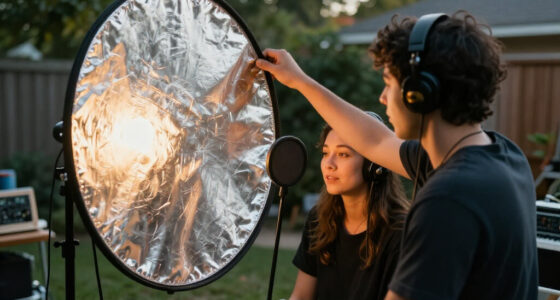
For example, put a large light slightly above eye level and just off to one side. If the light sits too far to the side, one cheek may fall into a dark wedge; if it sits too high, the eye sockets can look heavy. I make small adjustments while watching the person, then return to the marked position when the result works. Glasses may catch a bright reflection, so a slight change in light height or angle can help without changing the whole look.
Daylight feels appealing because it is already soft near a large window, but the color and brightness can drift as clouds pass. Mixed room lights add another color cast. If you use a window, watch a test frame during the session and keep the station away from shifting sun patches. Flash or controlled continuous lighting is easier to hold steady. LED fixtures let you see the light on a face before the shutter fires, but their color quality and output vary; set a matching color temperature and judge the test image rather than trusting the dial.
There is no single light position that flatters every person in precisely the same way. Keep the overall direction and softness consistent, then make modest changes for glasses, facial hair, skin tone, or a seated pose. A gentle adjustment should preserve the series; a dramatic change can make one portrait look as if it belongs to a different shoot.
On a busy team day, a white shirt and a dark jacket can fool automatic exposure into changing brightness from one frame to the next. Fixed lighting power and manual exposure stop those clothing changes from becoming lighting changes in the finished portraits.
Lock camera settings before clothing and backgrounds fool the meter
Manual exposure and a fixed white balance help keep brightness and color consistent across a headshot series. Set exposure, image format, focus mode, and white balance before the first participant, then review a test portrait at the size you will deliver. Auto exposure and auto white balance can shift as clothing, background, and room light change from frame to frame.
Imagine photographing one person in a pale shirt against a light gray background and the next in a dark jacket against navy. An automatic meter may brighten one frame and darken the other, even though the subject has not moved and the lights have not changed. Manual exposure holds the same baseline. Fixed white balance also avoids a run of portraits drifting warmer as a room fills with evening light.
Choose a shutter speed that freezes small movements, an aperture that keeps the face sharp, and an ISO that suits your light. A short telephoto lens is a common choice because it gives you a natural perspective at a comfortable working distance, but your room may call for something different. There is no universal setting: check sharpness at the eyes and make sure enough of the face stays in focus when a person turns slightly toward you.
Before the group arrives, take a test frame and inspect the eyes, exposure, color, crop, and background. A tethered camera can send images to a computer or tablet as you shoot, making it easier to catch a focus or framing problem early. Tethering does not fix the station for you, but a large preview lets you spot a small issue before it appears in forty portraits.
Keep the original files and use a clear naming system, such as a session date followed by the participant’s approved identifier. Confirm how the images will be used, what file dimensions and formats are needed, and how the team wants names handled before you deliver anything.
Match framing and pose without making people look copied
Consistent framing starts with choosing a crop and an eye position before the session, then keeping both steady. Decide whether you want head-and-shoulders portraits or a tighter crop, and check the first few files against a reference image. The portraits will feel like a set when their background, crop, and visual balance match, even though each person has a different expression.
For instance, if your sample portrait leaves a modest margin above the head and places the eyes near the upper third, use that as your guide for everyone. If one person’s eyes sit high in the frame and the next person seems to sink toward the bottom, the portraits can feel inconsistent when they appear together on a staff page. A tethered preview makes these differences easier to see while the subject is still standing on the mark.
Give short, concrete direction instead of asking for a vague “natural” pose. You might say, “Turn your shoulders a little this way, bring your chin forward slightly, and let your hands rest comfortably.” Then pause. If a person feels stiff, give them a moment between frames rather than repeating instructions faster. You can offer a choice between standing and sitting and explain that the same camera framing will apply to either.
The aim is a shared visual language, not one identical expression. A lawyer may prefer a composed look; a creative team may want a little more ease. Agree on the intended tone before the first portrait and keep your prompts respectful, clear, and flexible. Avoid telling people to smile in a particular way or assuming one pose suits every body.
Take enough frames to let a person settle into the session and show a small range of expressions, while keeping your position and lighting fixed. A brief review after the first few participants can reveal whether your cues are landing as intended.
Keep the background clean and the subject comfortable
A predictable background and a prepared subject make it easier to create portraits that feel polished without relying on heavy editing. Choose a clean, neutral backdrop that suits the intended use, light it evenly, and check for wrinkles, marks, and distracting edges. Give the subject enough separation from the background to reduce hard shadows and keep the portrait from feeling cramped.
A plain gray or soft-colored backdrop can work across many roles, while a company’s office wall may fit its style better if you can control clutter and light. Before the first person arrives, look at the whole frame for power outlets, bright windows, and objects that seem to grow out of someone’s head. A wrinkle that looks faint in the room can become a clear crease when lit from the side.
Set out a small prep area with a mirror, lint roller, tissues, and a place to put a coat or bag. These modest details save time: a participant can catch a flipped collar before you make the first exposure, and a quick lint roll can remove bright specks that would draw the eye on a dark jacket. Share clothing guidance in advance, including whether the background is light or dark, so people can choose outfits that separate clearly from it.
Comfort affects expression. If someone arrives rushed from a meeting, take a breath, explain what will happen, and let them see the reference portrait. That gives them a concrete idea of the crop and tone instead of leaving them to guess what “professional” means.
Ask participants how they want to be photographed and offer adjustments without assumptions. A seated option, a stable chair, or a clear path around the light stands can make the station usable for people with different heights and mobility needs. Good access is part of good planning, not a special case to improvise at the last minute.
Use a short repeatable routine to run the station
A simple routine makes a headshot session faster and reduces preventable differences between portraits. Before the first participant, build the station, take a test frame, and compare it with your approved sample. Between participants, return to the subject mark, repeat your direction, and check focus and framing at regular intervals.
- Set the room: Place the background, camera, light, and subject mark; tape their positions and clear the walking path.
- Set the camera: Choose manual exposure, white balance, focus mode, and image format, then confirm the crop in a test frame.
- Check the reference: Compare light direction, eye position, background tone, and overall brightness with the approved portrait.
- Welcome each person: Explain the process, offer standing or seated options, and give one or two clear pose cues.
- Review and reset: Check the eyes, exposure, and crop; return anything that moved to its floor mark before the next portrait.
Picture a session with thirty staff members and a short lunch break. Without a routine, each arrival can trigger a different guess about where to stand and how to pose. With a clear sequence, you can keep the pace moving while giving each person a few moments to settle into the light.
Build periodic quality checks into the schedule instead of waiting until the end. Review a frame after the first few people, then again after a room change, a lighting adjustment, or a long pause. If you notice a problem, correct it and note which files may need another look. Back up the images and use the agreed naming convention before files get mixed between participants.
Editing is part of consistency too. Apply the same restrained color treatment and crop, preserve natural skin texture, and avoid giving one person noticeably heavier retouching than the rest. Background cleanup or AI-assisted tools can save time, but they should support a cohesive set rather than create a different-looking person in each frame.
Document the setup so another room can match the look
A portable setup guide helps another photographer reproduce your headshot style across rooms or dates. Record the camera height, subject-to-background distance, light position, camera settings, crop, and editing approach, then include a diagram and an approved reference image. The guide will not erase every difference between cameras and rooms, but it gives the next operator a useful starting point.
For a distributed team, imagine one office with a deep studio space and another with a small meeting room. The first photographer can document the light’s height and angle, the subject’s mark, and the distance from camera to subject. The second can recreate those relationships as closely as the room allows, take a test image, and compare it with the sample before photographing the group.
Use measurements that make sense in the room, such as floor marks and stand height, and label the gear without assuming every location owns identical equipment. If a window replaces a flash at one site, note that change and check color and exposure carefully. Small differences may remain, so build in a review before publication rather than expecting every file to match perfectly straight out of camera.
Agree on delivery details early: file type, dimensions, background requirements, naming, intended use, and who may access the images. Headshots may appear on websites, staff directories, press materials, or professional profiles. Tell participants how the images will be used, how long they will be kept, and who will see them; obtain any required consent and follow the organization’s privacy practices.
A well-documented station is more than a list of camera settings. It includes the human parts of the process too: how you welcome people, what choices you offer, and how you keep the pace calm. That consistency helps the portraits feel considered from the first frame to the final delivery.
Frequently Asked Questions
What equipment do I need for a basic headshot station?
You need a camera or capable phone, stable support, controlled light or a bright window, a background, and room to place everything consistently. A tripod and a large soft light make the job easier, but the setup should match the quality and number of portraits you need. A tape measure, floor tape, and reference image help you repeat the arrangement.
How much space should I leave behind the subject?
Use as much space as the room allows between the subject and background. That separation helps reduce hard shadows and gives you more control over backdrop light. In a small room, move the subject forward as far as practical and inspect a test frame for shadows, wrinkles, and uneven tone.
Should I use window light, flash, or LED lighting?
Any of them can work if you control the result. Window light is simple but can change with clouds and time of day, while flash and LED setups are easier to keep steady across a long session. Avoid mixing sources with noticeably different color casts, and check a test frame before photographing the group.
How do I make portraits consistent across different locations?
Write down camera height, subject and background positions, light placement, settings, crop, and editing choices. Add a diagram and an approved portrait, then have each operator make and compare a test frame before the session. Different rooms and camera systems can still produce small variations, so review the results before publication.
How can I help someone who feels awkward in front of the camera?
Explain the process, offer a choice of standing or seated poses, and give one or two specific cues at a time. A mirror and a moment to settle can help more than repeated requests to “look natural.” Let the person choose an expression that suits them, and avoid pressuring anyone to smile.
How many frames should I take of each person?
Take enough frames to let the person settle and give you a small choice of expressions or subtle pose variations. Keep your camera, light, and framing steady while you shoot. The right number depends on the pace of the session and how the final images will be selected.
What should I confirm before delivering headshots?
Confirm file format, dimensions, crop, background needs, naming convention, intended use, and who can access the images. Tell participants how their portraits will be used and retained, obtain any required consent, and follow applicable workplace privacy policies. Apply a consistent edit while preserving natural skin texture.
Conclusion
Consistency comes from repeating the parts of the portrait you control: camera position, light, background, framing, settings, and direction. Mark them, document them, and compare real test frames with a reference before the room fills up. Then make small, thoughtful adjustments for the person in front of you.
Do that, and a long row of headshots can feel like one calm, well-lit conversation rather than thirty separate setups. Start with the tape marks; the rest of the session has a steadier place to stand.