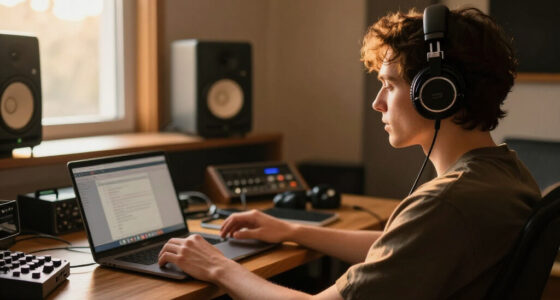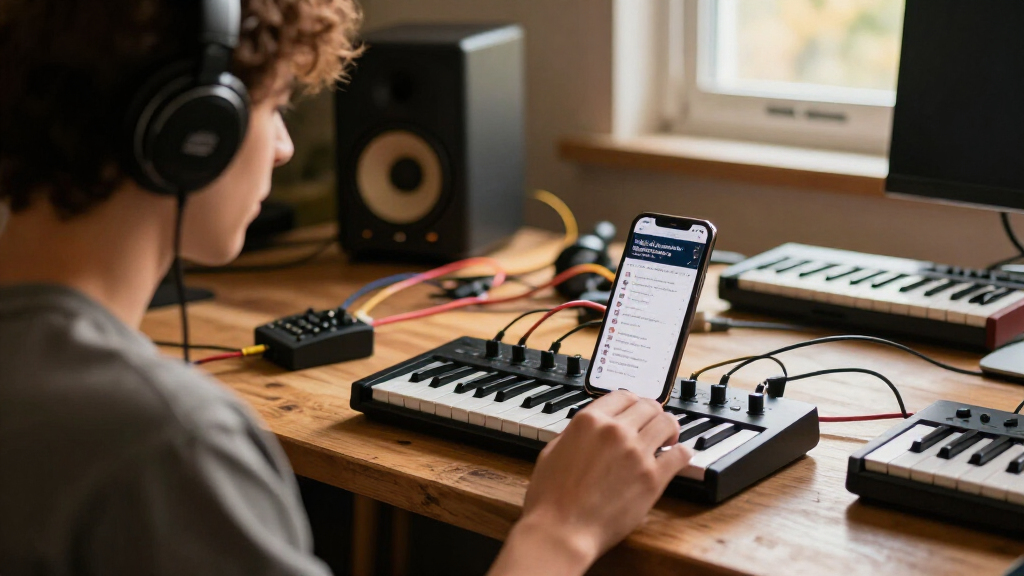
This checklist is for mobile music producers who want to build a reliable, portable rig without wasting money on gear that doesn’t travel well. Whether you’re sketching beats in a coffee shop, recording vocals in a hotel room, or mixing on a plane, every item here earns its place in your bag. We’ve focused on practical, road-tested picks that solve real problems—like clean audio, comfortable monitoring, and fast file transfers—while skipping the flashy extras you don’t need.

Get audio and creator gear delivered free with Prime
- Fast, free delivery on millions of items
- Prime Video, Amazon Music and more included
- Member-only deals all year
The list is organized by workflow: first you capture ideas (MIDI keyboard, interface), then you monitor (headphones), then you store and power everything (SSD, stand, hub). Each section explains why the slot matters, common mistakes to avoid, and what to check for before you buy. Use the look-for bullets as a quick pre-purchase audit, and the verdict as a bottom-line summary.
To get the most out of this guide, read each section in order, but feel free to jump to the piece you’re shopping for. We’ve kept the advice gear-agnostic where possible—especially for the MIDI keyboard—so you can apply the same criteria to any brand. Ready? Let’s build your mobile studio.
Portable MIDI Keyboard
The MIDI keyboard is your primary input for melodies, chords, and drum programming. On the road, you need something that’s light enough to toss in a backpack but still has enough keys and controls to feel expressive. A common mistake is buying a 25-key mini model with tiny, stiff keys that make you fight for every note—or going the other way and hauling a 49-key weighted board that kills your shoulder. The sweet spot for mobile work is usually 25 to 37 full-size or semi-weighted keys with velocity sensitivity, plus a few assignable knobs or pads.
Another trap is ignoring power and connectivity. Many portable keyboards run on batteries, which is great for jamming in a park, but if you’re plugging into a laptop or tablet, check that it works over USB-C without needing a separate power adapter. Also look for class-compliant operation—that means no driver installation, so you can plug into any device (iOS, Android, Windows, macOS) and it just works. Finally, consider the keybed action: synth-action (springy) is fine for most, but if you play piano-style parts, a semi-weighted feel will be more comfortable for long sessions.
Don’t overpay for built-in sounds or sequencers you’ll never use. Your DAW already has better instruments. Instead, spend your budget on build quality and key feel—those are the things that make a keyboard a joy to play, not a frustration. A good rule of thumb: if it feels like a toy, it’ll sound like one.
What to look for:
- 25–37 keys with velocity sensitivity
- USB-C class-compliant (no drivers needed)
- Battery or bus-powered with low power draw
- Assignable knobs/pads for DAW control
- Solid build—no flex or wobble when playing
USB-C Audio Interface
An audio interface is the heart of your mobile recording rig—it converts your microphone and instrument signals into clean digital audio. The Icon Pro Audio Harrison 32Ci stands out because it combines analog Harrison preamps (known for their musical character) with a 12-channel USB-C connection. That’s overkill for a simple vocal take, but if you’re recording a band or multiple synths on the go, having 12 inputs means you won’t need a second interface. The preamps are the real selling point: they add a subtle warmth that can make budget mics sound more expensive.
Common buying mistakes: choosing an interface with only one or two inputs when you’ll eventually need more, or ignoring latency and driver stability. For mobile work, you want a unit that runs bus-powered (no wall wart) or has a robust power supply that won’t fail in a hotel room. Check that the USB-C port is USB 3.0 or higher for low-latency performance, and that it works with your DAW on both Mac and Windows. Also, look at the headphone amp—if it’s weak, your mixes will be misleading.
Another factor is portability vs. connectivity. The 32Ci is a bit larger than a pocket-sized interface, but it’s still rack-mountable and built like a tank. If you’re mostly recording one mic, a smaller 2-in/2-out might be easier, but you’ll sacrifice the Harrison preamp character. Weigh your actual needs: if you’re a singer-songwriter, a simple 2-channel is fine; if you’re a producer with hardware synths, the 12-channel flexibility is worth the extra bulk.
What to look for:
- High-quality preamps (look for brand reputation like Harrison)
- At least 2 inputs—more if you record multiple sources
- USB-C with low-latency drivers (check OS compatibility)
- Durable metal chassis for travel
- Independent headphone volume and monitoring controls
Icon Pro Audio Harrison 32Ci Analog Mic Preamps with 12-channel USB C Audio Inte

The Harrison 32Ci is a professional 12-channel USB audio interface featuring legendary Harrison 32C preamps known for warm, transparent sound. It offers studio-grade performance with high-gain capacity, innovative filters, and seamless control for music production and recording.
Pros:
- High-quality Harrison 32C preamps for warm, transparent sound
- Studio-grade performance with broad frequency response
- Revolutionary filters and high-gain capacity for versatile recording
Cons:
- Requires compatible DAW software and setup knowledge
- Limited to USB connectivity, no other I/O options mentioned
Best for: Producers recording multiple sources with premium analog tone
Not ideal for: Ultra-minimalist setups needing a pocket-sized interface
Bottom line: The Icon Pro Audio Harrison 32Ci delivers studio-grade preamps and 12 channels in a travel-friendly package.
Closed-Back Studio Headphones
Closed-back headphones are essential for mobile mixing because they isolate sound—both from leaking out and from letting room noise in. The Focal Lensys Professional are a top-tier choice, offering the same driver technology as Focal’s high-end studio monitors but in a closed-back design. They provide a flat, accurate frequency response that lets you hear exactly what’s in your mix without hype, which is critical when you’re working in a hotel room or a noisy café. The build is robust, with replaceable ear pads and a sturdy headband—important for daily travel.
One mistake is buying open-back headphones for mobile work. They sound great but leak sound and let everything in, ruining your isolation. Another is ignoring impedance and sensitivity. If your interface or laptop can’t drive them loud enough, you’ll be pushing the volume and distorting the mix. The Lensys are 55 ohms, which is a good middle ground—they work well with most interfaces and even some laptops, but you’ll want a decent headphone amp for best results. Check the clamping force too: too tight and your ears will hurt after an hour; too loose and they’ll slip off.
Also, consider comfort for long sessions. The Lensys are relatively lightweight (under 300g) and the ear cups are deep enough for most ears. They fold flat, making them easy to pack. Finally, don’t be fooled by “studio” labels—many headphones are colored for consumer listening. The Lensys are designed for critical listening, so they might sound less exciting than consumer cans, but that’s exactly what you need for accurate mixes.
What to look for:
- Closed-back design for isolation
- Flat frequency response (check published specs)
- Impedance 32–80 ohms for easy driving
- Comfortable earpads and adjustable headband
- Foldable or compact for travel
Focal Lensys Professional Closed-Back Headphones

Focal’s Lensys Professional headphones feature dual aluminum/magnesium drivers and sound isolation design, providing detailed monitoring and authentic playback. They are designed for studio use, monitoring, and casual listening, with soft memory foam earpads and a sturdy headband for comfort.
Pros:
- High-quality aluminum/magnesium drivers deliver detailed sound
- Effective sound isolation for studio and casual use
- Comfortable soft memory foam earpads and sturdy headband
- Suitable for monitoring, recording, and playback
Cons:
- Wired connection may limit mobility
- Lack of foldable design for portability
- No water resistance for outdoor use
Best for: Critical mixing and tracking in noisy environments
Not ideal for: Casual listening or those who prefer boosted bass
Bottom line: The Focal Lensys Professional give you transparent, reliable monitoring that travels well.
Portable SSD
Your portable SSD is your creative lifeline—it holds your samples, project files, and backups. The Samsung T9 4TB is the current king of speed and capacity, offering USB 3.2 Gen 2×2 (20Gbps) transfer rates. That means you can move a full project folder in seconds, which is crucial when you’re bouncing between studio and stage. The T9 is also compact and rugged, with a metal body that handles drops and bumps—something you’ll appreciate when it’s bouncing around in your bag.
Common mistakes: buying a spinning hard drive (too slow and fragile), or getting a cheap SSD with slow write speeds. For music production, you need fast random read/write for loading sample libraries and saving large audio files. Also, don’t underestimate capacity—audio files are huge, and a 1TB drive fills up fast. The 4TB T9 gives you room for years of projects. Check that it uses USB-C with the right speed rating—if your laptop only has USB 3.1 Gen 1, you’ll be limited to 10Gbps, but the T9 will still work fine.
Another consideration is power consumption. Some SSDs draw too much power from a bus-powered hub, causing disconnects. The T9 is efficient and works directly from a laptop’s USB-C port. Also, look for hardware encryption if you’re carrying sensitive client work. The T9 has AES 256-bit encryption, so your files stay safe if you lose the drive. Finally, consider the cable—the T9 includes a USB-C to C cable and a C to A adapter, which is handy for older ports.
What to look for:
- USB 3.2 Gen 2×2 (20Gbps) for fast transfers
- Capacity 2TB or more for sample libraries
- Shock-resistant metal body
- Hardware encryption (AES 256-bit)
- Compact size—fits in a pocket
Samsung T9 4TB Portable SSD, USB 3.2 Gen 2×2
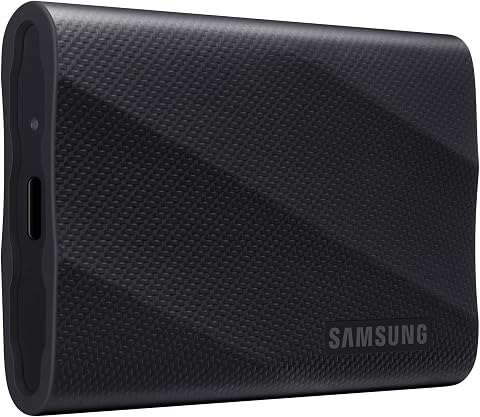
The Samsung T9 is a 4TB portable solid-state drive with read and write speeds of up to 2,000 MB/s when used with a compatible host and cable. It features dynamic thermal management, AES 256-bit hardware encryption, and compatibility with computers, consoles, tablets, and supported iPhones.
Pros:
- Up to 2,000 MB/s read and write speeds with a compatible setup
- Dynamic thermal management helps control heat during heavy use
- AES 256-bit hardware encryption
- Rugged durability with drop resistance up to 9.8 ft
Cons:
- Maximum speeds require a compatible USB 3.2 Gen 2×2 host, cable, and UASP mode
- Host device compatibility may vary
Best for: Producers with large sample libraries and fast transfer needs
Not ideal for: Budget-conscious users who don’t need 4TB
Bottom line: The Samsung T9 4TB is a reliable, speedy workhorse for your mobile studio.
Laptop Stand
A good laptop stand is about ergonomics and heat management. When you’re producing for hours, having your laptop at eye level prevents neck strain, and raising it off the desk improves airflow to keep your CPU cool. The Nulaxy 18″ Height Telescopic 360° Rotating Aluminum Laptop Stand is a versatile choice because it adjusts from a low profile to a tall standing desk height, and it rotates 360°—perfect for showing your screen to a collaborator or adjusting the angle for different lighting. The aluminum build is sturdy and won’t wobble, even with a 17-inch laptop.
Common mistakes: buying a stand that’s too small for your laptop, or one that blocks the vents. Check the maximum width and height your laptop needs, and make sure the stand’s arms don’t cover the bottom vents. Also, look for non-slip padding to keep your laptop from sliding. The Nulaxy has silicone pads on the arms and base, which is great for stability. Another issue is portability—some stands are heavy and bulky. The Nulaxy folds flat and weighs under 2 pounds, so it’s easy to slip into a backpack.
Also consider adjustability. You might want a low angle for typing or a high angle for standing. The telescopic height adjustment on the Nulaxy goes from about 6 inches to 18 inches, which covers most scenarios. The 360° rotation is a bonus, but make sure the swivel mechanism is smooth and locks into place—you don’t want your laptop spinning accidentally. Finally, think about heat dissipation: an aluminum stand helps draw heat away from the laptop’s base, which can prevent throttling during heavy sessions.
What to look for:
- Adjustable height (at least 10 inches of range)
- 360° rotation with secure locking
- Aluminum construction for durability and heat sink
- Non-slip silicone pads on all contact points
- Folds flat for easy transport
Nulaxy 18" Height Telescopic 360° Rotating Aluminum Laptop Stand Desk, Gray
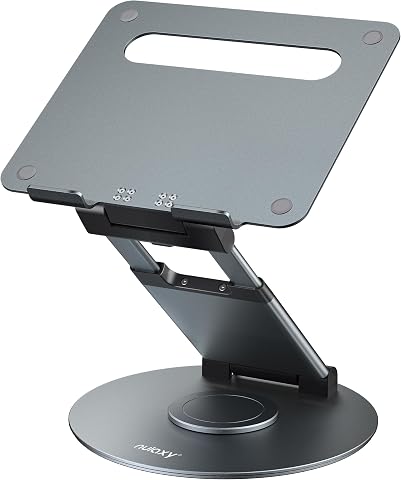
This adjustable laptop stand features 360° rotation, height up to 18 inches, and tilt angle adjustment for ergonomic comfort. It supports laptops up to 17 inches and 22 pounds, making it ideal for office use and collaboration.
Pros:
- 360° rotation for easy sharing and collaboration
- Adjustable height and tilt for ergonomic comfort
- Supports laptops up to 17 inches and 22 lbs
- Sturdy aluminum construction
Cons:
- Requires external keyboard and mouse for optimal typing
- Adjustments should be made with laptop removed for safety
Best for: Producers who need flexible positioning and heat management
Not ideal for: Those wanting a fixed, minimal-height stand
Bottom line: The Nulaxy stand gives you ergonomic comfort and cooling in a portable package.
USB-C Hub
A USB-C hub is the unsung hero of mobile production. Modern laptops often have only one or two USB-C ports, and you need to connect your interface, SSD, MIDI keyboard, and maybe a monitor. The Dell 34 Monitor S3425DW might seem like an odd pick for a hub, but it’s actually a smart move: this monitor has a built-in USB-C hub with power delivery, video, and data pass-through. So you can plug your laptop into the monitor with a single cable, and then connect your peripherals to the monitor’s USB ports. That’s a game-changer for a mobile setup—you get a large WQHD display with 120Hz refresh rate, and you also get a hub without carrying an extra box.
But if you don’t need a monitor, you’ll want a dedicated hub. The key is to match the hub’s ports to your gear. Look for at least one USB-C port with power delivery (to charge your laptop), two or more USB-A ports for legacy devices, an HDMI or DisplayPort output, and an SD card slot if you shoot video. Avoid hubs that get too hot or have flimsy connectors. Also, check the data transfer speed—USB 3.2 Gen 2 (10Gbps) is ideal for SSDs.
When using a hub, be aware of power limitations. Some hubs can’t supply enough power to run a bus-powered interface and charge your laptop simultaneously. The Dell monitor’s hub provides 90W of power delivery, which is plenty for most laptops. If you go with a standalone hub, check the wattage. Also, make sure the hub is plug-and-play and doesn’t require drivers. Finally, consider the cable length—a short cable might be fine on a desk, but if you’re working from a couch, a longer cable helps.
What to look for:
- USB-C power delivery (at least 60W for laptops)
- Multiple USB-A ports for legacy devices
- HDMI/DisplayPort for external display
- SD card slot for camera files
- USB 3.2 Gen 2 speeds for fast data
Dell 34 Monitor S3425DW, WQHD VA, 120Hz, FreeSync Premium, Eye Comfort

The Dell S3425DW is a 34-inch curved monitor featuring a WQHD resolution of 3440×1440, a 120Hz refresh rate, and AMD FreeSync Premium for smooth visuals. It offers vivid colors with 99% sRGB and 95% DCI-P3 coverage, along with eye comfort technology and easy USB-C connectivity for a seamless experience.
Pros:
- Vivid and true-to-life colors with high color coverage
- Smooth visuals with 120Hz refresh rate and FreeSync Premium
- Eye comfort features reduce blue light emissions
- Convenient USB-C connectivity with power delivery
Cons:
- Large size may not fit smaller desks
- Limited stand adjustability details
- No built-in speakers mentioned
Best for: Producers who want a single-cable setup with a big screen
Not ideal for: Those who already have a monitor and just need a simple hub
Bottom line: The Dell S3425DW combines a stunning display with a versatile USB-C hub, simplifying your mobile rig.
If you’re building your mobile studio on a budget, start with the essentials: a portable MIDI keyboard, a good pair of closed-back headphones, and a reliable SSD. Those three cover capturing ideas, monitoring, and storing your work. Add an audio interface when you’re ready to record vocals or external gear, and pick up a laptop stand and hub once you’ve got the core setup down. The order matters—don’t blow your budget on a fancy monitor hub if you don’t have a decent interface yet.
Remember, the best gear is the gear you actually use. Test everything with your own laptop and DAW before committing, and always prioritize portability and build quality over specs you’ll never need. With this checklist, you’re ready to make music anywhere—so grab your bag, hit the road, and let the creativity flow. Happy producing!