This checklist is for anyone assembling a podcast recording setup, from a solo host recording at a desk to a small team creating conversations on the go. It covers core recording gear and a few supporting pieces, with each section focused on a different role in the setup.

Get audio and creator gear delivered free with Prime
- Fast, free delivery on millions of items
- Prime Video, Amazon Music and more included
- Member-only deals all year
The sections move from microphones and positioning to monitoring, portable recording, pop filtering, and room treatment. Each pick is considered for the job its product name suggests, so use the checklist to compare what each slot needs with the way you plan to record.
Before buying, map out your recording space, number of speakers, and connection needs. Check the product listing for exact dimensions and compatibility, then prioritize the pieces that address your biggest setup needs first.
USB Podcast Microphone
A microphone is the central capture point in a podcast setup, so this slot matters for both how you record and how easily the mic fits into your workflow. The Shure MV7+ is described as a USB-C and XLR dynamic podcast microphone and includes a stand. Those connection options may suit different recording arrangements, but check the listing and your equipment before assuming either connection works with your computer, mixer, or other gear.
A common buying mistake is choosing based on the microphone name alone and overlooking the rest of the chain. Confirm what cables or adapters are included, what your recording device accepts, and whether the included stand fits your desk and preferred mic position. Also consider who will use it: a solo setup and a multi-speaker setup can have different placement needs. The product name identifies one microphone, so check whether you need additional microphones for other speakers.
Review the microphone’s physical dimensions and connection details against your workspace and existing equipment. A compatibility check before purchase can help avoid a setup that requires accessories you did not plan for.
What to look for:
- Confirm your recording device supports USB-C, XLR, or the connection you plan to use.
- Check whether required cables or adapters are included.
- Verify the included stand fits your desk and preferred placement.
- Confirm how many microphones your recording setup needs.
- Review the microphone’s dimensions and mounting requirements.
Shure MV7+ USB-C & XLR Podcast Dynamic Microphone with Stand – Black

The Shure MV7+ is a versatile dynamic microphone designed for podcasting, streaming, and content creation. It features OBS certification, advanced DSP noise reduction, customizable LED touch controls, and flexible connectivity options via USB-C and XLR.
Pros:
- High-quality sound with noise reduction and voice isolation
- Flexible connectivity options for various setups
- Customizable LED touch controls and app integration
Cons:
- May be complex for beginners due to advanced features
- Requires software for full customization
- Potentially higher price point
Best for: A setup comparing USB-C and XLR connection options
Not ideal for: Anyone needing multiple microphones in one purchase
Bottom line: Check your recording device and included accessories to see whether this microphone fits your setup.
Desktop Microphone Stand
A desktop stand helps position a microphone where a host can use it comfortably, making it an important part of a desk-based recording setup. The InnoGear product name describes an adjustable telescopic table mic stand, which points to height adjustment as a feature to evaluate. The provided name is truncated, so confirm the full product details and included components on the listing before deciding.
A frequent mistake is assuming that any table stand will fit any microphone. Check the microphone’s mounting interface, the stand’s supported adjustment range, and whether an adapter is needed. Consider the desk itself too: available surface space, the edge or area where the stand will sit, and how you want the microphone positioned relative to your mouth. A stand that adjusts in height still needs to suit the reach and orientation you need.
Compare the stand’s listed dimensions and attachment details with your microphone and workspace. If you plan to move the mic between users or positions, check that the adjustment method supports those changes. Fit and reach are more useful checks than relying on the product category alone.
What to look for:
- Check the full listing because the product name is incomplete.
- Verify the stand’s mounting connection matches your microphone or adapter.
- Review its adjustment range against your preferred mic position.
- Measure available desk space and confirm the stand’s footprint.
- Check the listing for included hardware or accessories.
InnoGear Desktop Microphone Stand, Adjustable Telescopic Table Mic Stand with Mi
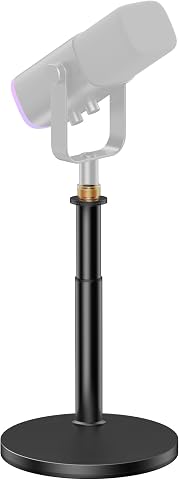
This adjustable desktop microphone stand features an instant-lock mechanism for quick height adjustments, ranging from 11.26 to 16.14 inches. Its stable, larger base provides secure support for microphones up to 3.3 lbs, compatible with various models including Blue Yeti, Snowball, and Shure SM7B.
Pros:
- Quick and easy height adjustments with instant-lock mechanism
- Enhanced stability with a larger, heavier base
- Supports a wide range of microphones with compatible adapters
- Strong load capacity for heavier microphones
Cons:
- No mention of adjustable tilt or swivel features
- Limited to desktop use, not suitable for floor mounting
- Mic clip max diameter may not fit larger microphones
Best for: Desk setups that need an adjustable table stand
Not ideal for: Buyers who cannot confirm mount compatibility
Bottom line: Verify the full listing, mount, and adjustment range against your microphone and desk.
Closed-Back Headphones
Headphones let a host monitor the recording while working at a microphone. This pick is identified as professional closed-back headphones, making it a candidate for the monitoring slot in a podcast setup. Before choosing, confirm how you will connect them to your recording device and whether their listed specifications suit your intended use.
A common mistake is treating the words “closed-back” or “professional” as a substitute for checking comfort and connection fit. Review the product listing for connector type, cable details, and any included accessories, then compare those with your recorder, interface, or computer. If you wear headphones for extended sessions, check the listed weight and design details, and consider whether the fit works for you. The product name alone does not establish those specifics.
For a multi-person recording, consider how many people need to monitor at once and whether this single pair is enough. Check the connection path for each listener, including any splitter or headphone output needs. Connection and comfort should guide the decision alongside the closed-back design named for this product.
What to look for:
- Confirm the headphone connector matches your recording device or planned adapter.
- Check cable length and included accessories in the listing.
- Review listed fit and weight details for your session length.
- Decide how many listeners need monitoring headphones.
- Confirm your recorder or interface can provide the required headphone connection.
Focal Lensys Professional Closed-Back Headphones

Focal’s Lensys Professional headphones feature dual aluminum/magnesium drivers and sound isolation design, providing detailed monitoring and authentic playback. They are designed for studio use, monitoring, and casual listening, with soft memory foam earpads and a sturdy headband for comfort.
Pros:
- High-quality aluminum/magnesium drivers deliver detailed sound
- Effective sound isolation for studio and casual use
- Comfortable soft memory foam earpads and sturdy headband
- Suitable for monitoring, recording, and playback
Cons:
- Wired connection may limit mobility
- Lack of foldable design for portability
- No water resistance for outdoor use
Best for: Listeners looking for a closed-back headphone option
Not ideal for: Teams needing several monitoring pairs from one pick
Bottom line: Check the connector, comfort details, and number of listeners before choosing.
Portable Audio Recorder
A portable recorder can serve as the capture point when a podcast is recorded away from a fixed desk setup. The Zoom F6 is named as a professional field recorder, so this slot is for anyone considering a dedicated recorder for field use. Check the listing to understand its inputs, recording options, power needs, and included accessories rather than inferring those details from the product name.
A common buying mistake is overlooking how many microphones or other sources need to connect at once. Make a list of your planned sources and compare it against the recorder’s listed inputs and connector types. Then check how recordings transfer to your editing device and what storage media and power accessories are required. Confirm whether those items are included or need to be obtained separately.
For portable work, consider the recorder’s listed size and weight, plus how you will carry and position it during a session. If you expect to record multiple speakers, check the input count and monitoring arrangements for the full setup. Inputs, storage, and power are practical points to confirm before deciding whether the F6 fits your recording plan.
What to look for:
- Compare the listed input count and connectors with your microphones.
- Confirm supported storage media and whether it is included.
- Check power requirements and included power accessories.
- Review the recording transfer process for your editing setup.
- Consider listed size and weight for your planned field use.
Zoom F6 Professional Field Recorder
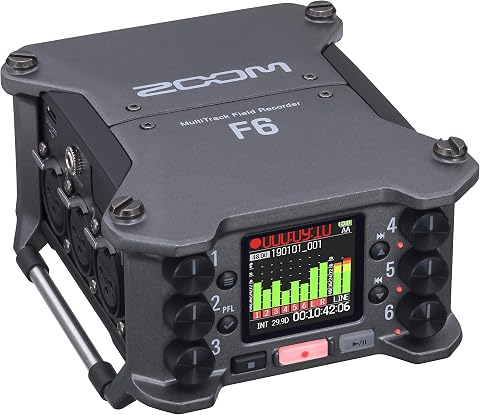
The Zoom F6 is a portable multitrack field recorder with 32-bit float recording and dual A/D converters for capturing a wide dynamic range. It has six XLR inputs, records up to 14 tracks, and includes timecode I/O for syncing audio with video.
Pros:
- 32-bit float recording with dual A/D converters provides wide dynamic range
- Six XLR inputs and up to 14 tracks support multitrack recording
- Timecode I/O supports audio and video synchronization
- Portable design with multiple power options
Cons:
- Requires four AA batteries when using battery power
- The description does not specify included storage beyond the stated 8 GB capacity
Best for: Recording plans that call for a portable field recorder
Not ideal for: Setups that have not checked inputs and storage needs
Bottom line: Match the recorder’s listed connections, storage, and power requirements to your session.
Microphone Pop Filter
A pop filter is intended to sit in the microphone setup, so it is important to confirm exactly what this product includes before assigning it that role. The supplied name describes an M100 two-person podcast equipment bundle and begins to identify a condenser microphone, but the name is cut off. It does not clearly identify a standalone pop filter. Read the full listing and contents carefully before buying it for this slot.
A common mistake is assuming a bundle includes a particular accessory because it is grouped with podcast equipment. Check whether a pop filter is explicitly listed, how many microphones and stands are included, and what connections those microphones use. The name suggests a two-person bundle, but you should verify the actual contents and compatibility rather than relying on that label alone. If you already own a microphone, make sure the bundle’s parts work with it or decide whether you need a separate filter instead.
Check how any included filter attaches and whether it can be positioned with your microphone and stand. Confirm the mounting method and available space at the desk. Included contents and fit are essential here because the product name does not establish that a pop filter is part of the package.
What to look for:
- Open the full listing and confirm whether a pop filter is included.
- Verify the exact bundle contents and number of microphones.
- Check microphone connection types against your recording equipment.
- Confirm filter attachment and positioning compatibility.
- Compare the bundle with the microphone and stand you already own.
M100 2-Person Podcast Equipment Bundle, Dual XLR-3.5 Condenser Microphones

This all-in-one podcast bundle is designed for dual-host interviews, live streaming, voice-overs, and online meetings. It includes a mixer, two condenser microphones with pop filters, adjustable stands, and all necessary cables, offering a plug-and-play setup for both amateurs and professionals.
Pros:
- Complete all-in-one setup ideal for dual recording and streaming
- High-quality cardioid condenser microphones for clear, detailed sound
- Plug-and-play design with broad device compatibility
- Built-in effects and Bluetooth support enhance live broadcasts
Cons:
- Limited to 8 hours of battery life for outdoor use
- May be complex for beginners unfamiliar with audio equipment
- No detailed information on price or advanced customization options
Best for: Shoppers considering a two-person podcast bundle
Not ideal for: Anyone seeking a confirmed standalone pop filter
Bottom line: Confirm that a pop filter is included and compatible before using this bundle for the slot.
Acoustic Sound Panels
Room treatment is a separate consideration from microphones and recording devices. This product is described as hexagon black acoustic ceiling panels, so check whether the listing’s intended installation and materials suit the area you want to address. The product name alone does not specify panel dimensions, quantity, mounting method, or where the panels are designed to be installed.
A common mistake is buying panels without first checking the surface and coverage. Measure the available area, compare it with each panel’s dimensions and the package quantity, and confirm the panels can be mounted on your intended surface. Since the name refers to ceiling panels, verify the installation instructions and suitability for your ceiling before making a plan. Check the listing for materials and care details as well.
Think about where the recording setup sits and which surfaces you intend to cover. Confirm that the color and hexagon shape suit the room, then check whether the installation method works with the space you have. Coverage and mounting are the practical fit checks to settle before choosing a panel product.
What to look for:
- Confirm panel dimensions and quantity in the package.
- Check the listing’s stated installation surface and mounting method.
- Measure the area you intend to cover before ordering.
- Review material and care details in the product listing.
- Confirm the black hexagon design suits the room.
Acoustic Ceiling Panels Sound Absorbing Panels, Hexagon Black

These hexagon-shaped acoustic ceiling panels are made of high-density polyester felt, effectively absorbing background noise and reducing echoes. They feature a modern geometric design, adjustable hanging height, and are easy to install and maintain, making them suitable for offices, studios, restaurants, and classrooms.
Pros:
- Effective noise absorption and echo reduction
- Modern geometric design enhances decor
- Adjustable hanging height for customization
- Easy to install and clean
Cons:
- Limited color options
- May require multiple panels for larger spaces
- Potentially higher cost for premium designs
Best for: Rooms where black hexagon ceiling panels fit the plan
Not ideal for: Buyers who have not checked mounting and coverage
Bottom line: Measure the intended area and confirm ceiling mounting details before choosing these panels.
Build in a practical order: start with the microphone and the recording device or connection path you need, then add a stand and headphones that fit the setup. Next, consider a portable recorder if your sessions call for one, and confirm the bundle contents before buying the item listed for the pop filter slot. Leave room treatment until you have checked coverage and mounting for the space.
You do not need to solve every part of the setup at once. Check each product’s full listing against your equipment, room, and number of speakers, then add pieces as your recording needs become clear. A few careful fit and compatibility checks can make the shopping process much easier.