Finding the best external SSD enclosure depends on your priorities, whether it’s speed, durability, or affordability. The UGREEN 20Gbps M.2 NVMe and SATA SSD Enclosure stands out for its impressive transfer speeds, making it ideal for power users. The Sabrent Tool-Free NVMe & SATA Enclosure offers quick setup for those who want convenience, while the BENFEI 2.5 Inch SATA Enclosure provides reliable compatibility at a lower price. All options involve tradeoffs between speed, ease of use, build quality, and cost. Keep reading for a detailed breakdown of the best external SSD enclosures to meet your specific needs.

Get audio and creator gear delivered free with Prime
- Fast, free delivery on millions of items
- Prime Video, Amazon Music and more included
- Member-only deals all year
Complete the kit



Key Takeaways
- Speed-focused enclosures like UGREEN 40Gbps deliver the fastest data transfer, ideal for professional workflows.
- Tool-free design simplifies installation, but may compromise on durability or heat dissipation.
- Compatibility varies: SATA enclosures are more affordable but slower, while NVMe options excel in performance.
- Build quality and thermal management are critical for long-term reliability, especially with high-speed drives.
- Price ranges significantly based on features—budget options are suitable for occasional use, premium enclosures for intensive tasks.
| UGREEN 10Gbps M.2 NVMe SSD Enclosure |  | Best Overall for Versatile High-Speed NVMe Support | Transfer Rate: 10Gbps | USB Version: USB 3.2 Gen2 | Supported SSD Sizes: 2230, 2242, 2260, 2280 | VIEW LATEST PRICE | See Our Full Breakdown |
| Sabrent Tool-Free NVMe & SATA M.2 SSD Enclosure, USB 3.2 Type-C |  | Best for Easy Swapping and Versatile Drive Support | Compatibility: NVMe and SATA M.2 SSDs in 2242, 2260, 2280 | Transfer Speed: Up to 10Gbps | Material: Aluminum case with ABS frame | VIEW LATEST PRICE | See Our Full Breakdown |
| BENFEI 2.5 Inch SATA to USB External Hard Drive Enclosure |  | Best for Budget SATA HDD/SSD Compatibility | Size: 2.5 inches | Supported Drives: SATA I/II/III, SSD/HDD up to 6TB | Transfer Speed: Up to 5 Gbps | VIEW LATEST PRICE | See Our Full Breakdown |
| UGREEN SSD Enclosure Tool-Free USB C External 10Gbps M.2 NVMe to USB |  | Best for Portable NVMe SSDs with Easy Setup | Data Transfer Rate: 10Gbps | USB Version: USB 3.2 Gen2 | Compatibility: M.2 NVMe SSDs (2230/2242/2260/2280), up to 8TB | VIEW LATEST PRICE | See Our Full Breakdown |
| UGREEN 20Gbps M.2 NVMe and SATA SSD Enclosure |  | Best for Ultra-Fast Dual Protocol Support | Compatibility: NVMe and SATA SSDs up to 8TB | Transfer Speed: Up to 20Gbps | Interface: USB 3.2 Gen 2×2 | VIEW LATEST PRICE | See Our Full Breakdown |
| Cable Matters Aluminum 10Gbps USB C Hard Drive Enclosure for 2.5″ SSD/HDD |  | Best Overall | Supported Drive Size: 2.5 inches | Maximum Drive Thickness: 9.5mm | Data Transfer Rate: 10Gbps | VIEW LATEST PRICE | See Our Full Breakdown |
| UGREEN 20Gbps M.2 NVMe and SATA SSD Enclosure for M.2 SSDs |  | Best Value | Supported SSD Types: NVMe and SATA M.2 | Maximum Capacity: 8TB | Supported Sizes: 2230, 2242, 2260, 2280 | VIEW LATEST PRICE | See Our Full Breakdown |
| UGREEN 40Gbps M.2 NVMe Enclosure |  | Best for Ultra-High-Speed NVMe | Maximum Speed: 3600MB/s | Supported Protocols: USB4, 3.2, 3.1, 3.0, 2.0, Thunderbolt 3/4 | Supported SSD Sizes: 2230, 2242, 2260, 2280 | VIEW LATEST PRICE | See Our Full Breakdown |
| UGREEN USB C Hard Drive Enclosure for 2.5″ SATA SSD HDD Aluminum | 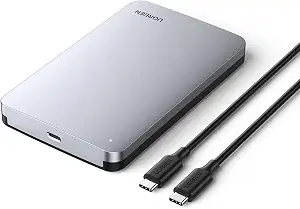 | Best for Budget & Compatibility | Transfer Speed: 6Gbps | Protocol: UASP | USB Version: USB 3.1 Gen 2 | VIEW LATEST PRICE | See Our Full Breakdown |
| external SSD enclosure | Material | Compatibility | Transfer Speed |
|---|---|---|---|
| UGREEN 10Gbps M.2 NVMe SSD Enc | Aluminum | — | — |
| Sabrent Tool-Free NVMe & SATA | Aluminum case with ABS frame | NVMe and SATA M.2 SSDs in 2242, 2260, 2280 | Up to 10Gbps |
| BENFEI 2.5 Inch SATA to USB Ex | — | Windows, Linux, MacOS 8.0+ | Up to 5 Gbps |
| UGREEN SSD Enclosure Tool-Free | Aluminum | M.2 NVMe SSDs (2230/2242/2260/2280), up to 8TB | — |
| UGREEN 20Gbps M.2 NVMe and SAT | Aluminum | NVMe and SATA SSDs up to 8TB | Up to 20Gbps |
| Cable Matters Aluminum 10Gbps | Aluminum | Windows, Mac, Thunderbolt 3 | — |
| UGREEN 20Gbps M.2 NVMe and SAT | Aluminum with silicone cover | — | Up to 20Gbps |
| UGREEN 40Gbps M.2 NVMe Enclosu | Aluminum | Windows, Mac, Linux, Android | — |
| UGREEN USB C Hard Drive Enclos | Aluminum alloy | — | 6Gbps |
More Details on Our Top Picks
UGREEN 10Gbps M.2 NVMe SSD Enclosure
This enclosure stands out for its combination of speed, portability, and broad compatibility. Supporting NVMe M.2 SSDs up to 8TB, it offers data transfer rates up to 10Gbps, matching the performance of the UGREEN SSD Enclosure Tool-Free USB C, but adds durability with an aluminum shell and thermal pad. Unlike the Sabrent Tool-Free NVMe & SATA Enclosure, it is optimized for NVMe drives, though it does not support SATA-based M.2 SSDs. The main tradeoff is that achieving full 10Gbps speeds requires a USB C 3.2 Gen2 cable, which could be a barrier for some users. It’s ideal for those who need a reliable, fast, and portable NVMe enclosure, but not for users with SATA drives or those who want plug-and-play simplicity without compatibility concerns.
Pros:- Supports NVMe M.2 SSDs up to 8TB with high-speed transfer up to 10Gbps
- Aluminum construction provides effective heat dissipation
- Compact and portable for travel or on-the-go use
- Supports multiple OS including Windows, Mac, Linux, Android, and iOS
Cons:- Requires USB C 3.2 Gen2 cable to reach maximum speeds
- Does not support SATA or mSATA SSDs
- Compatibility may vary depending on SSD model
Best for: Power users who require fast NVMe transfer speeds and broad system compatibility
Not ideal for: Users with SATA-only M.2 drives or those seeking an enclosure for SATA SSDs or HDDs
- Transfer Rate:10Gbps
- USB Version:USB 3.2 Gen2
- Supported SSD Sizes:2230, 2242, 2260, 2280
- Maximum Capacity:8TB
- Material:Aluminum
- Protection Features:Short-circuit, over-current, multi-protection
Our verdict“This enclosure is best suited for users needing fast, portable NVMe support across different operating systems, accepting some cable dependency for full speed.”
Sabrent Tool-Free NVMe & SATA M.2 SSD Enclosure, USB 3.2 Type-C
This model is designed for maximum convenience, offering tool-free installation for both NVMe and SATA M.2 SSDs. Compared with the UGREEN 10Gbps NVMe Enclosure, it adds support for SATA drives, making it more flexible for mixed drive types. Its aluminum case combined with an ABS frame helps with thermal management, but it lacks a heatsink, which could limit prolonged high-speed use. The enclosure supports transfer speeds up to 10Gbps via USB 3.2 Type-C, yet only supports drives in 2242, 2260, and 2280 sizes, so users with smaller or larger drives should look elsewhere. It’s ideal for users who frequently swap drives and need a quick, tool-free setup, but not for those who rely heavily on sustained high-speed performance or need support for 2.5-inch SATA drives.
Pros:- Tool-free, quick installation and drive swapping
- Supports both NVMe and SATA M.2 SSDs
- Slim aluminum design enhances portability
- Fast data transfer speeds up to 10Gbps
Cons:- No heatsink included, may limit sustained high-speed use
- Supports only specific M.2 sizes (2242, 2260, 2280)
- No support for 2.5-inch SATA drives
Best for: Content creators or tech enthusiasts who swap SSDs often and need support for both NVMe and SATA drives
Not ideal for: Users seeking a dedicated NVMe enclosure or those with 2.5-inch SATA drives
- Compatibility:NVMe and SATA M.2 SSDs in 2242, 2260, 2280
- Transfer Speed:Up to 10Gbps
- Material:Aluminum case with ABS frame
- Interface:USB 3.2 Type-C
- Power:Bus powered
- Included:Enclosure, 8-inch Type-C to Type-C cable, manual
Our verdict“This enclosure excels for users who need quick swap capability and support for multiple SSD types on the go, accepting some thermal and size limitations.”
BENFEI 2.5 Inch SATA to USB External Hard Drive Enclosure
This enclosure provides a straightforward solution for connecting 2.5-inch SATA drives, supporting SSDs and HDDs up to 6TB. Compared to the UGREEN 20Gbps M.2 NVMe Enclosure, it sacrifices speed and advanced features for simplicity and affordability, making it suitable for basic backup or storage needs. Its tool-free design and plug-and-play operation make it accessible to users unfamiliar with tech setups, but it is limited to SATA drives and offers a maximum transfer rate of 5Gbps, which is slower than NVMe options. Heavy-duty or continuous data operations might push this model beyond its comfort zone, but it’s a solid choice for casual users with 2.5-inch drives who prioritize ease of use over speed.
Pros:- Simple, tool-free installation process
- Supports both SSD and HDD up to 6TB
- Compatible with Windows, Mac, and Linux
- Affordable price point
Cons:- Limited to 2.5-inch SATA drives only
- Maximum transfer speed of 5Gbps
- No included cable, may need to purchase separately
Best for: Home users seeking an affordable, easy-to-use external drive for backups or media storage
Not ideal for: Power users or professionals requiring high-speed data transfer or NVMe support
- Size:2.5 inches
- Supported Drives:SATA I/II/III, SSD/HDD up to 6TB
- Transfer Speed:Up to 5 Gbps
- Compatibility:Windows, Linux, MacOS 8.0+
- Design:Tool-free, Hot-Swappable
- Supported Thickness:7/9.5mm
Our verdict“This enclosure is best suited for budget-conscious users needing basic, reliable external storage for SATA drives, with speed being a secondary concern.”
UGREEN SSD Enclosure Tool-Free USB C External 10Gbps M.2 NVMe to USB
This enclosure emphasizes simplicity and speed, supporting USB 3.2 Gen2 with transfer rates up to 10Gbps. Compared with the UGREEN 20Gbps M.2 NVMe and SATA SSD Enclosure, it focuses solely on NVMe drives, which means it’s better optimized for ultra-fast PCIe SSDs, but it doesn’t support SATA M.2 drives. Its compact aluminum case ensures durability and heat dissipation, suitable for users who need a reliable, portable NVMe enclosure. The tool-free design allows quick installation, though it relies on a USB C 3.2 Gen2 cable for maximum performance, which could be a limiting factor if the cable isn’t high quality. This model is ideal for those seeking a lightweight, high-speed NVMe enclosure that’s easy to set up, but not for users requiring SATA compatibility or more extensive drive options.
Pros:- Supports high-speed data transfer up to 10Gbps
- Tool-free installation for quick setup
- Durable aluminum case improves heat management
- Compatible with various operating systems
Cons:- Does not support SATA or mSATA SSDs
- Requires high-quality USB C 3.2 Gen2 cable for full speed
- Limited to NVMe protocol only
Best for: Travelers or professionals who need a simple, fast NVMe enclosure for portable high-speed storage
Not ideal for: Users needing support for SATA SSDs or those working with older or non-USB-C ports
- Data Transfer Rate:10Gbps
- USB Version:USB 3.2 Gen2
- Compatibility:M.2 NVMe SSDs (2230/2242/2260/2280), up to 8TB
- Material:Aluminum
- Protection Features:Short-circuit, over-current, multi-protection
- Size:Compact
Our verdict“This enclosure suits users who prioritize portability and fast NVMe speeds with minimal setup fuss, accepting some dependency on quality cables.”
UGREEN 20Gbps M.2 NVMe and SATA SSD Enclosure
This model pushes performance with support for both NVMe PCIe and SATA SSDs up to 8TB, delivering data transfer speeds up to 20Gbps via USB 3.2 Gen 2×2. Compared to the UGREEN 10Gbps NVMe Enclosure, it doubles the speed potential, making it ideal for demanding tasks like large file transfers or professional workflows. Its aluminum construction offers excellent heat dissipation, and its plug-and-play setup simplifies use across Windows, macOS, Linux, Android, and iOS. However, to reach the full 20Gbps speed, a compatible USB 3.2 Gen 2×2 port is necessary—often on high-end systems like Thunderbolt 4 or recent MacBooks. It does not include drives, so users must supply their own. This enclosure is perfect for users who need maximum speed and flexibility in drive support, but less suitable for those with older ports or minimal speed requirements.
Pros:- Supports NVMe and SATA SSDs up to 8TB with speeds up to 20Gbps
- Aluminum case ensures efficient heat dissipation
- Plug-and-play with wide OS compatibility
- Dual protocol support offers versatile drive options
Cons:- Full 20Gbps speed depends on high-end port availability
- No included drives, users must supply their own
- Requires USB 3.2 Gen 2×2 port for maximum performance
Best for: Tech aficionados who require the fastest possible transfer speeds with support for both NVMe and SATA SSDs
Not ideal for: Casual users or those with older computers lacking USB 3.2 Gen 2×2 ports
- Compatibility:NVMe and SATA SSDs up to 8TB
- Transfer Speed:Up to 20Gbps
- Interface:USB 3.2 Gen 2×2
- Material:Aluminum
- Protection Features:UASP, TRIM, short-circuit, over-current
- System Compatibility:Windows, macOS, Linux, Android, iOS
Our verdict“This enclosure is ideal for power users demanding top-tier speeds and drive versatility, provided their system can support USB 3.2 Gen 2×2.”
Cable Matters Aluminum 10Gbps USB C Hard Drive Enclosure for 2.5″ SSD/HDD
This enclosure stands out for combining reliable performance with broad compatibility, supporting SATA drives up to 9.5mm thick and delivering data transfer speeds up to 10Gbps. Its aluminum housing not only adds durability but also enhances heat dissipation, making it well-suited for intensive data transfer tasks. Compared with the UGREEN 40Gbps M.2 enclosure, it offers slightly lower speeds but is more versatile for standard 2.5″ drives and easier to use without requiring Thunderbolt 4. The main tradeoff is its limited drive thickness and the need for a compatible USB C or Thunderbolt 3 port, which might restrict use with older systems. This pick makes the most sense for users seeking a straightforward, durable enclosure for SATA drives with fast transfer rates.
Pros:- Supports high-speed data transfer up to 10Gbps
- Durable aluminum housing for heat dissipation
- Compatible with Windows and Mac systems
- Tool-free installation
Cons:- Limited to 2.5″ SATA drives up to 9.5mm thick
- Requires compatible USB C or Thunderbolt 3 port
- No included drive
Best for: Users who want a reliable, high-speed enclosure for SATA SSDs or HDDs on Windows or Mac, prioritizing durability and compatibility.
Not ideal for: Those with NVMe M.2 SSDs or seeking ultra-fast transfer speeds beyond 10Gbps, since this enclosure supports only SATA drives and maxes out at 10Gbps.
- Supported Drive Size:2.5 inches
- Maximum Drive Thickness:9.5mm
- Data Transfer Rate:10Gbps
- Interface:USB C 3.1
- Compatibility:Windows, Mac, Thunderbolt 3
- Material:Aluminum
Our verdict“Ideal for users needing a durable, fast, and easy-to-use enclosure for standard SATA drives.”
UGREEN 20Gbps M.2 NVMe and SATA SSD Enclosure for M.2 SSDs
This enclosure offers a compelling balance between speed and versatility, supporting both NVMe and SATA M.2 SSDs up to 8TB with transfer speeds reaching 20Gbps. Its aluminum case provides effective heat management, making it suitable for prolonged use without throttling. Compared to the UGREEN 40Gbps M.2 enclosure, it supports a broader range of SSD types and is more affordable, though it doesn’t reach the extreme speeds of the higher-end model. The key tradeoff is that maximum speeds require a USB 3.2 Gen 2×2 interface—something not all systems support—and SSDs are sold separately. It’s perfect for users who want fast, flexible M.2 storage without paying premium prices.
Pros:- Supports both NVMe and SATA M.2 SSDs up to 8TB
- High-speed transfer up to 20Gbps
- Effective heat dissipation with aluminum case
- Plug-and-play design without drivers
Cons:- Requires USB 3.2 Gen 2×2 for maximum speeds
- SSD not included in the package
- Limited to M.2 SSDs, no support for mSATA
Best for: Tech-savvy users who need a versatile enclosure supporting both NVMe and SATA M.2 SSDs for high-speed data transfer and capacity expansion.
Not ideal for: Beginners or those with older computers lacking USB 3.2 Gen 2×2 ports, since they won’t reach full transfer speeds and might be disappointed with performance limitations.
- Supported SSD Types:NVMe and SATA M.2
- Maximum Capacity:8TB
- Supported Sizes:2230, 2242, 2260, 2280
- Transfer Speed:Up to 20Gbps
- Interface:USB 3.2 Gen 2×2
- Material:Aluminum with silicone cover
Our verdict“Best suited for users seeking flexible, high-speed M.2 storage solutions at a reasonable price point.”
UGREEN 40Gbps M.2 NVMe Enclosure
This enclosure pushes the limits of portable SSD performance, supporting NVMe M.2 SSDs up to 8TB with transfer speeds up to 3600MB/s. Its innovative fin design enhances heat dissipation, maintaining high performance during extended use. When compared with the UGREEN 20Gbps M.2 enclosure, it offers nearly double the maximum speed, but this requires compatible USB4 or Thunderbolt 3/4 connections—often only available on newer devices. Its support for multiple SSD sizes and durable aluminum build makes it versatile for demanding tasks. The main drawback is that maximum speed is only achievable with Thunderbolt 4 cables and ports, which could limit compatibility or increase cost for some users. This enclosure is best for professionals or enthusiasts needing blazing-fast external NVMe storage.
Pros:- Supports speeds up to 3600MB/s
- Excellent heat dissipation with fin design
- Compatible with multiple SSD sizes and OS
- Compact, durable aluminum construction
Cons:- Requires Thunderbolt 4 or USB4 devices for full speed
- SSD not included
- Potential fit issues without thermal pads for some SSDs
Best for: Power users with Thunderbolt 4 or USB4-enabled devices who need the fastest possible external NVMe storage for large files or intensive workflows.
Not ideal for: Average users or those with older computers lacking Thunderbolt 4 or USB4 ports, since they won’t reach peak speeds and may find the device overkill.
- Maximum Speed:3600MB/s
- Supported Protocols:USB4, 3.2, 3.1, 3.0, 2.0, Thunderbolt 3/4
- Supported SSD Sizes:2230, 2242, 2260, 2280
- Maximum Drive Capacity:8TB
- Material:Aluminum
- Compatibility:Windows, Mac, Linux, Android
Our verdict“Ideal for users with high-end Thunderbolt or USB4 systems who need the fastest external NVMe storage possible.”
UGREEN USB C Hard Drive Enclosure for 2.5″ SATA SSD HDD Aluminum
This enclosure provides a practical solution for expanding storage with SATA SSDs or HDDs up to 6TB, supporting transfer speeds of 6Gbps with UASP protocol. Its aluminum construction helps with heat dissipation, and the plug-and-play setup means no drivers are needed—ideal for users who value simplicity and broad device compatibility. Compared to the other UGREEN options, it offers slower speeds but excels in supporting both SSDs and HDDs across a wide range of devices, including gaming consoles and smart TVs. Its main limitation is the absence of active cooling, which could lead to higher temperatures during prolonged use, and it’s restricted to 2.5″ drives. This makes it a solid choice for users wanting reliable, affordable external storage for everyday tasks.
Pros:- Supports drives up to 6TB
- Supports transfer speeds up to 6Gbps
- Plug and play, no driver needed
- Compatible with various systems and devices
Cons:- No active cooling fan, may run hotter
- Limited to 2.5″ SATA drives
- Maximum speed capped at 6Gbps
Best for: Casual users or those needing a versatile, budget-friendly enclosure for 2.5″ SATA drives on multiple systems, including gaming consoles.
Not ideal for: Power users or those seeking high-speed data transfer, as its 6Gbps limit may bottleneck performance during large file transfers.
- Transfer Speed:6Gbps
- Protocol:UASP
- USB Version:USB 3.1 Gen 2
- Max SATA Speed:6Gbps
- Material:Aluminum alloy
- Supported Drives:2.5″ SATA SSD/HDD up to 6TB
Our verdict“Best for users looking for an affordable, compatible enclosure for everyday storage needs with moderate speed requirements.”
How We Picked
The products were evaluated based on performance, build quality, ease of installation, compatibility, and value. Speed was a key factor, especially for NVMe drives, but reliability and thermal management also influenced rankings. Ease of use, such as tool-free access, was considered alongside connectivity options like USB 3.2 and Thunderbolt. Price-to-performance ratios helped distinguish between budget-friendly and premium enclosures. These criteria ensure the top picks serve different user needs, from casual users to professionals requiring maximum speed and durability.| external SSD enclosure | Material | Compatibility |
|---|---|---|
| UGREEN 10Gbps M.2 NVMe SSD Enc | Aluminum | — |
| Sabrent Tool-Free NVMe & SATA | Aluminum case with ABS frame | NVMe and SATA M.2 SSDs in 2242, 2260, 2280 |
| BENFEI 2.5 Inch SATA to USB Ex | — | Windows, Linux, MacOS 8.0+ |
| UGREEN SSD Enclosure Tool-Free | Aluminum | M.2 NVMe SSDs (2230/2242/2260/2280), up to 8TB |
| UGREEN 20Gbps M.2 NVMe and SAT | Aluminum | NVMe and SATA SSDs up to 8TB |
| Cable Matters Aluminum 10Gbps | Aluminum | Windows, Mac, Thunderbolt 3 |
| UGREEN 20Gbps M.2 NVMe and SAT | Aluminum with silicone cover | — |
| UGREEN 40Gbps M.2 NVMe Enclosu | Aluminum | Windows, Mac, Linux, Android |
| UGREEN USB C Hard Drive Enclos | Aluminum alloy | — |
Factors to Consider When Choosing Best External SSD Enclosures
Choosing the right external SSD enclosure involves understanding several key factors that influence performance, usability, and longevity. Beyond just speed, you’ll want to consider compatibility with your drives, build quality, and intended use case. Making the right choice can prevent frustration and ensure your data stays safe. Here are the main considerations to keep in mind when selecting an enclosure:Performance and Transfer Speed
Speed is often the primary reason for choosing an external enclosure, especially for NVMe SSDs. While USB 3.2 Gen 2×2 and Thunderbolt 3/4 offer the fastest transfer rates, not all enclosures support these interfaces. Be mindful of your drive’s maximum potential and match it with an enclosure that can handle those speeds. Investing in a high-speed enclosure makes sense if you regularly transfer large files or work with demanding applications.Compatibility and Drive Types
Enclosures vary in what drives they support—SATA, NVMe, or both. SATA enclosures tend to be more affordable and compatible with older drives, but they limit you to lower speeds. NVMe enclosures unlock faster data transfer but often come at a higher cost. Confirm your drive type before purchasing to avoid compatibility issues, especially if you plan to upgrade or swap drives frequently.Build Quality and Thermal Management
Durability is crucial, especially for portable use. Aluminum enclosures generally offer better heat dissipation, which is vital for maintaining performance during extended use. Cheaper plastic cases may be less resilient and prone to overheating, risking drive health. Consider enclosures with good ventilation or integrated heatsinks if you expect heavy workloads or long sessions.Ease of Use and Installation
A tool-free design can significantly reduce setup time and frustration, especially for users who swap drives often. However, some tool-free enclosures might compromise on secure fit or thermal performance. Conversely, screw-based enclosures often provide a more secure connection but require a screwdriver and more time to install. Think about your comfort with hardware assembly when choosing between these options.Connectivity and Future-Proofing
Look for enclosures supporting the latest USB standards—such as USB 3.2 Gen 2×2 or Thunderbolt 4—to maximize transfer speeds and ensure compatibility with future devices. Also, consider the connector type (USB-C vs. USB-A) based on your current hardware. Investing in a versatile enclosure with multiple port options can extend its usefulness over time.Frequently Asked Questions
Will a high-speed enclosure make my SSD faster?
While an enclosure with higher transfer capabilities can support faster drives, the actual speed depends on the drive itself. For example, using a Thunderbolt 3 enclosure with a SATA SSD won’t increase its speed beyond SATA limits. To truly benefit from high-speed enclosures, ensure your SSD matches the interface and that your host device supports the highest transfer standards available.
Are tool-free enclosures as durable as screw-based ones?
Tool-free enclosures are generally easier to access and swap drives, but they may not always provide the same level of secure fit or thermal management as screw-based models. For frequent drive swapping or portable use, tool-free options offer convenience, but for long-term reliability, especially with high-performance drives, screw-based enclosures might be more dependable.
Can I use an external SSD enclosure for data backup?
Absolutely, external SSD enclosures are excellent for backup purposes due to their portability and speed. Just ensure the enclosure supports the drive type and capacity you’re using. Selecting an enclosure with good build quality and thermal management can help maintain drive health over time, making it a reliable backup solution.
Is it worth paying extra for Thunderbolt enclosures?
Thunderbolt enclosures offer the fastest transfer speeds currently available, ideal for professionals working with large files or requiring rapid data access. However, they tend to be more expensive and require compatible hardware. If your workflow demands maximum speed and your device supports Thunderbolt, investing in a Thunderbolt enclosure can be justified; otherwise, USB 3.2 options often suffice.
How important is thermal management in an external SSD enclosure?
Thermal management is crucial for maintaining consistent performance and extending the lifespan of your SSD. Overheating can cause throttling or, in worst cases, drive failure. Enclosures with metal construction and proper ventilation help dissipate heat more effectively. If you’re planning to use the enclosure for intensive tasks or extended periods, prioritizing thermal features is highly advisable.
Conclusion
For most users seeking a balance of speed and ease of use, the UGREEN 20Gbps M.2 NVMe and SATA SSD Enclosure offers excellent performance at a reasonable price. If you’re a professional who needs maximum data transfer rates, a high-end option like the UGREEN 40Gbps M.2 NVMe Enclosure is worth the investment. Beginners or casual users will find the BENFEI 2.5 Inch SATA Enclosure straightforward and affordable. Power users requiring the fastest speeds should lean toward NVMe enclosures with Thunderbolt or USB 3.2 Gen 2×2 support. Ultimately, your choice should reflect your specific needs, budget, and hardware compatibility.
As an affiliate, we earn on qualifying purchases.Halloween Picks
halloween