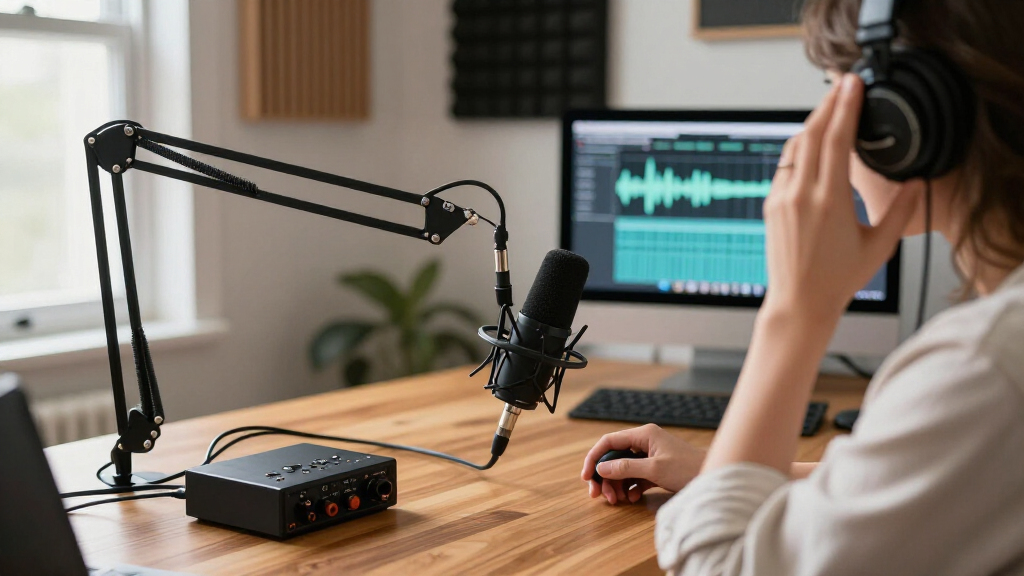
Among USB microphones for podcasting, I rank the Samson Q2U as the best overall choice for its dynamic design and USB/XLR flexibility, while the RØDE NT-USB Mini suits a clean, compact desk setup and the FIFINE AmpliTank K688CT offers a practical path toward an XLR-capable rig. The main tradeoff is between simple setup and upgrade flexibility: USB-only models keep recording straightforward, while USB/XLR microphones can grow with your equipment. Room noise, mic placement, included accessories, and whether you record alone or with guests also affect the right pick. I weighed those needs alongside controls, monitoring, and everyday usability. Read on for the full breakdown and guidance on matching a microphone to your podcast.

Get audio and creator gear delivered free with Prime
- Fast, free delivery on millions of items
- Prime Video, Amazon Music and more included
- Member-only deals all year
Complete the kit



Key Takeaways
- USB/XLR flexibility separates the strongest long-term picks: the Samson Q2U and FIFINE K688CT can connect directly to a computer now and support an XLR-based setup later.
- Dynamic microphones suit untreated spaces better than desk convenience alone suggests: they can help keep attention on a close-miked voice, though careful positioning still matters.
- Condenser models divide into two roles: the RØDE NT-USB Mini prioritizes a compact, tidy setup, while the FIFINE T669 adds a studio-style accessory package.
- Bundled stands and arms change setup effort, not just box contents: kits such as the FIFINE AM8T and MAONO DGM20S can simplify mounting, but their gaming-focused features are not essential for spoken-word recording.
- Controls vary from basic to feature-heavy: a mute button and gain control can help during live sessions, while echo, RGB, and multiple pickup patterns matter less than mic position and room sound for many solo podcasters.
| FIFINE K669B USB Condenser Microphone |  | Best Simple Desktop Pick | Microphone type: USB condenser | Connectivity: USB Type-A and USB Type-C | Pickup pattern: Cardioid (unidirectional) | VIEW LATEST PRICE | See Our Full Breakdown |
| FIFINE AmpliTank K688CT Podcast Microphone Kit, USB/XLR Dynamic Vocal Mic | 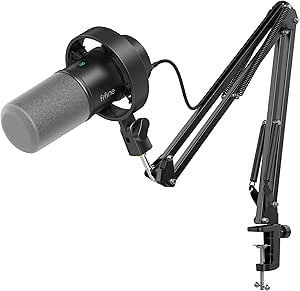 | Best Complete Podcasting Kit | Microphone type: Dynamic vocal microphone | Connectivity: USB and XLR | Pickup pattern: Cardioid (unidirectional) | VIEW LATEST PRICE | See Our Full Breakdown |
| ZealSound K66 USB Condenser Microphone with Noise Reduction, Gain and Mute Controls |  | Best for Computer-and-Mobile Recording | Microphone type: USB condenser | Pickup pattern: Cardioid | Frequency response: 40 Hz–18 kHz | VIEW LATEST PRICE | See Our Full Breakdown |
| Samson Q2U USB/XLR Dynamic Microphone Recording and Podcasting Pack | 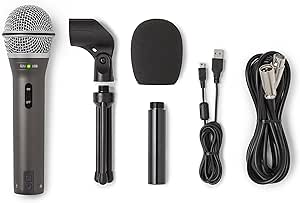 | Best XLR Upgrade Path | Microphone type: Dynamic handheld | Connectivity: USB-C and XLR | Pickup pattern: Unidirectional | VIEW LATEST PRICE | See Our Full Breakdown |
| RØDE NT-USB Mini USB Condenser Microphone |  | Best Compact Premium USB Pick | Microphone type: USB condenser | Connectivity: USB-C | Pickup pattern: Unidirectional | VIEW LATEST PRICE | See Our Full Breakdown |
| CMTECK G009 USB Desktop Microphone with Mute Button |  | Best for Simple Desktop Calls | Connectivity: USB | Microphone type: Condenser | Pickup pattern: Listed as omnidirectional; specifications also list unidirectional | VIEW LATEST PRICE | See Our Full Breakdown |
| MAONO DGM20S USB Gaming Microphone with Boom Arm |  | Best Beginner Podcasting Setup | Connectivity: USB, USB-C | Microphone type: Condenser | Polar pattern: Unidirectional (cardioid) | VIEW LATEST PRICE | See Our Full Breakdown |
| FIFINE AmpliGame AM8 USB/XLR Dynamic Microphone |  | Best for a USB-to-XLR Upgrade Path | Connectivity: USB, XLR | Microphone type: Dynamic | Polar pattern: Cardioid (unidirectional) | VIEW LATEST PRICE | See Our Full Breakdown |
| FIFINE AmpliGame AM8T USB/XLR Dynamic Gaming Microphone Kit with Boom Arm |  | Best Complete Boom-Arm Kit | Connectivity: USB and XLR | Microphone type: Dynamic | Polar pattern: Unidirectional (cardioid) | VIEW LATEST PRICE | See Our Full Breakdown |
| MAONO PD200W Hybrid Wireless Dynamic Podcast Microphone |  | Best for Wireless and Multi-Mic Podcasts | Connectivity: Wireless, USB, XLR | Microphone type: Dynamic | Polar pattern: Unidirectional (cardioid) | VIEW LATEST PRICE | See Our Full Breakdown |
| Logitech Blue Yeti USB Microphone with Blue VO!CE, Four Pickup Patterns, and Desktop Stand – Blackout |  | Best for Flexible Recording Setups | Connectivity: USB | Microphone design: Tri-capsule array | Pickup patterns: Cardioid, omnidirectional, bidirectional, stereo | VIEW LATEST PRICE | See Our Full Breakdown |
| ZealSound K66 Pro USB Podcast Microphone with Noise Reduction, Tap-to-Mute, Gain and Echo Controls, Zero-Latency Monitoring, and RGB Lighting |  | Best for Phone-and-Computer Recording | Microphone type: USB condenser | Pickup pattern: Cardioid | Sampling rate: 48 kHz | VIEW LATEST PRICE | See Our Full Breakdown |
| TONOR TC-777 USB Podcast Microphone with Tripod Stand and Pop Filter | 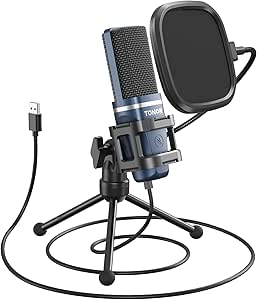 | Best for a Simple Starter Setup | Model: TC-777 | Connectivity: USB 2.0, USB Type-A | Polar pattern: Unidirectional cardioid | VIEW LATEST PRICE | See Our Full Breakdown |
| FIFINE AmpliGame A6V USB Gaming Microphone |  | Best for Gaming-and-Podcast Desks | Connectivity: USB | Microphone type: Condenser | Polar pattern: Bidirectional | VIEW LATEST PRICE | See Our Full Breakdown |
| FIFINE T669 Studio Condenser USB Microphone for Recording Podcasting |  | Best for a Boom-Arm Desk Setup | Connectivity: USB Type-A, USB Type-C | Polar pattern: Unidirectional | Frequency range: 20 Hz–20 kHz | VIEW LATEST PRICE | See Our Full Breakdown |
| USB microphones for podcasting | Connectivity | Signal-to-noise ratio | Microphone type |
|---|---|---|---|
| FIFINE K669B USB Condenser Mic | USB Type-A and USB Type-C | 78 dB | USB condenser |
| FIFINE AmpliTank K688CT Podcas | USB and XLR | 80 dB | Dynamic vocal microphone |
| ZealSound K66 USB Condenser Mi | — | — | USB condenser |
| Samson Q2U USB/XLR Dynamic Mic | USB-C and XLR | 70 dB | Dynamic handheld |
| RØDE NT-USB Mini USB Condenser | USB-C | 82 dB | USB condenser |
| CMTECK G009 USB Desktop Microp | USB | 76 dB | Condenser |
| MAONO DGM20S USB Gaming Microp | USB, USB-C | 78 dB | Condenser |
| FIFINE AmpliGame AM8 USB/XLR D | USB, XLR | 80 dB | Dynamic |
| FIFINE AmpliGame AM8T USB/XLR | USB and XLR | 80 dB | Dynamic |
| MAONO PD200W Hybrid Wireless D | Wireless, USB, XLR | 82 dB | Dynamic |
| Logitech Blue Yeti USB Microph | USB | 100 dB | — |
| ZealSound K66 Pro USB Podcast | USB-C to USB-A/USB-C cable; Lightning adapter included | — | USB condenser |
| TONOR TC-777 USB Podcast Micro | USB 2.0, USB Type-A | 80 dB | — |
| FIFINE AmpliGame A6V USB Gamin | USB | 70 dB | Condenser |
| FIFINE T669 Studio Condenser U | USB Type-A, USB Type-C | 78 dB | — |
More Details on Our Top Picks
FIFINE K669B USB Condenser Microphone
I’d choose the FIFINE K669B for a first podcast setup where ease matters more than advanced monitoring or future studio upgrades. Its plug-and-play USB connection, cardioid pickup, and onboard volume knob keep the basics straightforward: place it on the tripod, connect it to a compatible computer, and adjust the mic level at the desk. Compared with the Samson Q2U, the K669B skips XLR flexibility and headphone monitoring, but its uncomplicated desktop format asks less of a new podcaster. The metal body is a useful step up from a lightweight plastic mic, though the included tripod keeps the capsule close to the desk and can pick up surface bumps. It also lacks the K66’s mobile-device adapters, so it’s a better fit for computer-based recording than a mixed-device setup.
Pros:- Plug-and-play USB connection keeps setup simple
- Cardioid pickup is suited to focusing on one speaker
- Onboard volume control includes a zero setting
- Metal body and included tripod provide a stable desktop setup
Cons:- No headphone jack for direct monitoring while recording
- Tripod placement can transfer desk vibrations and limits positioning
- Not compatible with Xbox or phones
Best for: New podcasters recording solo on a compatible laptop or desktop who want a simple USB mic with a physical level control.
Not ideal for: Creators who need headphone monitoring, XLR expansion, phone compatibility, or a boom arm to keep the mic off a busy desk.
- Microphone type:USB condenser
- Connectivity:USB Type-A and USB Type-C
- Pickup pattern:Cardioid (unidirectional)
- Frequency response:20 Hz–20 kHz
- Signal-to-noise ratio:78 dB
- Cable:USB-B to USB-A/C, 6.5 ft listed
- Included stand:Tripod stand
- Compatible devices:Laptop, desktop, PC, PS4, and PS5
Our verdict“Choose the K669B for uncomplicated computer-based podcasting; choose the Samson Q2U instead if you want monitoring or an XLR upgrade path.”
FIFINE AmpliTank K688CT Podcast Microphone Kit, USB/XLR Dynamic Vocal Mic
The FIFINE AmpliTank K688CT is the most ready-to-position kit here: its dynamic mic, metal boom arm, shock mount, and windscreen suit a fixed podcast desk better than the K669B’s small tripod. USB operation gives beginners quick access to mute, gain, and headphone monitoring, while XLR connectivity leaves room to move to an interface later. That flexibility is a step beyond the USB-only RØDE NT-USB Mini, which is more compact but doesn’t offer an XLR route. The tradeoff is that the K688CT’s on-mic controls are disabled on XLR, so the upgrade path changes how you manage the mic. Its clamp also only fits desks up to two inches thick, and its stated frequency range tops out at 16 kHz.
Pros:- USB and XLR connectivity support both simple setups and interface-based recording
- Included metal boom arm and shock mount help free desk space and limit vibration transfer
- USB mode provides mute, gain, and headphone monitoring controls
- Dynamic cardioid design is suited to close-miked spoken-word recording
Cons:- On-mic function keys are disabled when connected over XLR
- C-clamp fits desks only up to two inches thick
- Frequency range is specified as 50 Hz–16 kHz
Best for: Home podcasters who want a dynamic mic, boom-arm positioning, direct headphone monitoring, and the option to switch from USB to an XLR interface.
Not ideal for: People with desks thicker than two inches, frequent travelers, or users who expect the mic’s onboard controls to work through XLR.
- Microphone type:Dynamic vocal microphone
- Connectivity:USB and XLR
- Pickup pattern:Cardioid (unidirectional)
- Frequency range:50 Hz–16 kHz
- Signal-to-noise ratio:80 dB
- Controls:Mute, gain, and headphone monitoring
- Included mounting:Metal boom arm and shock mount
- Enclosure material:Metal
Our verdict“Pick the K688CT if you want a positioned, upgradeable podcast setup in one kit and your desk works with its clamp.”
ZealSound K66 USB Condenser Microphone with Noise Reduction, Gain and Mute Controls
The ZealSound K66 earns its place for podcasters who may record on a computer one day and a compatible phone or tablet the next. Its USB-C and Lightning adapters make that range more practical than the computer-focused FIFINE K669B, while a headphone jack provides zero-latency monitoring without extra gear. The K66 also combines mic-volume, monitoring-volume, echo, and mute controls, giving a solo host more adjustments at hand than the simpler K669B. Its noise-reduction mode may help with ambient sound, but it should not be treated as a substitute for a quiet room or close mic technique. Unlike the dynamic Samson Q2U, this is a condenser model, so its setup is aimed at flexible voice recording rather than an XLR-based studio path.
Pros:- USB-C and Lightning adapters broaden compatibility with supported devices
- Zero-latency headphone monitoring supports direct listening while recording
- Separate mic-volume and monitoring controls allow quick level adjustments
- Noise-reduction mode and mute control add useful recording options
Cons:- Noise reduction can help with background sound but does not eliminate it
- Mobile compatibility depends on the device and included adapter working together
- No XLR connection for use with a traditional audio interface
Best for: Solo podcasters who switch among a Windows or Mac computer, tablet, and compatible iPhone or USB-C device and want direct headphone monitoring.
Not ideal for: Hosts who need XLR connectivity, a boom arm in the box, or dependable noise removal in a loud recording space.
- Microphone type:USB condenser
- Pickup pattern:Cardioid
- Frequency response:40 Hz–18 kHz
- Sampling rate:46 kHz
- Sensitivity:–45 dB ±3 dB
- Monitoring:3.5 mm headphone jack with zero-latency monitoring
- Controls:Microphone volume, monitoring volume, echo, and mute
- Included adapters:USB-C and Lightning
Our verdict“Choose the K66 if device flexibility and built-in monitoring matter more than XLR connectivity or a boom-arm kit.”
Samson Q2U USB/XLR Dynamic Microphone Recording and Podcasting Pack
The Samson Q2U makes the most sense for a podcaster who wants a straightforward USB start without closing off a later move to an audio interface. Its USB-C and XLR connections give it an upgrade path the USB-only RØDE NT-USB Mini lacks, and the included stand, extension arm, clip, windscreen, and cables mean fewer separate accessories are needed to begin recording. As a handheld dynamic mic, it also offers a different style from the condenser ZealSound K66, which adds more onboard controls and mobile adapters. The Q2U’s main compromise is monitoring: there’s no built-in headphone jack, so direct zero-latency listening requires other equipment. Its supplied desktop stand is also less flexible than the K688CT’s boom-arm setup for a crowded recording desk.
Pros:- USB-C and XLR connectivity support a gradual move to interface-based recording
- Accessory pack includes a desktop stand, extension arm, clip, windscreen, and cables
- Metal construction suits regular handling and desktop use
- Dynamic handheld design offers an alternative to the condenser models in this roundup
Cons:- No built-in headphone jack for zero-latency monitoring
- Included desktop stand offers less positioning range than a boom-arm kit
- Only one microphone is included, so multi-host recording needs another mic
Best for: First-time podcasters who want to begin with USB, use the included accessories, and later connect the same mic to an XLR interface.
Not ideal for: Hosts who need built-in headphone monitoring, extensive onboard controls, or a boom arm included for close, adjustable desk positioning.
- Microphone type:Dynamic handheld
- Connectivity:USB-C and XLR
- Pickup pattern:Unidirectional
- Frequency range:50 Hz–15 kHz
- Maximum SPL:148 dB
- Signal-to-noise ratio:70 dB
- Item weight:11.2 oz
- Included accessories:Tripod desktop stand, extension arm, mic clip, windscreen, USB-C cable, and XLR cable
Our verdict“Choose the Q2U if you want one dynamic mic that can start on USB and continue into an XLR podcast setup.”
RØDE NT-USB Mini USB Condenser Microphone
The RØDE NT-USB Mini is the compact choice for a podcaster who wants a tidier desk and direct headphone monitoring rather than multiple connection types. Its integrated pop filter and zero-latency headphone output make solo recording more self-contained than with the Samson Q2U, which supports XLR but has no headphone jack. The magnetic stand detaches for standard mic-arm mounting, a useful advantage over the FIFINE K669B’s fixed tripod format when desk space is tight. This is still a USB-only condenser: it does not offer the K688CT’s XLR route or the ZealSound K66’s array of gain, echo, and mobile-adapter features. The limited gain control can also restrict quick adjustments, and older devices may need a USB-C adapter.
Pros:- Integrated pop filter helps manage plosive sounds without a separate filter
- Zero-latency headphone monitoring supports live listening
- Magnetic desk stand detaches for standard mic-arm mounting
- Compact body fits smaller podcasting desks
Cons:- USB-only connectivity does not provide an XLR upgrade path
- Limited gain control reduces adjustment options at the microphone
- Older devices may require a USB-C adapter
Best for: Solo podcasters who want a compact USB-C condenser with headphone monitoring and a stand that can be swapped for a mic arm.
Not ideal for: Buyers who want XLR expansion, extensive onboard gain controls, broad included mobile adapters, or a low-cost basic desktop mic.
- Microphone type:USB condenser
- Connectivity:USB-C
- Pickup pattern:Unidirectional
- Frequency range:20 Hz–20 kHz
- Signal-to-noise ratio:82 dB
- Monitoring:Zero-latency headphone monitoring with volume control
- Stand:Magnetic desk stand, detachable for mic-arm mounting
- Dimensions:7.28 × 2.36 × 1.97 in
Our verdict“Choose the NT-USB Mini for a compact, self-contained USB podcast setup; choose the Q2U if XLR expansion matters more.”
CMTECK G009 USB Desktop Microphone with Mute Button
The CMTECK G009 is the straightforward pick here for a stationary desk setup where quick muting matters more than studio-style isolation. Its LED-indicated mute button makes it easier to see when the mic is off during a remote interview or class, while the flexible gooseneck helps bring the capsule closer without a boom arm. Compared with the cardioid MAONO DGM20S, this model’s listed omnidirectional pickup may collect more sound from around the room, which can be a drawback in a noisy home. The product information also lists a conflicting unidirectional pattern, so buyers cannot confidently judge its pickup behavior from the specs alone. Its plug-and-play USB connection and compact base keep setup simple, but its stated compatibility excludes Linux, Android, and Raspberry Pi.
Pros:- USB setup requires no driver installation or external power supply
- Mute button has an LED status indicator
- Flexible gooseneck allows convenient mic positioning
- Compact base takes up little desk space
Cons:- Conflicting pickup-pattern information makes room-noise performance uncertain
- Omnidirectional pickup may capture more surrounding sound than cardioid alternatives
- Not compatible with Raspberry Pi, Linux, or Android
Best for: Windows or Mac users who need a compact desktop mic for calls, classes, or casual podcasting in a relatively quiet room
Not ideal for: Podcast hosts recording in noisy rooms, or anyone using Linux, Android, or Raspberry Pi
- Connectivity:USB
- Microphone type:Condenser
- Pickup pattern:Listed as omnidirectional; specifications also list unidirectional
- Form factor:Flexible gooseneck with compact base
- Special features:Mute button, volume control, pop filter
- Compatible systems:Windows 7, 8, and 10; Mac OS
- Signal-to-noise ratio:76 dB
- Dimensions:2.68 × 4.21 × 4.41 inches
Our verdict“Choose the CMTECK G009 for simple, close-range desktop recording in a quiet room, not for a noisy podcast space that needs predictable directional pickup.”
MAONO DGM20S USB Gaming Microphone with Boom Arm
The MAONO DGM20S suits first-time podcasters who want a mic, arm, and basic monitoring controls in one USB setup. Its cardioid pickup favors sound from the front, helping a solo host keep nearby room noise less prominent than with the CMTECK G009’s potentially omnidirectional pattern. The included boom arm, shock mount, and pop filter also make positioning easier and reduce handling and breath noise without requiring separate accessory choices. A gain knob, one-touch mute, and zero-latency headphone monitoring provide useful control while recording. The tradeoff is that noise-cancellation software is Windows-only, and this mic does not offer the XLR upgrade path found on the FIFINE AmpliGame AM8. Skip it if you need Xbox support or expect to move to an audio interface later.
Pros:- Cardioid pickup is better suited to focusing on a solo speaker than an omnidirectional desk mic
- Includes an adjustable boom arm, shock mount, and removable pop filter
- Gain control, one-touch mute, and zero-latency headphone monitoring support hands-on recording
- USB and USB-C connectivity works with PC, Mac, PS4, and PS5
Cons:- Not compatible with Xbox
- Noise-cancellation software is available only for Windows
- USB-only connection offers no XLR upgrade path
Best for: New solo podcasters on PC or Mac who want a cardioid USB mic with an included arm and live headphone monitoring
Not ideal for: Xbox users or podcasters planning to add an XLR mixer or interface to their setup
- Connectivity:USB, USB-C
- Microphone type:Condenser
- Polar pattern:Unidirectional (cardioid)
- Frequency range:50 Hz–20 kHz
- Signal-to-noise ratio:78 dB
- Included accessories:Metal boom arm, shock mount, pop filter, USB and USB-C cable, desktop clamp
- Monitoring:Zero-latency headphone monitoring
- Compatible devices:PC, Mac, PS4, PS5
Our verdict“Pick the DGM20S if you want a ready-to-position USB setup for solo podcasting and do not need Xbox or XLR support.”
FIFINE AmpliGame AM8 USB/XLR Dynamic Microphone
The FIFINE AmpliGame AM8 makes sense for podcasters who want to start with USB and later connect to an audio interface or mixer over XLR. Its dynamic cardioid design is a practical fit for close-mic speech, while the headphone jack and USB-mode volume controls let a host monitor without adding a separate device. Unlike the USB-only MAONO DGM20S, the AM8 can stay in the setup as recording gear grows. That flexibility has limits: the XLR cable is not included, and the tap-to-mute, RGB, and function controls work only over USB. The suggested recording distance of 2–6 inches also calls for close placement, which may not suit hosts who prefer to sit farther back from the mic.
Pros:- USB and XLR connections support a gradual move from computer recording to an interface
- Dynamic cardioid pickup suits close speech and helps reject off-axis sound
- USB mode includes headphone monitoring, volume controls, and tap-to-mute
- Compatible with 3/8-inch and 5/8-inch microphone stand threads
Cons:- XLR cable is not included
- RGB lighting and function controls are inactive in XLR mode
- Suggested recording distance of 2–6 inches requires close mic placement
Best for: Solo podcasters who want a close-talking dynamic mic now and plan to add an XLR interface or mixer later
Not ideal for: Hosts who need a complete boom-arm kit, record from farther away, or expect USB controls and lighting to work in XLR mode
- Connectivity:USB, XLR
- Microphone type:Dynamic
- Polar pattern:Cardioid (unidirectional)
- Frequency response:50 Hz–16 kHz
- Signal-to-noise ratio:80 dB
- Headphone jack:Yes
- Stand threads:3/8 inch and 5/8 inch
- Enclosure materials:ABS plastic and metal
Our verdict“Choose the AM8 if you want a close-talking USB mic that can later join an XLR podcast chain, and accept that some controls are USB-only.”
FIFINE AmpliGame AM8T USB/XLR Dynamic Gaming Microphone Kit with Boom Arm
The FIFINE AmpliGame AM8T is the better fit than the standalone FIFINE AmpliGame AM8 for podcasters who specifically need a boom arm in the box. Both offer dynamic cardioid pickup and USB/XLR connectivity, but the AM8T adds an adjustable arm and clamp, freeing desk space and making close placement easier. Its on-mic mute, gain, and headphone controls help a host make quick adjustments without reaching for software. The tradeoffs are practical: the XLR cable is separate, and the clamp only fits desktops under two inches thick. As with the AM8, RGB and connection details should be weighed against recording needs rather than treated as sound upgrades. This kit is aimed at a fixed desk; buyers with a thicker or unusual tabletop may need another mounting solution.
Pros:- Includes an adjustable boom arm and C-clamp for close positioning and a less crowded desktop
- USB and XLR connectivity allow different recording setups
- On-mic mute, gain, and headphone volume controls support quick adjustments
- Customizable RGB lighting can be turned off
Cons:- XLR cable is not included
- Desk clamp only fits desktops less than two inches thick
- The included arm and clamp make this a less compact choice than the standalone AM8
Best for: Desk-based podcasters who want an included boom arm, on-mic monitoring controls, and the option to move from USB to XLR
Not ideal for: Podcasters with desks two inches thick or more, or anyone expecting the kit to include an XLR cable
- Connectivity:USB and XLR
- Microphone type:Dynamic
- Polar pattern:Unidirectional (cardioid)
- Frequency range:50 Hz–16 kHz
- Signal-to-noise ratio:80 dB
- Sensitivity:-50 dB
- Included accessories:Boom arm stand, C-clamp, 8.2 ft USB-to-USB-C cable, user manual
- Desk clamp compatibility:Desktops less than 2 inches thick
Our verdict“Choose the AM8T over the standalone AM8 if an included boom arm matters and your desk fits its clamp.”
MAONO PD200W Hybrid Wireless Dynamic Podcast Microphone
The MAONO PD200W is the most flexible connection choice in this group: it supports wireless, USB, and XLR, while the AM8 and AM8T are wired USB/XLR models. That range suits podcasters who may record at a desk one day and move around a room another. Its cardioid dynamic capsule and three-stage noise cancellation are designed to keep speech central, and the MaonoLink app adds EQ and reverb controls. It also supports two wireless microphones with separate tracks, a useful distinction for interviews, although a second mic must be purchased separately. Battery life is listed up to 60 hours with RGB off. The added flexibility brings extra setup considerations, and camera or Lightning accessories are sold separately.
Pros:- Wireless, USB, and XLR connectivity cover mobile and desk-based recording setups
- Supports two wireless microphones with separate recording tracks
- Three-stage noise cancellation and app-based EQ and reverb provide sound adjustments
- Battery life is listed up to 60 hours with RGB lighting off
Cons:- A second microphone is required for two-mic recording
- Camera and Lightning accessories are sold separately
- More connection and app options may add setup complexity compared with the USB-only DGM20S
Best for: Mobile podcasters and interview hosts who want wireless movement, USB convenience, XLR connectivity, or separate tracks from two wireless mics
Not ideal for: Buyers seeking a simple, low-accessory desktop USB setup or anyone who needs camera or Lightning connections from the included accessories
- Connectivity:Wireless, USB, XLR
- Microphone type:Dynamic
- Polar pattern:Unidirectional (cardioid)
- Signal-to-noise ratio:82 dB
- Maximum SPL:128 dB
- Wireless range:Up to 60 m
- Battery life:Up to 60 hours with RGB off
- Included accessories:Desktop stand, USB-C to USB-A&C cable, Type-C receiver, Type-C adapter cable
Our verdict“Pick the PD200W if wireless mobility or separate tracks for two speakers matter more than a minimal plug-and-play setup.”
Logitech Blue Yeti USB Microphone with Blue VO!CE, Four Pickup Patterns, and Desktop Stand – Blackout
The Blue Yeti earns its place for podcasters who need one microphone to handle more than a solo voice track. Its four pickup patterns let you switch from cardioid for an individual host to bidirectional for an interview across the desk, a flexibility the cardioid-only TONOR TC-777 cannot offer. Onboard gain, mute, headphone volume, and pattern controls also make quick recording adjustments easier without hunting through software. The tradeoff is that a condenser with multiple patterns can capture more of the room than a focused dynamic mic, so untreated spaces may be less forgiving. Blue VO!CE effects require Logitech G HUB for full functionality, and the microphone needs a wired USB connection. I’d choose it over the simpler FIFINE T669 when recording formats vary, but not for a minimalist setup.
Pros:- Four pickup patterns accommodate solo narration, interviews, and other recording arrangements.
- Onboard gain, mute, headphone-volume, and pattern controls support quick adjustments.
- Plug-and-play USB setup works with Mac and PC.
- Adjustable desktop stand is included, with boom-arm support for alternate positioning.
Cons:- Full Blue VO!CE functionality requires installing Logitech G HUB.
- Wired USB connectivity limits placement and mobile use.
- The broad pattern options do not prevent room sound from entering recordings.
Best for: Solo podcasters and interview hosts who record different formats at a desk and want multiple pickup patterns plus accessible onboard controls.
Not ideal for: Podcasters recording in noisy or echo-prone rooms who want a narrow, room-rejecting pickup, or anyone who prefers a setup without companion software.
- Connectivity:USB
- Microphone design:Tri-capsule array
- Pickup patterns:Cardioid, omnidirectional, bidirectional, stereo
- Frequency response:20 Hz–20 kHz
- Audio sensitivity:120 dB
- Signal-to-noise ratio:100 dB
- Channels:2
- Included stand:Adjustable desktop stand
Our verdict“Choose the Blue Yeti if recording flexibility and hands-on controls matter more than a simple, room-focused solo mic.”
ZealSound K66 Pro USB Podcast Microphone with Noise Reduction, Tap-to-Mute, Gain and Echo Controls, Zero-Latency Monitoring, and RGB Lighting
The K66 Pro stands out for podcasters who move between a computer and compatible mobile devices. Its USB-C, USB-A, and included Lightning adapter cover a wider range of recording setups than the desktop-focused TONOR TC-777, while the built-in headphone jack provides zero-latency monitoring. Dedicated gain, echo, and tap-to-mute controls are useful for adjusting a voice session without opening recording software. The cardioid pattern keeps the setup straightforward, though it offers less arrangement flexibility than the four-pattern Blue Yeti. Its noise-reduction mode can help with background sounds, but the supplied details do not claim it removes them; room noise still matters. I’d pick this over a PC-only option for mobile flexibility, but the Lightning compatibility listed is limited to iPhone 6–14.
Pros:- USB-C and USB-A connectivity plus an included Lightning adapter support several device types.
- Zero-latency monitoring is available through the built-in 3.5 mm headphone jack.
- Gain, headphone volume, echo, and mute controls are directly accessible.
- Noise-reduction and mute status indicators make control states visible.
Cons:- Noise reduction is described as reducing background sounds, not eliminating them.
- Cardioid is the only listed pickup pattern, limiting recording configurations.
- Listed Lightning compatibility covers iPhone 6–14 models only.
Best for: Podcasters who record at a desk and on compatible USB-C phones, tablets, or iPhone 6–14 models, and want direct headphone monitoring.
Not ideal for: Buyers seeking multiple selectable pickup patterns, or iPhone users outside the specified 6–14 compatibility range.
- Microphone type:USB condenser
- Pickup pattern:Cardioid
- Sampling rate:48 kHz
- Sensitivity:−45 dB ±3 dB
- Monitoring:Zero-latency via built-in 3.5 mm headphone jack
- Controls:Gain, headphone volume, echo, tap-to-mute, noise reduction, RGB lighting, Inside Mode
- Connectivity:USB-C to USB-A/USB-C cable; Lightning adapter included
- Included stand:Weighted metal base
Our verdict“Choose the K66 Pro if you need a controllable cardioid mic that can connect to both a computer and compatible mobile devices.”
TONOR TC-777 USB Podcast Microphone with Tripod Stand and Pop Filter
The TONOR TC-777 is a straightforward pick for a new podcaster who wants a ready-to-connect USB mic with basic recording accessories in the box. Its cardioid pattern focuses on a single speaker, and the included tripod, shock mount, and pop filter give beginners a more complete starting point than the FIFINE A6V, whose pattern is bidirectional. One-click mute and volume controls keep simple adjustments close at hand. The tradeoff is a narrower feature set than the ZealSound K66 Pro: there is no listed headphone monitoring, noise-reduction mode, or mobile-device support. It connects to PC, Mac, PS4, and PS5, but not Xbox. The red finish and compact tripod suit a basic desktop station, while podcasters planning more involved interviews may outgrow its single-pattern approach.
Pros:- USB plug-and-play setup keeps computer recording simple.
- Includes a foldable tripod, mini shock mount, and pop filter.
- One-click mute and volume controls are available on the microphone.
- Compatible with PC, Mac, PS4, and PS5.
Cons:- Not compatible with Xbox consoles.
- Only a unidirectional cardioid pattern is listed.
- No built-in headphone monitoring or mobile compatibility is specified.
Best for: First-time podcasters recording solo on a Windows or Mac computer who want a basic USB setup with a pop filter and tripod included.
Not ideal for: Xbox users, mobile-device podcasters, or hosts who need multiple pickup patterns and built-in headphone monitoring.
- Model:TC-777
- Connectivity:USB 2.0, USB Type-A
- Polar pattern:Unidirectional cardioid
- Frequency response:20 kHz
- Impedance:680 ohm
- Signal-to-noise ratio:80 dB
- Weight:345 g
- Included accessories:Foldable tripod, mini shock mount, pop filter, manual
Our verdict“Choose the TC-777 for a simple solo podcast desk setup; skip it if you need mobile connections or more recording flexibility.”
FIFINE AmpliGame A6V USB Gaming Microphone
The A6V suits podcasters who also stream or game from the same desk and want quick mute and gain controls alongside a visible RGB look. Its included shock mount, pop filter, tripod, and USB cable make setup accessible, while PC, PS4, and PS5 compatibility gives it a broader console role than a computer-only mic. The key podcasting caveat is its bidirectional pattern: it can pick up sound from behind the microphone, unlike the cardioid TONOR TC-777 or FIFINE T669, which are more natural matches for one host speaking toward the mic. Its 60 Hz–18 kHz range and mono channel listing also keep the feature set focused. I’d choose it for a shared gaming-and-voice setup, not for the quietest possible solo recording in a busy room.
Pros:- Tap-to-mute and gain knob provide direct control during a recording.
- Includes a shock mount, pop filter, tripod stand, and USB cable.
- Works with PC, PS4, and PS5.
- Seven gradient RGB colors suit a gaming-focused desk setup.
Cons:- Bidirectional pickup may capture sound from behind the microphone.
- Wired USB connection limits placement and mobile recording.
- Mono channels and a 60 Hz–18 kHz frequency range offer a focused rather than expansive spec profile.
Best for: PC or PlayStation users who podcast, stream, and game at one desk and value direct mute and gain controls with RGB lighting.
Not ideal for: Solo podcasters in noisy rooms who want a cardioid pickup pattern to focus more directly on the speaker.
- Connectivity:USB
- Microphone type:Condenser
- Polar pattern:Bidirectional
- Signal-to-noise ratio:70 dB
- Frequency range:60 Hz–18 kHz
- Channels:1
- Lighting:Seven gradient RGB colors
- Included accessories:Shock mount, pop filter, tripod stand, USB cable
Our verdict“Pick the A6V if podcasting shares space with gaming and streaming, but favor a cardioid mic for a more focused solo voice setup.”
FIFINE T669 Studio Condenser USB Microphone for Recording Podcasting
The T669 makes the most sense for a podcaster who wants the microphone positioned off the desk rather than perched on a small base. Its steel boom arm, cardioid pickup, and double pop filter are geared toward close, hands-free voice recording, while the detachable 8.2-foot cable gives more room to arrange a workstation. Compared with the tripod-based TONOR TC-777, the T669 can keep the mic in reach without taking up the same spot on the desktop, but its arm and accessory package demand more setup space. The USB connection is plug-and-play, and compatibility includes computers and PS4/PS5; Xbox is not supported. This is a more complete desk-mount option than the Blue Yeti’s included adjustable desktop stand, though it lacks the Yeti’s multiple pickup patterns.
Pros:- Steel boom arm positions the microphone within reach and frees the immediate desk surface.
- Cardioid pickup is suited to a single host speaking toward the mic.
- Double pop filter helps manage plosive sounds during close voice recording.
- Plug-and-play USB connection and detachable 8.2-foot cable support flexible computer setups.
Cons:- Boom arm and accessories can occupy significant desk space.
- Not compatible with Xbox consoles.
- Single unidirectional pattern is less flexible than the Blue Yeti’s four patterns.
Best for: Home podcasters and voice-over creators who record close to the mic and want a boom arm, pop filters, and cable reach in one setup.
Not ideal for: Small-desk users who cannot accommodate a boom arm, Xbox owners, or hosts who need multiple pickup patterns.
- Connectivity:USB Type-A, USB Type-C
- Polar pattern:Unidirectional
- Frequency range:20 Hz–20 kHz
- Signal-to-noise ratio:78 dB
- Channels:1
- Cable length:8.2 ft detachable USB cable
- Compatible devices:Laptop/desktop, PC, PS4, PS5
- Included accessories:Steel boom arm, double pop filter
Our verdict“Choose the T669 if a boom arm and close-mic podcast setup matter more than compact storage or multiple pickup patterns.”
How We Picked
I compared these microphones for the demands of spoken-word podcasting: clear voice capture, manageable room sound, reliable computer connection, and controls that help during a recording session. I also looked at microphone type, USB/XLR connectivity, monitoring options, mute and gain controls, included stands or arms, and the degree of setup each option asks of a new user. Features only counted as advantages when they served a recognizable podcasting need.
The ranking favors adaptable, voice-focused microphones first, then compact or well-equipped choices for narrower setups, followed by basic desktop and gaming-oriented models whose extras may not add much to a podcast workflow. That is why the Samson Q2U leads: it balances a dynamic design with USB convenience and an XLR upgrade route. The RØDE NT-USB Mini and FIFINE K688CT follow for different priorities, while the remaining models earn their places through specific strengths such as bundled mounting gear, simple controls, or wireless use. A lower position does not mean a microphone cannot work; it means its tradeoffs make it less broadly suited to podcasting.
| USB microphones for podcasting | Microphone type |
|---|---|
| FIFINE K669B USB Condenser Mic | USB condenser |
| FIFINE AmpliTank K688CT Podcas | Dynamic vocal microphone |
| ZealSound K66 USB Condenser Mi | USB condenser |
| Samson Q2U USB/XLR Dynamic Mic | Dynamic handheld |
| RØDE NT-USB Mini USB Condenser | USB condenser |
| CMTECK G009 USB Desktop Microp | Condenser |
| MAONO DGM20S USB Gaming Microp | Condenser |
| FIFINE AmpliGame AM8 USB/XLR D | Dynamic |
| FIFINE AmpliGame AM8T USB/XLR | Dynamic |
| MAONO PD200W Hybrid Wireless D | Dynamic |
| Logitech Blue Yeti USB Microph | — |
| ZealSound K66 Pro USB Podcast | USB condenser |
| TONOR TC-777 USB Podcast Micro | — |
| FIFINE AmpliGame A6V USB Gamin | Condenser |
| FIFINE T669 Studio Condenser U | — |
Factors to Consider When Choosing USB Microphones For Podcasting
Before choosing a model, I would match the microphone to the room, recording format, and equipment you already own. The following decisions often matter more than a long feature list.
Match microphone type to your room and speaking style
A microphone’s pickup design affects how much of the surrounding room reaches the recording, but it cannot remove noise that is already loud near the mic. Dynamic models are often a sensible starting point for untreated rooms, shared spaces, and close conversational delivery. Condensers can capture a more open sound, yet they may also make keyboard taps, reflections, and household noise more apparent. Neither type automatically produces a polished voice; distance, angle, and consistent speaking level still matter. Before buying, listen for the room’s echo and background noise, then decide whether treatment or a closer recording position would solve more than a different mic. Avoid choosing by microphone type alone when your environment is the larger problem.
Decide whether USB alone is enough
USB is convenient because the microphone can connect directly to a computer without a separate interface. That is usually the simplest route for a solo host starting a show or recording occasional interviews. USB/XLR models add a second connection path, which can help if you later adopt an audio interface, mixer, or a more involved recording setup. The tradeoff is that extra flexibility does not improve a recording by itself; it can add equipment, cables, and setup decisions. Choose USB-only if your workflow is stable and simplicity matters most. Pay attention to USB/XLR capability if you expect your recording chain to change or want a microphone that can serve more than one setup.
Plan for guests and multiple voices
A single desktop microphone is usually easiest to manage when one person speaks from a fixed position. Remote guests can often join through recording software, so a host does not automatically need a multi-pattern microphone or shared pickup area. In-person co-hosts raise different questions: one mic may capture uneven levels, extra room sound, and voices at different distances. Separate microphones give each speaker more control, but require additional connections and a recording setup that can handle them. Before choosing a microphone with multiple pickup patterns, decide whether you will actually record more than one person in the same room. A feature is useful only when it fits the show’s format and recording plan.
Prioritize monitoring and session controls
Headphone monitoring lets a podcaster hear what the microphone is capturing and catch problems before recording an entire episode. A mute button is useful for coughs, interruptions, or live calls, while gain control can help set a suitable input level without searching through computer menus. These controls make sessions easier to manage, but they do not replace checking levels in the recording software. Echo effects, lighting, and other presentation features may suit streaming or gaming, yet many podcast workflows never use them. Look for controls that solve a recurring task in your sessions, rather than assuming a longer feature list means a better spoken-word recording. If you record alone and edit later, basic monitoring and dependable level setting may be plenty.
Check mounting, placement, and desk noise
The included stand affects how easily you can position the mic at a comfortable speaking distance. A desktop tripod can be quick to set up, while a boom arm can free desk space and bring the microphone closer without forcing you to lean forward. Arms also need a stable attachment point and enough room to move; a bundled mount is not automatically a good fit for every desk. Tapping, typing, and bumps can travel through a desk stand, so assess those noises before blaming the microphone capsule. A pop filter or windscreen can reduce plosive bursts, but it will not correct a distant mic position or a reflective room. Choose mounting gear around your desk and posture, not simply the number of accessories in the package.
Pay for the workflow you will actually use
A higher-feature microphone is worth paying more attention to when it removes a real obstacle, such as awkward placement, limited connection options, or a need for wireless mobility. A beginner may get more value from straightforward controls and a stand that fits the desk than from advanced effects. Conversely, an experienced host with plans to add an interface may prefer USB/XLR flexibility even if the initial setup is more involved. Bundled accessories can save time, but check whether they suit your position and recording space before treating them as a benefit. Keep a separate budget for headphones, a stable mount, and any room improvements that your setup needs. The best choice is the one that supports repeatable recording, not the one with the most features on paper.
Frequently Asked Questions
Is a dynamic USB microphone a better choice for a noisy room?
It can be a helpful choice, especially when you can speak close to the mic and keep its rear pointed toward a noise source. A dynamic design does not cancel room noise, and loud fans, traffic, or nearby conversations may still enter the recording. Mic distance, input gain, and the room’s reflections all affect the result. For an untreated space, the Q2U or a USB/XLR dynamic model may suit the task better than a sensitive desktop condenser. If the noise is severe, changing the recording location or reducing the noise source may help more than replacing the microphone.
Should I buy USB-only or USB/XLR if I am starting a podcast?
Choose USB-only if you want a direct computer connection and do not expect to add an interface or mixer soon. USB/XLR models such as the Samson Q2U offer more options later, but the XLR connection only becomes useful when paired with compatible audio equipment. It is not a promise of better sound from the USB connection today. Consider how many people you record, whether you plan to use hardware processing, and how much setup you want to manage. If those plans are uncertain, a dual-connection model can preserve options without making USB recording mandatory.
Do I need a microphone with multiple pickup patterns for a podcast?
Most solo podcasts do not need multiple pickup patterns because the host speaks into one microphone from one position. Multiple patterns can help with certain shared-table recordings, but they also make placement and room sound more important. A single-direction setup is often easier to control for a host recording alone. If guests join remotely, each person can record through their own microphone rather than sharing one mic pattern. Buy multi-pattern capability only when you have a recording format that uses it regularly.
Will an included tripod or boom arm prevent plosives and desk noise?
No mount can solve both problems by itself. A boom arm can reduce desk clutter and help position the mic near your mouth, but a poorly attached arm may still transmit bumps. A tripod placed on a desk can pick up typing or surface knocks, so isolation and placement remain relevant. Plosives are bursts of air from sounds such as “p” and “b”; a pop filter, windscreen, or slight off-axis angle can help manage them. Check whether the included mounting gear fits your desk, and treat it as part of the setup rather than a guarantee of clean audio.
When does a wireless podcast microphone make sense?
Wireless operation is most useful when the host needs to move around, record away from a desk, or avoid a cable running to the computer. For a fixed desk podcast, a wired USB mic is usually simpler and removes battery and wireless-connection questions. Hybrid models can offer more ways to record, but each mode may involve different charging, pairing, or connection steps. Before choosing wireless, check how you will monitor the recording and how the receiver connects to your recording device. If you rarely move during an episode, a wireless feature may add complexity without changing your workflow.
Conclusion
For the best overall balance of voice-focused recording and future flexibility, I recommend the Samson Q2U. The FIFINE K669B is the straightforward best value choice for someone who wants a basic desktop condenser, while the RØDE NT-USB Mini is my best premium pick for a compact, restrained desk setup. New podcasters who want room to grow can start with the Q2U; its USB connection keeps setup accessible, and XLR remains available later. For specific needs, choose the FIFINE K688CT if you want a dynamic USB/XLR kit, the MAONO PD200W if wireless recording fits your format, or the FIFINE AM8T if a bundled boom arm suits your desk. Pick according to your room and workflow first, then use extras as tie-breakers.
Fall Picks
fall essentials
As an affiliate, we earn on qualifying purchases.