Editorial update log
November 21, 2026:
Deal update: RoundupForge price history now flags ASIN B00N1YPXW2 on amazon.com as below its typical tracked range. RF labels the deal as all_time_low.
Exact pricing remains intentionally gated through the live Grimfaste price module in the article.
Choosing a streaming microphone is less about finding a universally best connection and more about deciding how much audio setup you want to manage. A USB microphone plugs into your computer and typically handles the audio conversion internally. An XLR microphone sends an analog signal to a separate interface or mixer, which then connects to the computer. That extra hardware adds cost and setup, but can give you more control over gain, monitoring, and future audio upgrades.

Get audio and creator gear delivered free with Prime
- Fast, free delivery on millions of items
- Prime Video, Amazon Music and more included
- Member-only deals all year

Logitech Blue Yeti USB Condenser Microphone – Blackout
- ✔ Connection: USB
- ✔ Pickup patterns: Cardioid, omnidirectional, bidirectional, stereo
- ✔ Frequency response: 20 Hz–20 kHz
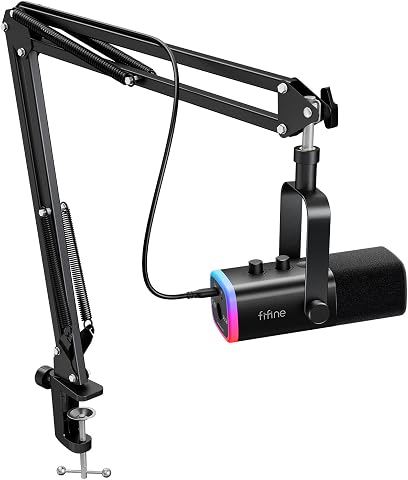
FIFINE AmpliGame AM8T XLR/USB Gaming Microphone Set, Dynamic PC Mic
- ✔ Connection: USB and XLR
- ✔ Microphone type: Dynamic
- ✔ Pickup pattern: Unidirectional cardioid

FIFINE T669 Studio Condenser USB Microphone for Recording Podcasting
- ✔ Connection: USB Type-A and USB Type-C
- ✔ Pickup pattern: Unidirectional cardioid
- ✔ Frequency range: 20 Hz–20 kHz
For a first stream, a desk setup, or a limited budget, USB is usually the practical choice. XLR makes more sense if you already own audio equipment, want hands-on control, or plan to connect multiple microphones and other sources. The right choice also depends on the room: neither connection can compensate for a noisy, echoing space or poor microphone placement.
At a Glance
| Criteria | USB microphone | XLR microphone | Winner |
|---|---|---|---|
| Initial setup | Connects directly to a computer; usually needs little configuration. | Requires an audio interface or mixer, cables, and some setup. | A |
| Total cost | Usually lower because the microphone includes its own audio interface. | Higher once the microphone, interface, cables, and any needed accessories are counted. | A |
| Audio control | Often limited to controls and software features built into the microphone. | Interface or mixer can provide hands-on gain, routing, and monitoring controls. | B |
| Monitoring and connections | Headphone monitoring and controls vary by model; fewer connection options overall. | Often supports more inputs, headphone options, and external audio sources. | B |
| Upgrade flexibility | Simple to replace the microphone, but the built-in interface generally cannot be reused separately. | Can swap microphones or upgrade the interface independently. | B |
| Portability | Easy to carry and set up without extra audio hardware. | Less convenient because the microphone depends on extra equipment and cabling. | A |
| Sound quality potential | Can sound excellent; room acoustics, placement, and microphone design matter more than connector type. | Can sound excellent, but XLR alone does not make a microphone sound better. | Tie |
Logitech Blue Yeti USB Condenser Microphone – Blackout
The Blue Yeti earns our top spot because it can adapt when a stream changes format. Cardioid is the natural starting point for a solo host, while its omnidirectional, bidirectional, and stereo patterns let the same mic handle room sound, two-person conversations, or broader audio experiments. Neither FIFINE model offers that range: both use a single cardioid pattern, which is simpler for voice-focused streams but less flexible beyond them.For a live host, the Yeti’s onboard mute, gain, and headphone volume controls make quick adjustments accessible without hunting through menus. Headphone monitoring is also useful for catching level or connection issues while speaking. The USB setup is designed for PC and Mac, and the supplied desktop stand can be replaced with a boom arm if you need to move the mic off the desk.Its versatility comes with practical costs. The Yeti is a large mic, so it may crowd a small streaming desk, and full functionality depends on installing Logitech G HUB. It is also a condenser, unlike the dynamic AM8T; streamers recording in a noisy room should think carefully about placement and room sound rather than assuming extra patterns solve background noise. Choose it when pattern flexibility and direct controls outrank a compact footprint or a bundled boom arm.
Pros:
- Four selectable pickup patterns support more than a standard solo cardioid stream.
- On-mic mute, gain, and headphone controls support live adjustments.
- USB plug-and-play connectivity works with PC and Mac.
- Can sit on its desktop stand or be mounted to a boom arm.
Cons:
- Large footprint can crowd a compact workstation.
- Full functionality requires Logitech G HUB installation.
- Corded operation offers no battery-powered placement.
Best for: Streamers who want one USB microphone for solo voice, interviews, and occasional wider or ambient recording.
Not ideal for: Creators with very limited desk space, or those who want an included boom-arm kit and minimal software setup.
Bottom line: Choose the Blue Yeti when streaming versatility and on-mic monitoring matter more than saving desk space.
“Choose the Blue Yeti when streaming versatility and on-mic monitoring matter more than saving desk space.”
FIFINE AmpliGame AM8T XLR/USB Gaming Microphone Set, Dynamic PC Mic
The FIFINE AmpliGame AM8T is the upgrade-path pick. It works over USB for a direct computer connection, but its XLR output also gives streamers the option to connect to an audio interface or mixer later. That makes it more adaptable to changing gear than the T669, which is USB-only. The Yeti remains more flexible in pickup patterns, but it does not offer the same listed USB/XLR connection choice.Its dynamic cardioid design is aimed at focused, front-facing capture, a sensible fit for a streamer speaking close to the mic. The included boom arm, mute button, gain knob, and headphone jack with volume control make the kit convenient to position and adjust. Controllable RGB lighting adds a visual accent that can be switched at the microphone, though it does not change the sound.There are limits to the package. An XLR cable is not included, so the expanded connection option takes an extra accessory, and the desk clamp only fits surfaces up to two inches thick. Compared with the T669, the AM8T emphasizes dynamic capture and connection flexibility rather than including a shock mount and double pop filter. It also lacks advanced DSP or software effects, unlike the Yeti’s Blue VO!CE support. We’d choose it for a streamer who expects to add audio hardware, not someone seeking extensive software shaping out of the box.
Pros:
- USB and XLR connections support both direct computer use and compatible audio gear.
- Dynamic cardioid format is suited to close, front-facing streaming speech.
- Includes a boom arm, mute, gain, and headphone volume controls.
- RGB lighting can be controlled directly on the mic.
Cons:
- XLR cable is not included.
- Desk clamp supports desktops only up to two inches thick.
- No advanced DSP or software sound customization is listed.
Best for: A streamer who wants USB simplicity now and the option to connect through XLR audio gear later.
Not ideal for: Anyone who needs an XLR cable in the box, has a desk thicker than the clamp allows, or wants software effects.
Bottom line: Pick the AM8T if you want a dynamic streaming mic that can move from USB to an XLR-based setup.
“Pick the AM8T if you want a dynamic streaming mic that can move from USB to an XLR-based setup.”
FIFINE T669 Studio Condenser USB Microphone for Recording Podcasting
The FIFINE T669 stands out by arriving with the pieces that often shape a home streaming setup: a steel boom arm, shock mount, double pop filter, and detachable USB cable. That bundle makes it the most ready-to-position option here. The Blue Yeti can be used with a boom arm, but its listed package also includes a desktop stand; the T669 puts the arm and pop-control accessories at the center of its offer.For a solo streamer, the cardioid condenser capsule focuses on sound from the front, and the boom arm’s reach and rotation help bring the mic near the speaker without taking up the same desk area as a desktop stand. Its gain knob offers a physical adjustment, while plug-and-play USB keeps setup straightforward on supported computers and PS4/PS5. This is a more complete mounting choice than the AM8T if pop filters and shock isolation are priorities.The tradeoff is a narrower role. Unlike the Yeti, the T669 has only one pickup pattern, so it is not the choice for changing between solo speech and room or two-person recording. Unlike the AM8T, it has no XLR connection for an interface-based setup. Its condenser design and cardioid pattern suit a positioned solo voice, but the supplied specs do not establish that it will eliminate room noise. Xbox is explicitly unsupported. Choose it when a straightforward USB stream and included mounting accessories matter more than future connection options.
Pros:
- Bundled steel boom arm, shock mount, and double pop filter make positioning and pop control easier.
- USB plug-and-play setup requires no additional drivers according to the product details.
- Cardioid pickup is suited to a single speaker facing the mic.
- Detachable 8.2-foot cable and adjustable arm support flexible placement.
Cons:
- Single cardioid pattern limits group and ambient recording options.
- USB-only connectivity does not provide an XLR upgrade path.
- Not compatible with Xbox consoles.
Best for: A first-time streamer who wants a USB condenser microphone with a boom arm, shock mount, and pop filters included.
Not ideal for: Xbox users, streamers who need multiple pickup patterns, or anyone planning an XLR audio interface setup.
Bottom line: Choose the T669 when a complete boom-arm USB kit matters more than multiple patterns or XLR expansion.
“Choose the T669 when a complete boom-arm USB kit matters more than multiple patterns or XLR expansion.”
As an Amazon Associate we earn from qualifying purchases.
Key Differences
The biggest practical divide is the rest of the system each microphone requires. USB puts the conversion and computer connection in one device, so there are fewer pieces to buy and troubleshoot. XLR separates the microphone from the interface: that adds a device and a cable, but gives you a central place to manage input level, headphones, and other audio sources. This difference is major for a new streamer on a tight budget and minor for someone who already owns a suitable interface.
Sound quality is not a reliable reason by itself to choose XLR. A well-designed USB microphone can produce clean, broadcast-ready voice, while an XLR microphone can sound poor if it is too far away, set at the wrong level, or used in a reflective room. XLR’s advantage is control and expandability, not an automatic improvement in tone. Spend time on positioning and room noise before paying extra for a different connector.
Value depends on whether you will use the extra system features. A USB model is better value for one person who needs a dependable voice input and wants to get streaming quickly. Paying more for XLR is worthwhile when its interface controls, extra inputs, or independent upgrade path solve a real need. If you have no plans to expand and do not want another device on your desk, the XLR system’s added flexibility may simply become added expense.
Detailed Comparison
Initial setup (USB microphone wins — moderate)
USB wins by a moderate margin. Most USB microphones connect directly to a computer and can be selected as the input device in streaming software. Some still need driver setup or software configuration, but there is no separate interface to connect. XLR requires the microphone, cable, interface or mixer, and a suitable computer connection. Once configured, either can work reliably; the difference is how much setup stands between you and your first stream.
Total cost (USB microphone wins — major)
USB wins by a moderate to major margin for a new buyer. Its audio conversion is built into the microphone, so the purchase can cover the core recording setup. An XLR budget must include an interface or mixer and a cable, and some microphones may need a stand or other accessories too. If you already own compatible hardware, the price gap can shrink substantially. Compare complete setups rather than microphone prices alone.
Audio control (XLR microphone wins — moderate)
XLR wins by a moderate margin. An interface or mixer can put input gain, mute, headphone volume, and routing controls within reach, though features vary by model. A USB microphone may offer useful onboard controls, but the range is usually determined by that particular device. For streamers who adjust levels often or mix several sources, centralized hardware control can make changes easier; for a fixed single-mic setup, this advantage may barely matter.
Monitoring and connections (XLR microphone wins — moderate)
XLR wins by a moderate margin for a more involved desk. Interfaces and mixers commonly provide headphone outputs and may accept additional microphones or line-level sources. USB microphones can also offer direct headphone monitoring, but capabilities differ by model and usually remain tied to that microphone. If you need several inputs, check the exact interface or mixer: an XLR microphone by itself does not provide them.
Upgrade flexibility (XLR microphone wins — moderate)
XLR wins by a moderate margin. The microphone and interface are separate, so either can be replaced while keeping the other. That can make gradual upgrades easier if your needs grow. With USB, the conversion hardware is integrated; changing the microphone usually means replacing the whole unit, though keeping an older USB microphone as a spare is simple. XLR’s flexibility pays off only if you actually expect to change or expand the setup.
Portability (USB microphone wins — moderate)
USB wins by a moderate margin. Fewer pieces make a USB microphone easier to pack, move between computers, or set up at a temporary streaming location. An XLR setup adds an interface and cable, which need space and careful packing. A compact interface can reduce the burden, so this is not a reason to rule out XLR if its control features matter more than portability.
Sound quality potential (major difference)
There is no general winner; this is a tie. Microphone design, pickup pattern, placement, gain, and room acoustics shape the result more than the USB or XLR label. A strong USB microphone can outperform a poorly matched XLR setup, and either type can capture clear speech when used well. Compare the specific microphones and their real features, rather than paying a premium on the assumption that XLR guarantees better sound.
USB microphone: Pros and Cons
Pros:
- Direct computer connection keeps the setup compact.
- Usually costs less as a complete first microphone setup.
- Straightforward to move or use at a different desk.
- Can provide excellent voice quality when well placed.
Cons:
- Controls and inputs depend on the microphone’s built-in features.
- The internal audio interface generally cannot be upgraded separately.
- Some models offer limited routing or monitoring options.
XLR microphone: Pros and Cons
Pros:
- Separate interface or mixer can offer hands-on level and monitoring controls.
- More suitable for multiple microphones and external audio sources.
- Microphone and interface can be upgraded independently.
- Works well for streamers building a larger audio setup.
Cons:
- Costs more after adding an interface or mixer and cable.
- Requires more setup and desk space.
- Extra equipment adds connections and potential configuration issues.
- The connection alone does not improve sound quality.
Who Should Choose What
Choose USB microphone if:
- You are starting to stream and want one microphone that connects directly to your computer.
- Your budget is for a complete working setup, not just the microphone.
- You use one mic and do not need several audio inputs or hands-on mixer controls.
- You want an easier setup to pack, move, or use at different locations.
Choose XLR microphone if:
- You already own an interface or mixer with a suitable microphone input.
- You want physical controls for gain, headphones, or routing close at hand.
- You expect to add co-hosts, instruments, or other audio sources.
- You plan to upgrade the microphone and interface separately over time.
Skip both if: If your room is noisy or echoing, first improve microphone distance, placement, and the recording environment; a connection change alone will not solve those problems.
Value for Money
For most people buying their first streaming mic, USB is the better value because its complete setup usually costs less and has fewer parts. The money saved can go toward a stable boom arm, headphones, or improving the room, all of which may make a more noticeable difference to a stream than moving to XLR. Check whether a USB model includes direct headphone monitoring if that matters to you.
Pay more for XLR when you will use its interface or mixer controls, additional inputs, or separate upgrade path. If you already own compatible equipment, the added cost may be limited to the microphone and cable, making XLR a sensible choice. If you do not need those features, the premium buys complexity rather than a guaranteed improvement in voice quality.
Final Verdict
Choose a USB microphone if you want a clean, capable streaming setup with low cost and little configuration. It is the strongest starting point for most solo streamers. Choose XLR if you already have an interface or need physical control, several inputs, or a system you can upgrade in parts. The deciding factor is whether you will use that extra hardware: if not, buy USB and put the difference toward positioning and room sound.
Frequently Asked Questions
Does an XLR microphone sound better than a USB microphone?
Not by default. A microphone’s design, placement, gain, and room conditions have more bearing on the result than its connector. Compare specific models and features rather than treating XLR as a sound-quality rating.
Do I need an audio interface for an XLR streaming microphone?
Yes. An XLR microphone needs an interface or mixer to convert its signal for a computer and provide a connection to your streaming setup. Include that hardware and a cable when comparing the total cost with USB.
Is USB enough for professional streaming?
Yes. A suitable USB microphone can capture clear, polished speech for streaming. Careful placement, reasonable input levels, and a quiet recording area matter more than choosing XLR for its reputation.
When is paying more for XLR worth it?
It is worth the added cost if you will use the interface controls, need multiple inputs, already own compatible equipment, or want to replace the microphone and interface separately. For a single mic with no expansion plans, USB is usually the better value.