The Sennheiser HDB 630 is my best overall pick among these wireless headphones for photography editing, thanks to its audiophile-focused design and flexible wireless listening. The Audio-Technica ATH-M50xBT2 is a practical alternative for editors who want a familiar studio-monitor style without a cable, while the LEWITT LW6 is aimed at buyers seeking a wireless studio-oriented option. The main tradeoff is that wireless convenience can introduce latency, battery dependence, or sound-processing differences that matter when judging video alongside photos. Wired studio models in this lineup avoid some of those issues but give up untethered use. Read on for how each option fits a different editing setup and what to prioritize before choosing.

Get audio and creator gear delivered free with Prime
- Fast, free delivery on millions of items
- Prime Video, Amazon Music and more included
- Member-only deals all year
Complete the kit


Key Takeaways
- The Sennheiser HDB 630 ranks first for buyers who want wireless listening with an audiophile-oriented focus; it is a stronger fit for careful listening than the DJ-style PUPGSIS option.
- The ATH-M50xBT2 is the most straightforward wireless studio-style pick, while the wired ATH-M50x offers a simpler path when wireless operation is not a requirement.
- The Sony MDR-7506 and wired ATH-M50x trade freedom for dependable wired use, making them more sensible for a desk-bound workflow than for moving around a studio.
- Wireless headphones are not automatically the best editing reference. Bluetooth processing, connection behavior, and battery needs can complicate critical listening, so check how a model works with your computer and editing applications.
- Open-back listening and closed-back isolation serve different rooms. The Audio-Technica ATH-AL5NC is the lineup’s open-back choice, while over-ear studio and DJ designs are better suited to reducing distractions around you.
| Sennheiser HDB 630 Wireless Audiophile Headphones |  | Best Overall for Wireless Editing | Driver size: 42 mm | Frequency response: Up to 40 kHz | Impedance: 470 ohm | VIEW LATEST PRICE | See Our Full Breakdown |
| PUPGSIS PG-MXPRO Wireless DJ Headphones |  | Best for Multi-Device Setups | Driver size: 50 mm | Frequency response: 20 Hz–40 kHz | Connectivity: 2.4 GHz wireless, Bluetooth 5.3, AUX | VIEW LATEST PRICE | See Our Full Breakdown |
| Audio-Technica ATH-AL5NC Wireless Open-Back Headphones |  | Best for Spacious, Open Listening | Driver size: 53 mm | Design: Open-back | Connectivity: Wireless; wired via 3.5 mm stereo mini-plug | VIEW LATEST PRICE | See Our Full Breakdown |
| Audio-Technica ATH-M50xBT2 Wireless Over-Ear Headphones, Black |  | Best for Editing Between Computer and Phone | Driver size: 45 mm | Battery life: Up to 50 hours | Rapid charging: Up to 3 hours of use from a 10-minute charge | VIEW LATEST PRICE | See Our Full Breakdown |
| Sony MDR-7506 Professional Stereo Headphones | 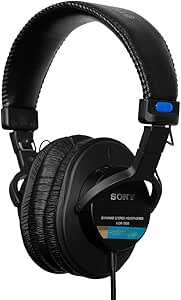 | Best Wired Reference Pick | Driver size: 40 mm | Frequency response: 10 Hz–20 kHz | Connectivity: Wired | VIEW LATEST PRICE | See Our Full Breakdown |
| LEWITT LW6 Wireless Studio Headphones |  | Best for Low-Latency Wireless Editing | Wireless audio: Uncompressed PCM | Latency: Under 6 ms | Wireless range: 5 m (16 ft) | VIEW LATEST PRICE | See Our Full Breakdown |
| Audio-Technica ATH-M50x Professional Studio Monitor Headphones | 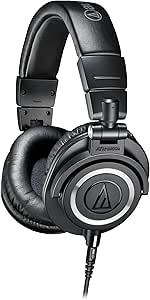 | Best Wired Studio Monitor Pick | Type: Over-ear professional monitor headphones | Driver size: 45 mm | Driver type: Dynamic | VIEW LATEST PRICE | See Our Full Breakdown |
| wireless headphones for photography editing | Driver size | Battery life | Frequency response | Connectivity |
|---|---|---|---|---|
| Sennheiser HDB 630 Wireless Au | 42 mm | Up to 60 hours | Up to 40 kHz | aptX HD, aptX Adaptive, USB-C |
| PUPGSIS PG-MXPRO Wireless DJ H | 50 mm | Up to 60 hours (Bluetooth); up to 30 hours (2.4 GHz) | 20 Hz–40 kHz | 2.4 GHz wireless, Bluetooth 5.3, AUX |
| Audio-Technica ATH-AL5NC Wirel | 53 mm | Up to 75 hours | — | Wireless; wired via 3.5 mm stereo mini-plug |
| Audio-Technica ATH-M50xBT2 Wir | 45 mm | Up to 50 hours | — | — |
| Sony MDR-7506 Professional Ste | 40 mm | — | 10 Hz–20 kHz | Wired |
| LEWITT LW6 Wireless Studio Hea | — | 21 hours | — | — |
| Audio-Technica ATH-M50x Profes | 45 mm | — | 20 Hz–28,000 Hz | — |
More Details on Our Top Picks
Sennheiser HDB 630 Wireless Audiophile Headphones
For editors who want a wireless-first pair without giving up detailed listening, the Sennheiser HDB 630 is the strongest fit in this group. Its 42 mm transducers are tuned for neutral sound and detailed mids, which can help when judging subtle tonal shifts and image-adjacent video work. Unlike the open-back Audio-Technica ATH-AL5NC, its adaptive noise cancellation and closed over-ear design are better suited to shared rooms or travel. USB-C audio up to 24-bit/96 kHz, aptX support, and app-based parametric EQ give you more ways to adapt playback to your editing setup. The tradeoff is that it costs you some flexibility as a wired studio tool: the listed 470-ohm impedance may call for a compatible source, and it has no water resistance. Its 60-hour battery life helps keep charging interruptions rare.
Pros:- Neutral tuning and detailed mids suit focused listening for tonal adjustments.
- USB-C audio up to 24-bit/96 kHz and aptX support offer flexible high-resolution playback.
- Adaptive noise cancellation and transparency mode help adapt to quiet work or awareness of surroundings.
- Up to 60 hours of battery life and app-based parametric EQ support long editing sessions.
Cons:- Not water resistant, so it is a poor choice for wet or dusty shoots.
- The listed 470-ohm impedance may limit compatibility with some wired audio sources.
- Noise cancellation and wireless features add complexity compared with a basic wired monitor such as the Sony MDR-7506.
Best for: Photographers who edit in varied locations and want wireless convenience, noise control, and EQ adjustment for checking tonal detail.
Not ideal for: Editors who need a rugged, water-resistant headset or plan to use wired listening from sources that may not suit its listed 470-ohm impedance.
- Driver size:42 mm
- Frequency response:Up to 40 kHz
- Impedance:470 ohm
- Sensitivity:105 dB
- Audio latency:30 milliseconds
- Battery life:Up to 60 hours
- Connectivity:aptX HD, aptX Adaptive, USB-C
- Noise control:Adaptive noise cancellation and transparency mode
Our verdict“Choose the HDB 630 if you want the most adaptable wireless listening setup here for editing at home and away.”
PUPGSIS PG-MXPRO Wireless DJ Headphones
The PUPGSIS PG-MXPRO earns its place for editors who move between a computer, phone, and audio gear that needs a physical connection. Its 2.4 GHz, Bluetooth 5.3, and AUX options make it more connection-flexible than the Audio-Technica ATH-M50xBT2, while the included transmitter and adapters reduce the need to source accessories separately. Rotating ear cups are aimed at single-ear monitoring, a useful DJ feature but less central to judging still-image edits. The large 50 mm drivers and broad listed frequency range offer a basis for general listening, though the supplied information does not establish a neutral editing profile or app-based EQ like the Sennheiser HDB 630. Battery life also depends on the connection: it reaches up to 60 hours on Bluetooth, but drops to 30 hours with the 2.4 GHz dongle. No active noise cancellation is listed, so busy rooms may distract.
Pros:- Three connection modes cover Bluetooth, 2.4 GHz wireless, and AUX listening.
- Included transmitter, cables, adapters, and case make it easier to connect with varied gear.
- Rotating ear cups allow single-ear monitoring when working with other audio.
- Bluetooth playback lasts up to 60 hours.
Cons:- Battery life falls to up to 30 hours when using the 2.4 GHz connection.
- No active noise cancellation is listed for blocking distractions during focused editing.
- The product details do not specify neutral tuning or an EQ app for color-critical listening.
Best for: Photographers who switch among a computer, phone, and equipment with AUX inputs, and value bundled connection accessories.
Not ideal for: Editors who need documented neutral tuning, active noise cancellation, or long runtimes specifically while using the 2.4 GHz transmitter.
- Driver size:50 mm
- Frequency response:20 Hz–40 kHz
- Connectivity:2.4 GHz wireless, Bluetooth 5.3, AUX
- Battery life:Up to 60 hours (Bluetooth); up to 30 hours (2.4 GHz)
- Total harmonic distortion:<0.5%
- Ports:3.5 mm and 6.35 mm
- Included accessories:2.4G transmitter, 6.35 mm adapter, 3.5 mm cable, USB-A to USB-C cable, storage case
- Warranty:1 year
Our verdict“Pick the PG-MXPRO if connection flexibility and included adapters matter more to your workflow than noise cancellation or documented neutral tuning.”
Audio-Technica ATH-AL5NC Wireless Open-Back Headphones
If your editing sessions happen in a quiet room and you prefer an airy presentation, the Audio-Technica ATH-AL5NC takes a different path from the closed-ear picks. Its open-back design is intended to create spacious, natural sound, while the lightweight 240 g build may feel less burdensome over long sessions than a heavier over-ear option. It also outlasts the Sennheiser HDB 630 on the listed battery figures, with up to 75 hours of playback and a quick-charge option. Wireless and 3.5 mm wired listening give you a fallback when the battery runs low. The central tradeoff is isolation: sound can escape and room noise can enter, unlike with the Sony MDR-7506’s closed-ear cups. The product mentions noise reduction, but does not specify its performance, so I would not choose it for noisy spaces.
Pros:- Open-back design aims for spacious, natural sound.
- At 240 g, its lightweight build supports extended listening.
- Up to 75 hours of playback and quick charging reduce downtime.
- Supports wireless and wired listening, with an included cable microphone and controls.
Cons:- Open-back construction provides less isolation and allows sound to leak.
- Noise-reduction performance is not specified in the supplied product details.
- A built-in microphone and low-latency mode add utility, but do not replace the stronger isolation of closed-ear models for noisy work.
Best for: Photographers editing in a quiet home studio who prefer an open, spacious presentation and a lightweight headset for long sessions.
Not ideal for: Editors in shared offices, noisy locations, or recording spaces where sound leakage and limited isolation could cause problems.
- Driver size:53 mm
- Design:Open-back
- Connectivity:Wireless; wired via 3.5 mm stereo mini-plug
- Battery life:Up to 75 hours
- Quick charge:Up to 8 hours of playback from a 15-minute charge
- Weight:240 g (8.5 ounces)
- Microphone:Built-in; in-line mic and controls on included cable
- App:Audio-Technica Connect app
Our verdict“Choose the ATH-AL5NC for long, quiet-room editing when an airy open-back presentation matters more than isolation.”
Audio-Technica ATH-M50xBT2 Wireless Over-Ear Headphones, Black
The Audio-Technica ATH-M50xBT2 is a practical pick for photographers who split their attention between image work and calls or reference audio on a phone. Its multipoint pairing connects two Bluetooth devices at once, so switching between a computer and mobile device is simpler than with the PUPGSIS PG-MXPRO, whose connection options are broader but do not list multipoint. The 45 mm drivers are described as clear with deep, accurate bass, and the A-T Connect app adds EQ adjustment. That flexibility helps tailor playback, though the bass-forward description is less directly aligned with neutral monitoring than the Sennheiser HDB 630’s stated tuning. Up to 50 hours of battery life supports long stretches away from a charger. The main compromise for location work is that active noise cancellation is not listed, and a full charge takes 3.5 hours.
Pros:- Multipoint pairing connects two Bluetooth devices at once.
- Up to 50 hours of battery life supports extended work sessions.
- App-based EQ allows playback adjustments.
- Beamforming microphones support clearer calls.
Cons:- Active noise cancellation is not listed, limiting its usefulness in noisy environments.
- A full battery charge takes 3.5 hours.
- Deep, accurate bass may suit general listening better than buyers seeking the Sennheiser HDB 630’s explicitly neutral tuning.
Best for: Photographers who edit on a laptop while staying connected to a phone for calls, messages, or reference material.
Not ideal for: Editors who need active noise cancellation or prioritize a clearly stated neutral sound profile for tonal checks.
- Driver size:45 mm
- Battery life:Up to 50 hours
- Rapid charging:Up to 3 hours of use from a 10-minute charge
- Bluetooth pairing:Multipoint; connects to two devices
- Microphones:Dual microphones with beamforming technology
- Charging connection:USB-C
- Battery charge time:3.5 hours
- Included accessories:USB charging cable, audio cable, pouch
Our verdict“Choose the ATH-M50xBT2 if you want wireless editing headphones that can stay paired to both your computer and phone.”
Sony MDR-7506 Professional Stereo Headphones
Although this roundup centers on wireless headphones, the Sony MDR-7506 earns a distinct place for photographers who would rather avoid batteries and Bluetooth during focused editing. Its closed-ear design helps reduce outside noise, while the wired connection keeps listening straightforward; compared with the Sennheiser HDB 630, it gives up wireless freedom, app EQ, and noise-control modes in exchange for a simpler signal path. The foldable build, soft case, and included 1/4-inch adapter suit studio desks and travel between workspaces. Its 9.8-foot cable gives room to move around a fixed workstation, but that length can snag or clutter a compact editing setup. More importantly, the cord is non-detachable, so cable damage is harder to address than with a replaceable lead. I’d choose it as a wired reference option, not as a true wireless alternative.
Pros:- Wired operation removes battery and wireless-connection concerns.
- Closed-ear, over-ear design helps reduce surrounding noise.
- Folds for storage and travel.
- Includes a soft case and 1/4-inch adapter for studio equipment.
Cons:- The 9.8-foot cable is non-detachable and can clutter a compact workspace.
- Wired-only listening is less convenient for photographers who move between devices or work away from a desk.
- No wireless features or app-based EQ are listed, unlike the Sennheiser HDB 630.
Best for: Photographers who edit at a fixed desk, want closed-ear isolation, and prefer a wired headset that never needs charging.
Not ideal for: Buyers who need untethered mobility, wireless device switching, or a detachable cable for easier replacement.
- Driver size:40 mm
- Frequency response:10 Hz–20 kHz
- Connectivity:Wired
- Cord length:9.8 ft
- Cord type:Non-detachable oxygen-free copper
- Earpiece design:Closed-ear, over-ear
- Weight:8 oz
- Included accessories:Soft case, 1/4-inch adapter
Our verdict“Choose the MDR-7506 if a dependable wired connection and closed-ear listening matter more than wireless convenience.”
LEWITT LW6 Wireless Studio Headphones
For photographers who want to review edits without a cable tugging at their workstation, the LEWITT LW6 offers a more studio-focused wireless setup than the Audio-Technica ATH-M50x, which is wired. Its uncompressed PCM audio and latency under 6 ms are aimed at responsive monitoring, while the companion app adds custom EQ profiles and virtual studio monitors that can help check how a mix or video soundtrack translates. That monitoring focus is useful, but it does not make headphone playback a substitute for judging color or detail on a calibrated display.
The tradeoff is a 5 m wireless range, which limits movement around a room, and 21 hours of battery life means it needs charging between long editing sessions. I’d choose the LW6 over the ATH-M50x when freedom from a cable matters more than a straightforward wired setup; the M50x is the simpler pick for buyers who do not need wireless features.
Pros:- Uncompressed PCM wireless audio supports monitoring without a compressed wireless signal.
- Latency under 6 ms keeps playback responsive during real-time audio checks.
- App provides custom EQ profiles, virtual studio monitors, and a loudness guard.
- Includes USB-C and analog cables plus adapters for wired connection options.
Cons:- Wireless range is limited to 5 m (16 ft), restricting movement away from the transmitter.
- 21-hour battery life requires charging for extended or back-to-back work sessions.
- Wireless monitoring features add setup complexity compared with the wired ATH-M50x.
Best for: Photographers editing at a desk who want low-latency wireless monitoring and app-based EQ for reviewing video audio alongside their visual work.
Not ideal for: Editors who need to move between rooms while listening, or who prefer a wired headphone that does not rely on a battery or companion app.
- Wireless audio:Uncompressed PCM
- Latency:Under 6 ms
- Wireless range:5 m (16 ft)
- Battery life:21 hours
- Battery charge time:80 minutes
- Controls:App and push button
- Included accessories:RealSound transmitter, USB-C and analog cables, jack adapters, USB-C to USB-A adapter, transmitter thread adapter, transport pouch
- Warranty:2 years
Our verdict“Choose the LW6 if you want responsive wireless audio monitoring at your editing desk and can work within its short range.”
Audio-Technica ATH-M50x Professional Studio Monitor Headphones
The Audio-Technica ATH-M50x is the practical choice here for photographers who value a direct wired connection over wireless convenience. Its 45 mm dynamic drivers and stated 20 Hz–28,000 Hz response suit checking music, dialogue, and sound effects while assembling a photo slideshow or video. Sound isolation can also make focused editing easier in a shared room. Unlike the wireless LEWITT LW6, the M50x needs no battery or transmitter, but its cable keeps the listener close to the device.
The swiveling earcups support one-ear monitoring, and the detachable cable is easier to replace or stow than a fixed lead. This model is not a wireless headphone, so it falls short of the roundup’s wireless premise; I’d pick it when connection reliability and a familiar studio-monitor format matter more than moving freely. Its over-ear build also takes more room in a compact bag than a smaller on-the-go option.
Pros:- 45 mm dynamic drivers and a broad stated frequency response suit detailed audio checks.
- Sound-isolating over-ear design helps reduce distractions during focused editing.
- Detachable cable can be replaced or removed for storage.
- 90-degree swiveling earcups allow one-ear monitoring.
Cons:- Wired connection limits movement compared with the wireless LEWITT LW6.
- Over-ear design is less convenient for compact storage.
- Not water resistant.
Best for: Photographers who edit at a fixed workstation and want wired, sound-isolating headphones for checking video audio without managing a battery.
Not ideal for: Buyers who specifically need wireless listening, or photographers prioritizing compact packing and water resistance.
- Type:Over-ear professional monitor headphones
- Driver size:45 mm
- Driver type:Dynamic
- Frequency response:20 Hz–28,000 Hz
- Impedance:38 ohms
- Sensitivity:99 dB
- Cable:Detachable
- Earcup swivel:90 degrees
- Noise control:Sound isolation
Our verdict“Choose the ATH-M50x if you edit near your computer and prefer a dependable wired studio monitor over wireless freedom.”
How We Picked
I ranked these headphones for the specific demands of photography editing: long sessions, careful review of video sound when a project includes clips, and comfortable use at a computer. I weighed the stated wireless design, intended listening role, fit and build cues, and practical tradeoffs such as relying on a battery or being tethered to a workstation. I did not treat a wireless label or studio branding alone as proof of accuracy; buyers should verify codec, latency, wired-operation, and device-compatibility details for their own setup.
The Sennheiser HDB 630 leads because it is the clearest match for a buyer seeking wireless, detail-focused listening. The ATH-M50xBT2 follows as a versatile studio-style wireless alternative, while the LEWITT LW6 and PUPGSIS PG-MXPRO serve more specific wireless or DJ-oriented needs. The open-back ATH-AL5NC and wired Sony MDR-7506 and ATH-M50x rank lower for this particular search because their design tradeoffs make them less direct fits for someone specifically seeking wireless headphones for editing.
Factors to Consider When Choosing Wireless Headphones For Photography Editing
Headphones can help you catch distracting noises and judge video audio, but they do not show whether a photograph’s color or brightness is accurate. I would choose around the way you work: how often you move away from the desk, whether you edit video too, and how much outside noise reaches your workspace.
Separate Photo Review From Audio Monitoring
Headphones do not replace a calibrated monitor or a controlled viewing environment for judging image color and exposure. Their value in a photo workflow is more indirect: they can make long sessions more comfortable and help you review sound when a shoot includes video. A headphone’s pleasing or bass-heavy presentation can make audio seem more polished than it is, so do not assume enjoyable listening equals neutral monitoring. If you rarely edit clips, comfort and connection reliability may matter more than studio-monitor claims. For mixed photo and video work, keep a second reference available, such as speakers or another pair, before making final sound decisions. That reduces the chance of tuning a soundtrack around one headphone’s character.
Check Wireless Delay and Connection Options
Wireless headphones can be convenient for moving around a room, but Bluetooth delay may be distracting when syncing dialogue or checking timing against a timeline. The effect varies with the headphone, computer, application, and connection mode, so confirm compatibility rather than relying on a product label. Look for a wired fallback if you expect to monitor video closely or work when the battery is low. Also check whether using a cable changes how the headphones operate; some models may not behave identically in wired and wireless modes. A wireless set is most useful when freedom of movement outweighs the need for a direct, low-delay connection. If you remain at one workstation, a wired model may be the simpler tool.
Match the Ear-Cup Design to Your Workspace
Closed-back headphones usually help limit outside noise and reduce sound leaking into a shared room, which can make focused editing easier. Open-back designs let more room sound in and send more sound outward, so they are a poor match for quiet offices, shared spaces, or noisy locations. Their more open feel may appeal to someone who dislikes a sealed fit, but comfort is personal and should not be inferred from the design alone. Think about who else is nearby and whether you need to hear the room while working. A common mistake is choosing open-back headphones for a busy environment because the category sounds appealing on paper. Choose for your actual room, not an imagined studio.
Prioritize Comfort for Long Culling and Retouching Sessions
Headphones that feel fine for a short playlist can become tiring during a full day of culling, masking, and retouching. Clamp pressure, ear-pad material, weight, heat, and how the headband sits all affect whether you will keep them on. Product descriptions rarely tell the whole story for an individual fit, so check return terms and replacement-pad availability before committing. If you wear glasses, the pressure where the arms meet the ear pads deserves special attention. A lighter or less isolating design can feel better for some people, while others prefer a secure seal that blocks room noise. Comfort should outrank a minor connectivity feature if you expect long sessions.
Decide Whether Battery Convenience Is Worth the Upkeep
Wireless headphones add charging and battery aging to a workflow that wired models keep simple. Consider how often you can charge at your desk, whether you can keep a cable connected during work, and what happens if the battery runs flat mid-session. A wired set avoids charging interruptions but can snag on a chair, camera equipment, or desk accessories. If you switch between a laptop, tablet, and phone, also check how easily the headphones pair and whether simultaneous connections matter to you. Paying more for wireless capability makes sense when you regularly move between devices or work away from the desk. If you seldom leave your workstation, the convenience may not justify the added maintenance.
Choose a Reference You Can Use Consistently
Consistency is more useful than chasing a headphone with an impressive feature list. Frequent changes in sound level, listening mode, or device can make audio judgments harder to compare from one edit to another. Set a comfortable listening level and use the same connection path when checking video projects. If you use wireless headphones for convenience, verify important audio on another playback system before delivery. For photography itself, judge the image on your display under stable lighting rather than making visual decisions based on headphone choice. This division of roles helps prevent a convenient accessory from being treated as a complete editing reference.
Frequently Asked Questions
Can wireless headphones be accurate enough for editing video alongside photos?
They can be useful for checking dialogue, ambient sound, and obvious mix problems, but wireless performance depends on the headphone, connection, and computer. Latency can make synchronization work awkward, and wireless processing may differ from a wired listening mode. I would confirm the model’s connection options and test it with the editing software you use. For a final check, listen through another playback system as well. For photo color and exposure, headphones do not replace a properly set up display.
Should I choose the HDB 630 or the ATH-M50xBT2 for a mixed photo and video workflow?
I would start with the HDB 630 if wireless, detail-focused listening is the main priority. The ATH-M50xBT2 is a better match if you want a studio-style headphone from a familiar monitoring line and value a practical everyday fit. Neither should be selected solely on its name: verify wireless compatibility, latency, and whether wired listening suits your computer setup. Your work habits matter too—someone who moves around may value wireless freedom more, while a desk-bound editor may favor a direct cable. Consider which tradeoff you will notice every day, not just which feature sounds more appealing.
Is an open-back headphone a good choice for editing in a shared office?
Usually not if you need privacy or need to avoid disturbing nearby people. Open-back headphones let room sound in and allow your audio to leak outward, which can be distracting in a shared workspace. They may suit a quiet private room or someone who dislikes a sealed ear-cup feel, but the environment should decide the choice. If conversations, fans, or household noise are common, a closed-back design is likely more practical. The ATH-AL5NC is the open-back option in this lineup, so compare its intended listening style with your room before choosing it.
Would a wired Sony MDR-7506 or ATH-M50x be a smarter buy than wireless headphones?
Yes, if you usually edit at one desk and want to avoid charging, pairing, or wireless delay. The MDR-7506 and wired ATH-M50x are not wireless picks, so they do not satisfy the main convenience goal in this roundup. Their value is a straightforward cable-based workflow, particularly when you monitor video audio and prefer a direct connection. The tradeoff is cable management and less freedom to move around. If you regularly work away from the computer, a wireless model such as the ATH-M50xBT2 is a closer fit.
What should I check before buying headphones for both editing and everyday listening?
Check how the headphones connect to each device you use, whether they can operate by cable, and how wireless behavior affects video playback. Then consider comfort, ear-cup design, battery routine, and whether the sound presentation suits long listening sessions as well as focused monitoring. Everyday enjoyment and reliable editing checks are related but not identical, so avoid assuming that a headphone you like for music will reveal every mix issue. If you work in a shared room, account for sound leakage and outside noise. A second listening reference is useful when your projects include audio that must translate beyond your own headphones.
Conclusion
For the best overall, I recommend the Sennheiser HDB 630 for editors who want wireless listening with an audiophile-oriented focus. Choose the best value-style wireless alternative, the Audio-Technica ATH-M50xBT2, if a studio-monitor design and everyday versatility matter more to you. The LEWITT LW6 is my pick for buyers specifically seeking a wireless studio-oriented option, while the PUPGSIS PG-MXPRO is better reserved for shoppers whose needs lean toward DJ use. For beginners, I would favor the ATH-M50xBT2 as a familiar, flexible starting point, provided its wireless behavior suits the editing setup. If you want a wired desk pair instead, compare the Sony MDR-7506 and ATH-M50x; choose the open-back ATH-AL5NC only when your room and listening preferences suit that design.
Halloween Picks
halloween
As an affiliate, we earn on qualifying purchases.